Why Your AI Tools Need a Gateway, Not Just More Integrations
As founders wire AI agents into their CRM, project management, Slack, and email, direct one-off integrations stop scaling fast. Here's why a gateway layer, not more point-to-point connections, is the fix.

The Point-to-Point Problem Nobody Notices Until It's Too Late
Most founders back into their AI setup the same way. You pick a tool, maybe a coding-focused AI assistant for engineering work, and a general assistant for basically everything else: Slack, WhatsApp, email, calendar. One founder in a recent group conversation described exactly this setup: one tool for development, another for everything else, wired into every channel he touches, to the point where he doesn't really check email anymore. The assistant just tells him what needs a response. That's a great outcome, but notice what already happened without anyone planning it: two separate AI tools, each with its own set of connections into other systems. It works fine at that scale, direct connections are simple enough that nobody notices the pattern forming, and each new tool you add just repeats the same setup work without anyone budgeting time for the repetition.
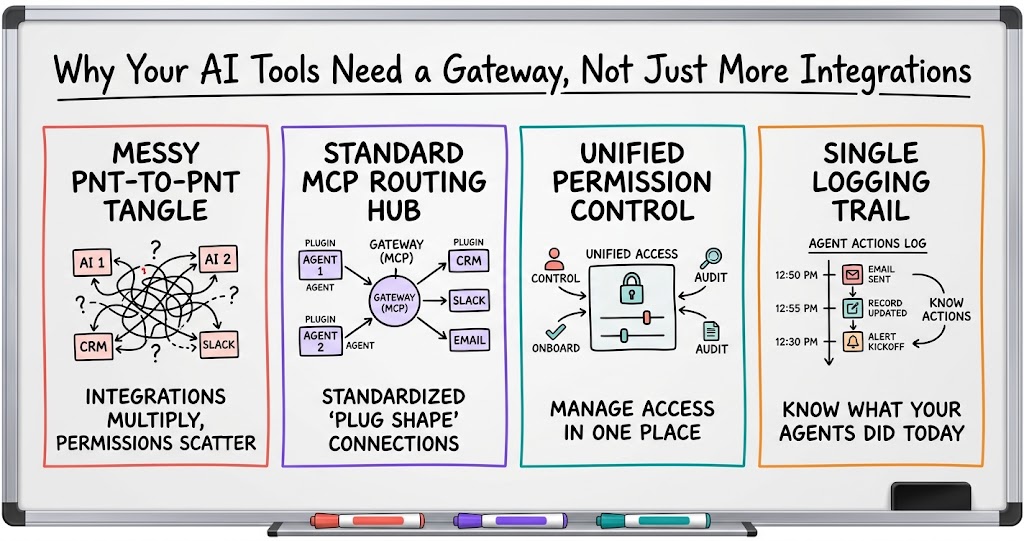
That's fine at two tools. It stops being fine at five or six. Every time you add a new AI agent, whether that's one living in your CRM, one running project management, or one handling support, you have to individually connect it to everything else it needs to talk to. Each connection is its own integration, with its own permissions, its own failure points, and its own thing to maintain. It's the same problem software engineers dealt with for two decades building point-to-point APIs, just showing up now in AI form.
- Integrations multiply, not add. Each new agent needs its own set of connections to every tool it touches, so the count grows faster than the number of tools does.
- Permissions get set ad hoc. Without a shared layer, you're deciding access tool by tool instead of once, which is how gaps happen.
- Nobody owns the full picture. With connections scattered across systems, no single person or process can see everything your agents are doing.
- Failures are hard to trace. When something breaks, you're checking each connection one at a time because there's no central place to look.
What a Gateway Actually Does
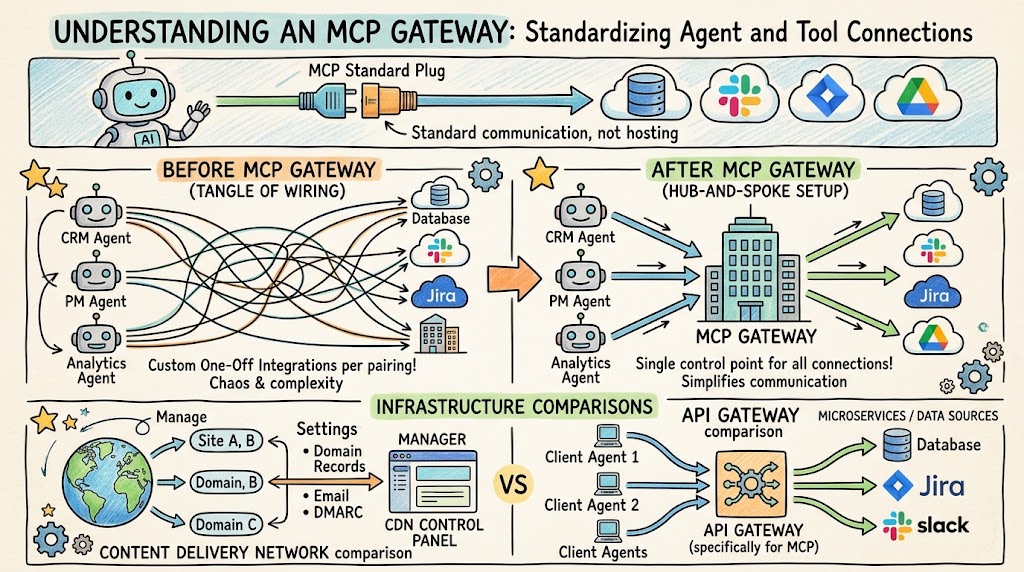
If you've spent any time around AI tooling this year, you've probably heard the term MCP, short for Model Context Protocol. It's an open, publicly documented way for AI agents to connect to outside tools and data sources without every vendor building a custom one-off integration for every pairing. Think of it as a standard plug shape: once a tool speaks MCP, any AI agent that also speaks MCP can talk to it, instead of needing custom code written for that specific combination. An MCP gateway sits between your agents and the tools they connect to. Every integration passes through it, which makes it a routing layer rather than infrastructure in its own right. It doesn't host or replace the tools it connects, it just standardizes how agents and tools talk to each other, and in doing so turns what would be a tangle of many-to-many wiring into a single hub-and-spoke setup.
A couple of members reached for familiar comparisons to explain it. One likened it to a content delivery network for AI, the way a single control point can manage all your domain records, email, and DMARC settings in one place. Another framed it as basically an API gateway, but built specifically for MCP connections. If you've got agents running in a CRM, in a project management tool, and in a few other places, you connect all of them to the gateway instead of wiring each one directly to every other one. Both comparisons point at the same underlying idea from web infrastructure, and neither one is tied to a specific vendor, what matters for your decision is whether you need that hub-and-spoke routing, not which particular tool provides it.
Routing and Permissions: Who Can Talk to What
The clearest practical benefit shows up in permissions and onboarding, and this is where a lot of founders feel real pain even if they haven't put a name on it yet. Right now, if you bring on a new hire, or a new agent, and it needs access to your CRM, your project management tool, and your email, you're setting that up connection by connection, tool by tool. There's no single place to say, this is the set of connections this person or this agent gets, and here's what they're allowed to touch. A gateway gives you that place. When someone new joins, you hand them a defined set of connections instead of manually wiring access to five different systems and hoping you didn't miss one or leave one too open.
- Onboarding becomes a checklist, not a scavenger hunt. New hires or new agents get a predefined bundle of connections instead of five separate setups done from memory.
- Permissions live in one place. You're not hunting through individual tool settings to figure out who can reach what.
- Cross-agent communication gets a clear path. If your CRM agent needs to talk to your project management agent, they route through the same layer instead of a custom bridge someone built once and forgot about.
- Mistakes are easier to catch. A single permission layer is far easier to audit than a dozen scattered ones across different tools.
Observability: Knowing What Your Agents Are Actually Doing
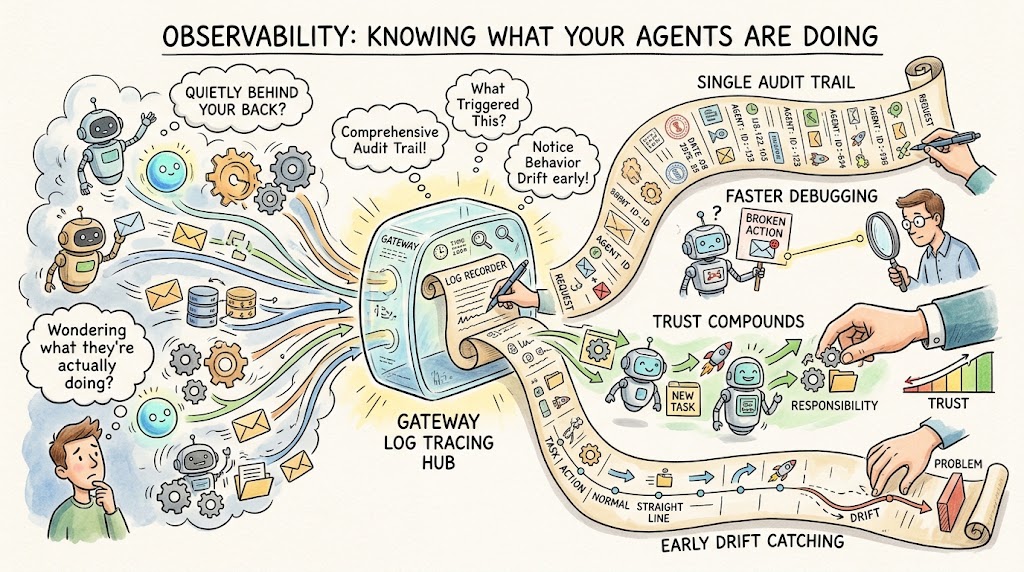
The other piece that came up repeatedly in the conversation was observability, log tracing specifically. Once you've got multiple AI agents running across multiple tools, taking actions on your behalf, sending emails, updating records, kicking off workflows, you genuinely want to know what they did and when. Once you're relying on these agents for real work, that visibility stops being optional. It becomes the difference between trusting the system and quietly wondering what it's been doing behind your back. A gateway that all your traffic runs through is a natural place to log that activity, because it sees every request pass by anyway.
- You get a single audit trail. Every agent action routes through the same layer, so log tracing covers everything instead of one tool at a time.
- Debugging gets faster. When an agent does something unexpected, you can trace exactly what request triggered it instead of guessing.
- Trust compounds. The more visibility you have into what your agents are doing, the more comfortable you get handing them more responsibility.
- It catches drift early. Watching agent behavior over time helps you notice when something's quietly gone off track before it turns into a real problem.
The SDK Angle: Building This Into Your Own Product
Worth flagging separately: some gateway tools also ship an SDK, meaning if you're a SaaS founder building your own product, you can build this same routing and observability pattern directly into your app rather than just using it for your own internal workflows. That's a meaningfully different use case than wanting your personal assistant to talk to your CRM. If you're shipping a product where customers will want their own AI agents connecting to their own tools through you, having that gateway logic available as an SDK means you're not building permissioning and log tracing from scratch. That matters most if your own customers will be connecting their own agents through your product, since at that point the pattern isn't just an internal convenience, it's a feature you're shipping.
When You Actually Need One (And When You Don't)
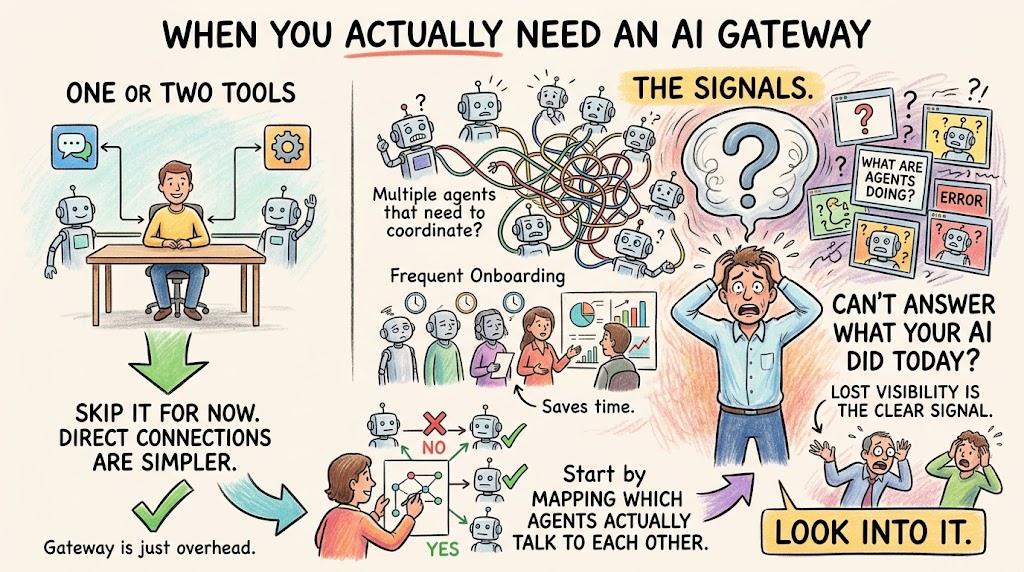
So when does this actually matter for you? If you're running one AI assistant that touches one or two tools, you almost certainly don't need a gateway yet. Just set up the direct connection and move on with your day. The calculus changes once you've got multiple agents, especially agents that need to talk to each other, or once you're bringing new people onto the team and re-explaining your AI setup every time starts to feel like a chore. It also changes the moment you realize you can't actually answer the question, what has my AI been doing this week, with any real confidence. That's usually the true signal: not the number of tools you've connected, but whether you've lost track of what's happening across them.
- One or two tools: skip it for now. Direct connections are simpler, and a gateway would just be overhead you don't need yet.
- Multiple agents that need to coordinate: look into it. Agent-to-agent communication is where point-to-point setups get messy fastest.
- Frequent onboarding: look into it. If you're repeatedly rebuilding access for new people or new agents, a shared layer saves real time.
- Can't answer what your AI did today: that's your signal. Lost visibility is the clearest sign you've outgrown ad hoc connections.
None of this requires ripping out what you've already built. Start by mapping which of your agents actually need to talk to each other, and let that map tell you whether a gateway layer is solving a real problem for you or just adding one more piece to keep track of.