
What Founders Are Really Spending on AI: Subscriptions vs. API Costs
Real monthly AI budgets from founders with teams of five to twenty-five, why API pricing runs so far above subscriptions, and how to plan your 2027 AI line item before prices move.

Every year around this time, founders sit down to set next year's budget, and this year a new line item is causing more debate than almost anything else: AI. When I asked a group of SaaS founders what they spend across their whole team, the answers ranged from a few hundred dollars a month to several thousand, and the spread had very little to do with company size. A team of 25 people was spending around $400 a month, while another team of nine was spending about $6,000. Nobody in the group was wrong, but the gap tells you something about how differently teams use these tools.
I want to walk through what these numbers look like, why the same work can cost 65 times more depending on how you pay for it, and what I would do before locking in a 2027 budget. I'll include my own numbers too, since it's only fair to share mine if I'm asking everyone else for theirs.
What the Spread Actually Looks Like
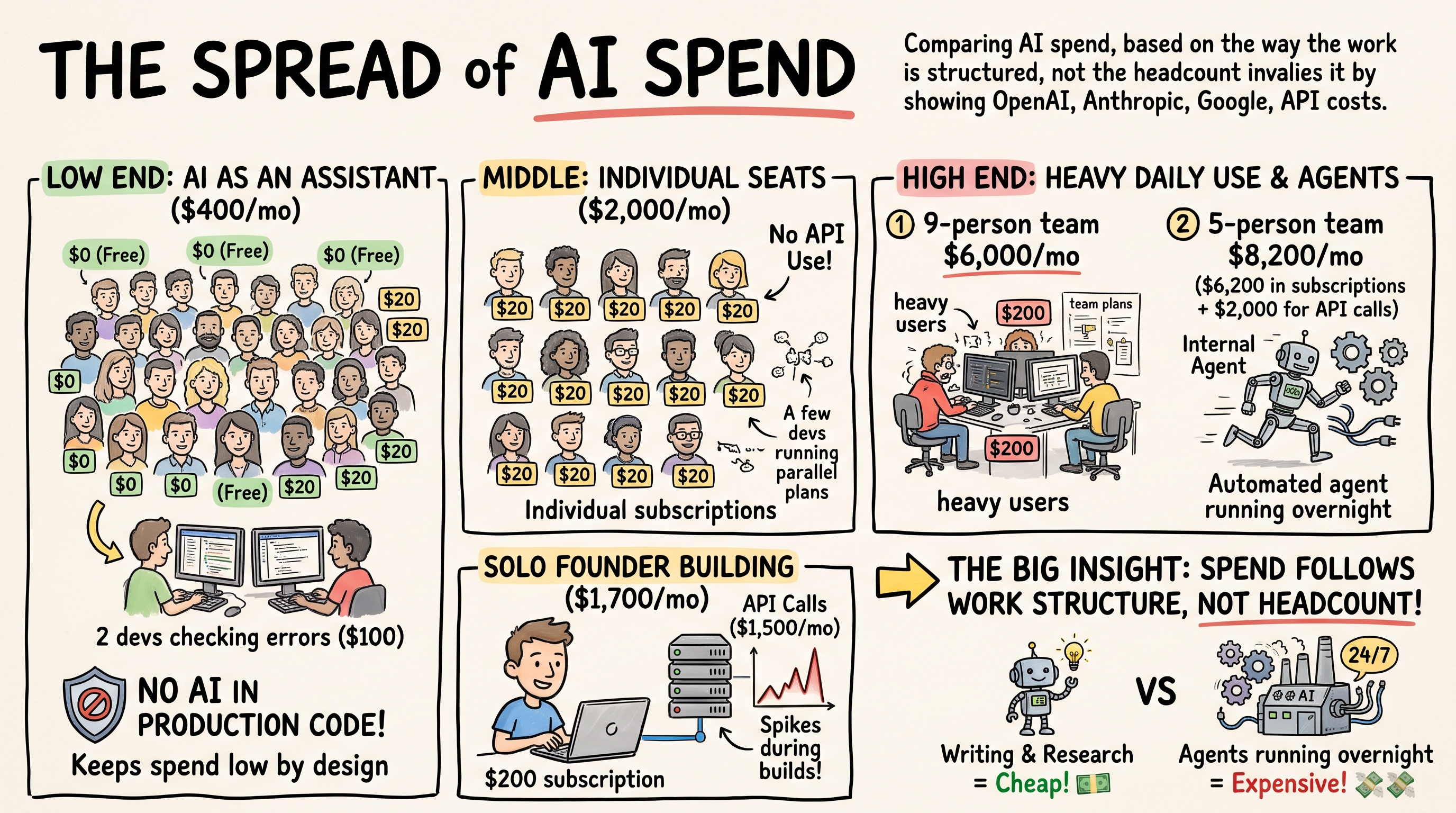
Here is what came out when each founder added up everything spent on OpenAI, Anthropic, Google, and the rest. One founder with a team of about 25 puts the total near $400 a month. Their marketing lead is on a $100 plan, two developers use an advanced plan for testing environments and error checking, and everyone else is on free or $20 plans. That team deliberately keeps AI out of its production code because they have seen too many issues with generated code, so spend stays low by design.
At the other end, a nine-person team is spending about $6,000 a month, mostly on a mix of $200 plans for the heaviest users and team plans for everyone else. Another founder runs about 25 employees on individual subscriptions for roughly $2,000 a month, with no API use at all. A third has a five-person team spending about $6,200 a month on subscriptions, plus another $2,000 or so on API calls for an internal agent. My own situation is smaller: a handful of employees on $20 plans, a $200 plan for me, and about $5,000 in extra API tokens over the last seven weeks, most of it a one-time build-out. I estimate I'm now paying about $1,500 a month in API costs plus the $200 subscription.
- Low end, around $400 a month for 25 people. Mostly free and $20 plans, with a few paid seats for developers who need them.
- Middle, around $2,000 a month for 25 people. Individual subscriptions, no API, and a few developers running two or three plans in parallel.
- High end, $6,000 or more for five to nine people. Heavy daily use, automated agents, and a few $200 plans per team.
- Solo founder building a product. About $200 a month in subscription plus a variable API bill that spikes during a build.
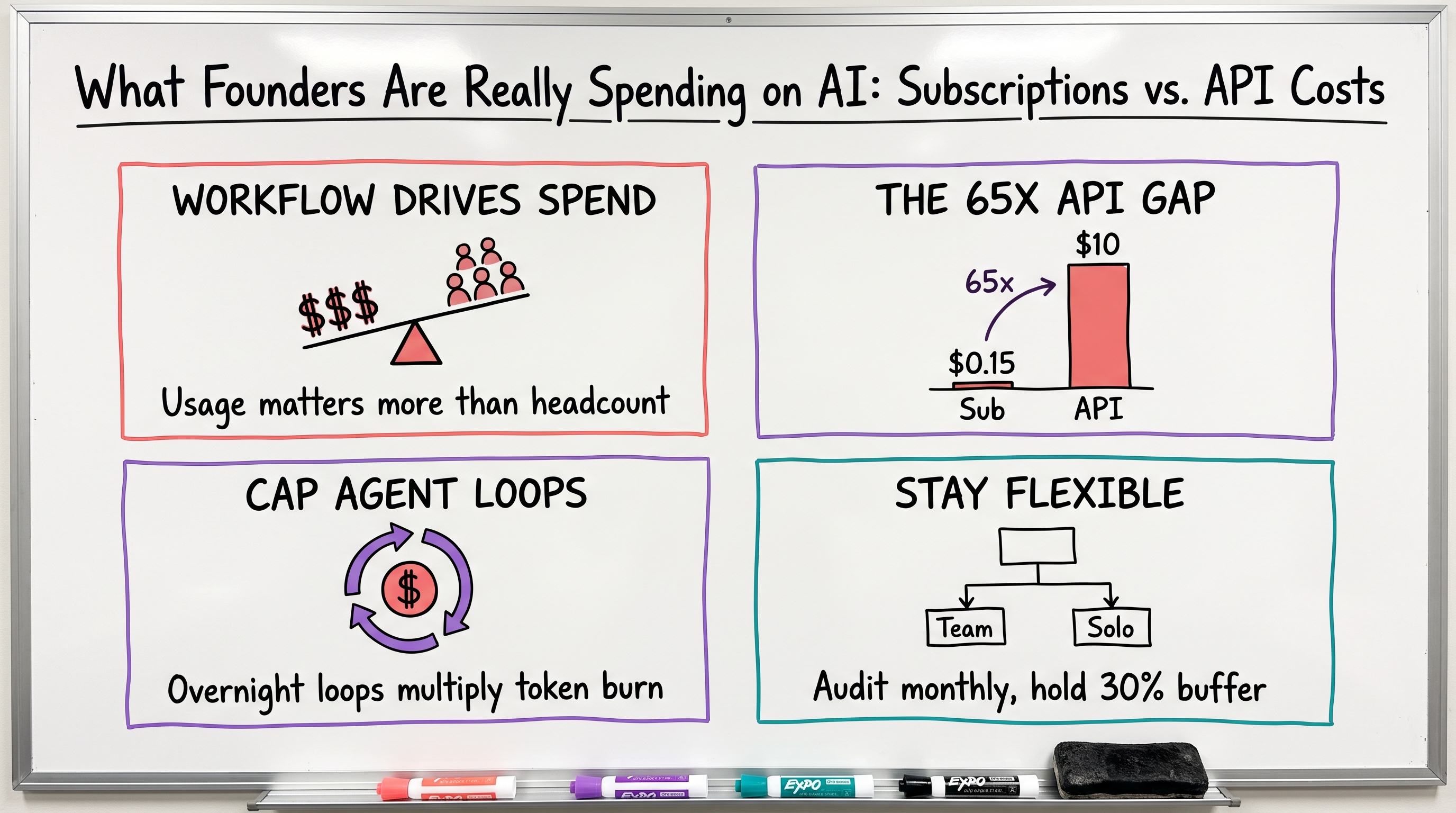
The pattern I take from this is that spend follows the way the work is structured, not the headcount. A team that treats AI as a writing and research assistant stays cheap. A team that has agents running overnight does not.
Why the API Costs So Much More Than the Subscription
The most striking number in the whole discussion came from a founder who compared the cost of a single task on a subscription versus the API. On a top-tier model, one task costs roughly 15 cents when it runs inside a subscription and around $10 when you pay API rates. That is a gap of about 65 times. This same founder calculated what his five-person team's subscription usage would cost at API prices and landed around $187,000, against the roughly $6,200 they actually pay. If you use a tool that bills you through the API, you are paying that API rate plus a markup of around 30%.
- Subscriptions are subsidized. The flat monthly price is well below what the same usage would cost at metered rates, and everyone in the group knows it.
- API billing is where agents get expensive. Any product that calls a model on your behalf is paying the metered price, plus whatever margin the vendor adds.
- The gap is a planning risk. If vendors close it by raising subscription prices, a budget built on today's flat rates could be off by a wide margin.
It's a little ridiculous how much more the API costs than the subscription, and the people who have noticed are the ones who tried to move a background process from one to the other. One founder is in the middle of doing exactly that: shifting the backend processes of an internal agent into his subscription plan, which he expects to save around $1,800 a month. If you have any automated workflow running on API credits, it is worth asking whether it can run on a subscription seat instead.
Where the Tokens Actually Go
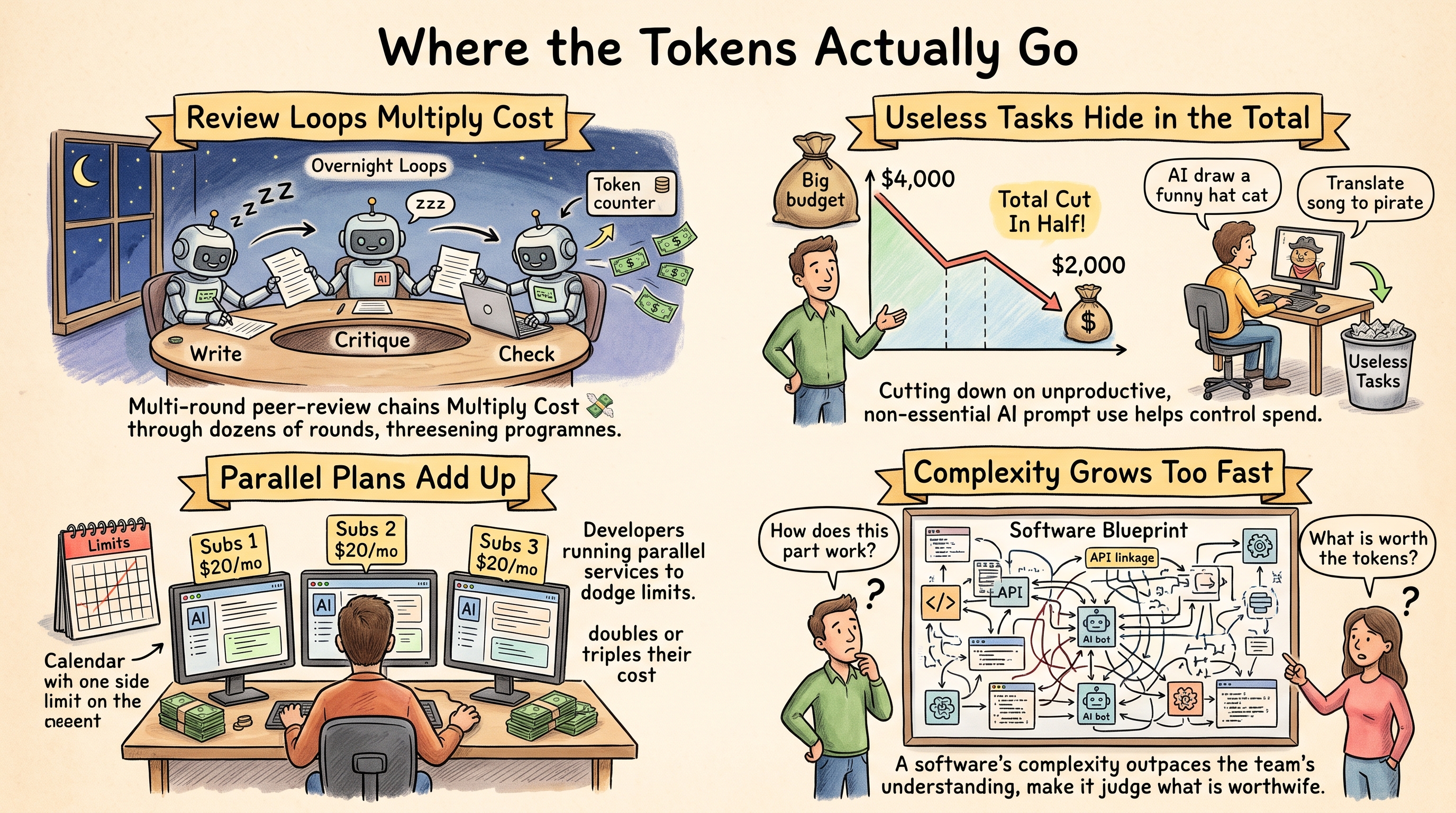
When a bill is higher than expected, the cause is almost always the same. One founder described what he calls a software factory: several models reviewing each other's work, in loops, overnight. He set up review councils where one agent writes, another critiques, a third checks the critique, and the cycle repeats until morning. It works, but he admitted it is not efficient, and he suspects most of his spend comes from the iteration loops rather than from the useful output. He also pointed out that a well-known developer reportedly gets by on three subscriptions and spends a fraction of what his team does.
- Review loops multiply cost. Every extra round of models checking models adds a full pass of tokens, and overnight loops can run dozens of rounds.
- Parallel plans add up. Some developers run two or three subscriptions at once to avoid hitting limits, which doubles or triples their cost.
- Useless tasks hide in the total. One founder cut his team's subscription spend roughly in half, from around $4,000 to $2,000 a month, after noticing people were using the tools for things that did not matter.
- Complexity grows faster than understanding. Another founder said the software his team builds is getting complicated enough that he can no longer explain how some parts work, which makes it hard to know what is worth the tokens.
My advice is to look at one week of usage by person and by workflow before you set the budget. You will probably find that a small number of people and a small number of automated loops explain most of the bill.
Team Plans vs. Individual Plans
One of the more practical debates was whether to put everyone on a team plan or give people individual subscriptions. The case for a team plan is simple and real: the conversations stay inside the company when an employee leaves. The case against is that heavy users get hit by usage limits and overages, and the pooled plan doesn't share capacity the way you might hope. One founder tried a team plan, decided there was no real benefit beyond keeping conversations in the company, and moved to individual plans. Another had the same experience, with heavy users getting hammered by limits, and broke them out onto top-tier individual plans while keeping the rest of the team on the shared plan.
- Team plan for light users. It keeps history in the company and is easy to administer.
- Individual plans for heavy users. Developers and operators who run long sessions do better with their own top-tier plan.
- Switching back was easy for some. One founder who split the team after starting on a shared plan said nobody complained, though others in the group had heard horror stories about the move.
I'd keep it flexible. Start light users on the cheapest plan that works, watch who hits limits, and upgrade only those people.
Pricing Risk and the Model Quality Question
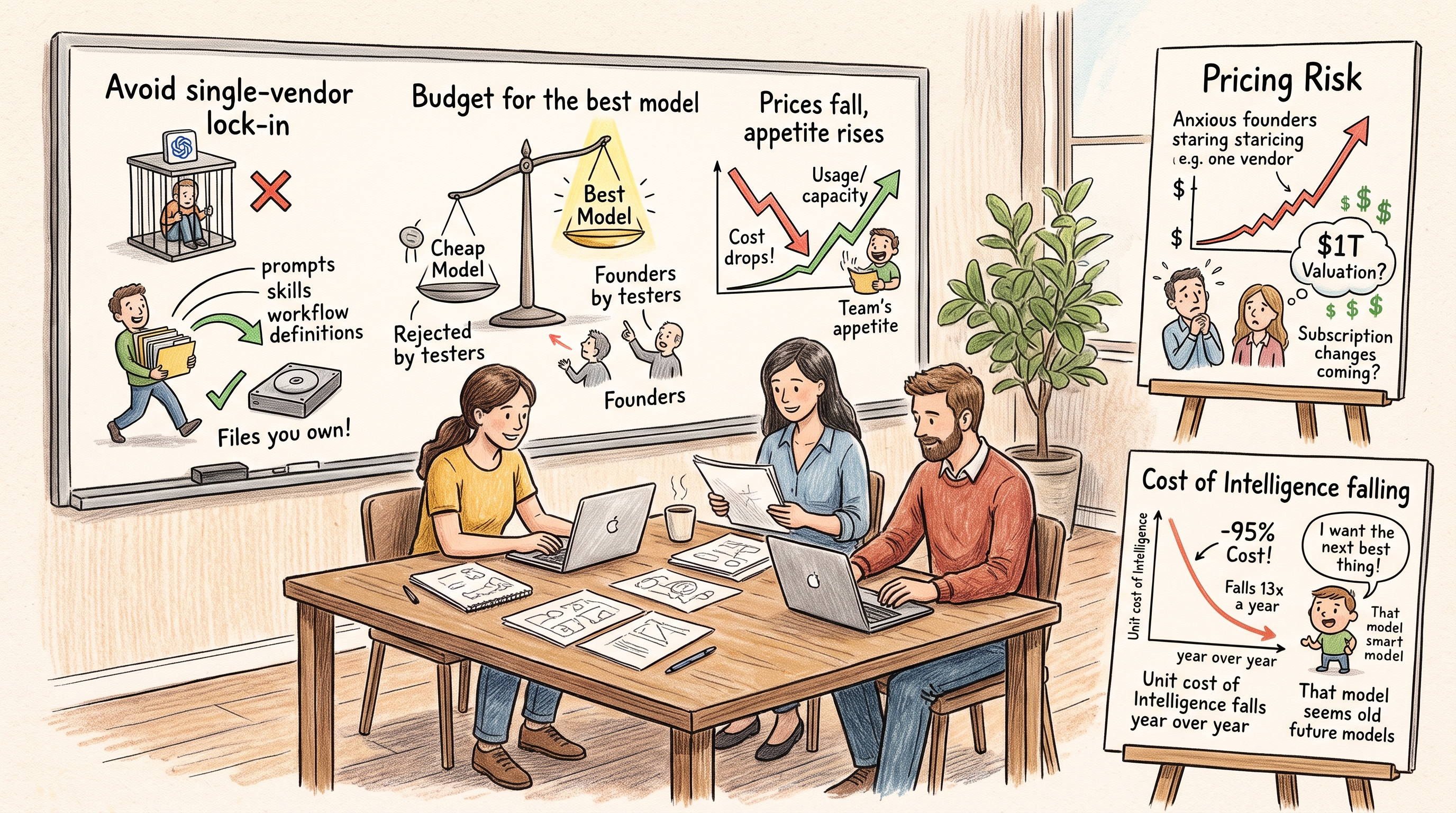
Two worries came up repeatedly. The first is pricing risk. One founder read a story about a 400-person company whose vendor raised prices roughly tenfold, leaving them stuck because all their workflows lived inside that one tool. That story is one anecdote, not a trend, but it is a good reminder to avoid building every workflow around a single vendor's plan. The second is that the money has to come from somewhere, and a company with a valuation approaching a trillion dollars will eventually need revenue to match, which probably means subscription changes are coming.
On the positive side, the cost per unit of intelligence has fallen about 13 times a year. As I put it, my hope is that a year from now the model we're paying a premium for today will cost about 95% less. Of course, by then none of us will want to use it, because it will seem dumb next to whatever comes next. One founder tested several competing models against the best Anthropic model and found the gap large enough that using anything else was almost impossible for general work, and most people in the group switched away from the alternatives roughly six months ago.
- Avoid single-vendor lock-in. Keep prompts, skills, and workflow definitions in files you own so you can move.
- Budget for the best model, not the cheap one. Cheaper models were rejected by every founder who tested them for general work.
- Expect prices to fall and appetite to rise. Cost per unit drops quickly, but your team will use the new capacity.
What I Would Do Before Setting a 2027 AI Budget
If I were setting this budget today, I'd treat AI like cloud hosting: a variable cost that needs a monthly review, not a fixed line item. A founder with a team of five and a founder with a team of 25 can end up in the same place if they manage it well.
- Audit last month's usage by person and by workflow. Find the top five consumers and ask what they got for it.
- Move background automation onto subscriptions where you can. Check whether any API-billed process can run inside a seat instead.
- Cap overnight loops. Set a maximum number of review rounds so a software factory can't run unchecked.
- Give heavy users their own plans and keep light users on cheap ones. Review who hits limits every month.
- Hold a contingency. Add 30 to 50 percent to the AI line in case pricing changes mid-year.
None of us really knows where pricing lands in 12 months. What I do know is that the founders who looked at their usage this quarter will make better decisions than the ones who set a number and hoped. Pull the data, find your top consumers, and set the budget around what you find.