
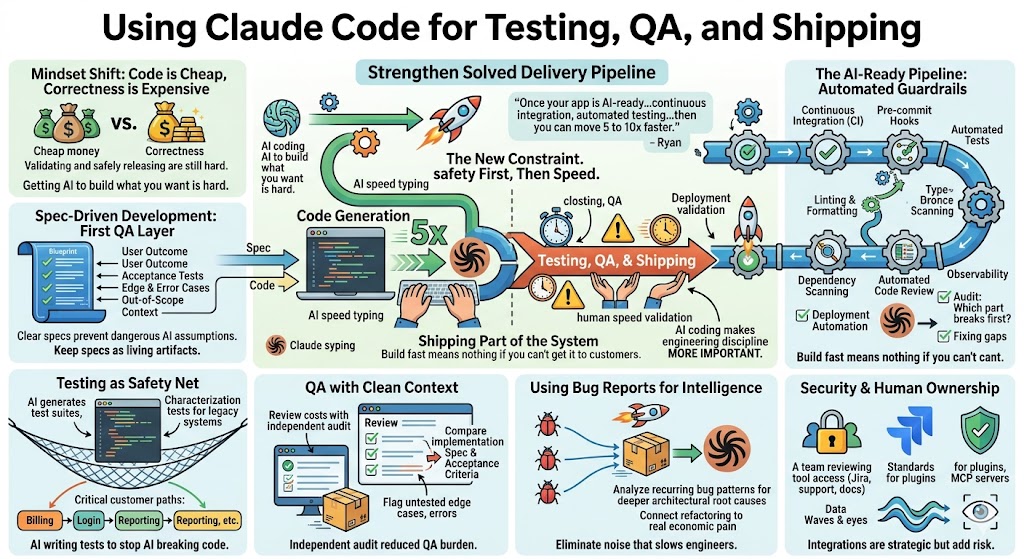
Using Claude Code for Testing, QA, and Shipping
A practical guide for SaaS founders and product leaders on using Claude Code to strengthen testing, QA, code review, and release processes so teams can ship faster without increasing regressions or production risk.

AI coding tools are making software development faster. That part is obvious now. Claude Code can write code, refactor old modules, explore three different implementation paths, and help engineers move through work that used to take days or weeks. But once teams start using it seriously inside an existing SaaS company, a new problem shows up fast: writing code is no longer the only bottleneck.
Testing, QA, code review, and shipping become the constraint. If Claude Code helps your engineers produce 5x more code, but your QA process, release process, and validation process still move at the old pace, you do not have a faster product organization. You have a traffic jam. As Patrick put it in the recording, “You get AI speed typing on one side and human speed validation on the other.”
That sentence is the heart of this topic. AI coding does not remove the need for engineering discipline. It makes engineering discipline more important. The teams that get real leverage from Claude Code will not be the ones that simply generate more code. They will be the ones that build a pipeline where AI-written code can be tested, reviewed, validated, and shipped safely.
Ryan summed up the opportunity well: “Once your existing SaaS application is AI-ready, and you have continuous integration, pre-commit hooks, automated testing, design standards, then you can move 5 to 10x faster.”
That is the promise. But the order matters. The safety system comes first. The speed comes after.
Code Is Cheap, But Correctness Is Expensive
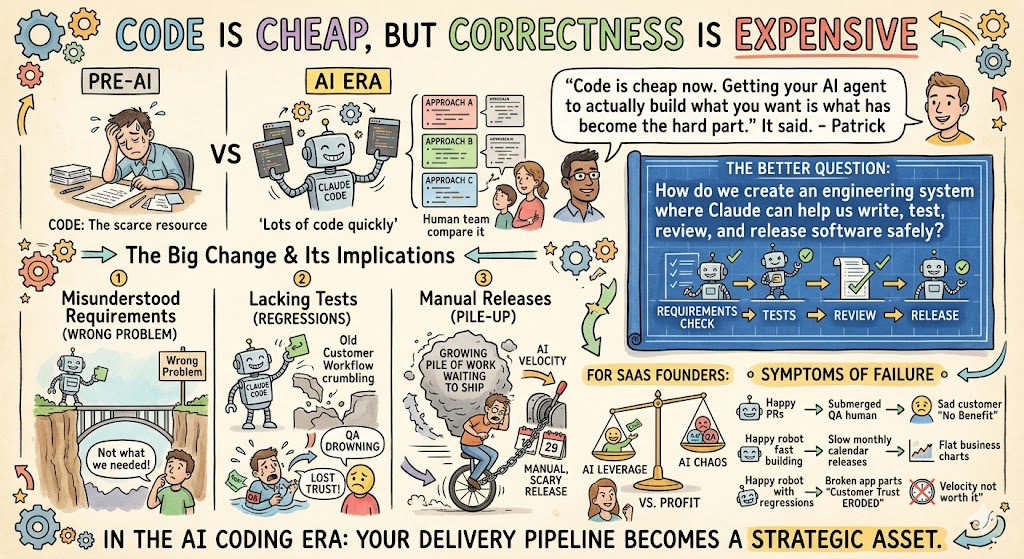
One of the biggest mindset shifts for SaaS teams is understanding that code generation is no longer the scarce resource. Claude Code can produce a lot of code quickly. It can also produce three different approaches to the same problem so your team can compare them. That is a big change.
But deciding what should be built, validating whether it works, and safely getting it into production are still hard.
Patrick said it directly: “Code is cheap now. Getting your AI agent to actually build what you want is what has become the hard part.”
That has big implications for testing and QA. If the agent misunderstands the requirement, it may write perfectly valid code that solves the wrong problem. If the codebase lacks tests, it may make a change that appears correct but breaks an old customer workflow. If your release process is manual, slow, or scary, AI-generated velocity just creates a growing pile of work waiting to ship.
This is why the conversation cannot stop at “how do we get Claude to write code?” The better question is: “How do we create an engineering system where Claude can help us write, test, review, and release software safely?”
For SaaS founders, this is more than a technical detail. It determines whether AI creates leverage or chaos.
If your engineers are producing more pull requests, but QA is drowning, your customers will not feel the benefit. If your team builds features faster but releases only once a month, the business will not capture the speed. If AI introduces regressions and customers lose trust, the velocity is not worth it.
In the AI coding era, your delivery pipeline becomes a strategic asset.
Spec-Driven Development Is the First QA Layer
Testing starts before code is written.
That may sound like an old-school software engineering idea, but it becomes even more relevant with Claude Code. The clearer the specification, the less ambiguity the model has to fill in on its own. And when the spec includes acceptance criteria, edge cases, error cases, and out-of-scope constraints, QA has something concrete to test against.
Patrick made an important point: “Agents fill those gaps with assumptions.”
That is exactly what creates regressions. When a human engineer has worked at a company for five years, they often know the unwritten rules. They remember why billing works a certain way, why a certain integration has special behavior, or why one customer type has a different onboarding flow. Claude does not know those things unless your team gives it the context.
A two-line prompt is not a spec. A Jira ticket with a vague title is not enough either. For small changes, Claude can often infer what to do. For larger features, refactors, or sensitive production code, the spec needs to survive beyond the prompt window.
That was one of the strongest lessons from the recording. Specs should not be disposable. In the old way of working, a product manager wrote a ticket, engineering built the feature, and the spec often disappeared into Jira history. With Claude Code, there is a strong argument for keeping important specs near the codebase, in Markdown files, linked tickets, or a system Claude can access later.
Why? Because the spec becomes part of your QA system.
If the implementation changes later, Claude or another review agent can compare the code against the original intent. If a new model gets better six months from now, you can ask it to re-evaluate whether the current implementation still matches the spec. If a regression appears, you can trace the behavior back to the written expectation.
That is a major unlock. The specification becomes a living artifact, not just a temporary instruction.
A useful spec for Claude-assisted development should include:
- The desired user outcome: what the user should be able to do when the work is complete.
- Acceptance tests: how the team will know the implementation is correct.
- Edge cases and error cases: what should happen when input is missing, permissions fail, integrations time out, or data is malformed.
- Out-of-scope boundaries: what Claude should not build, change, or “improve.”
- Relevant context: linked Jira tickets, architecture notes, screenshots, product docs, and known constraints.
That is the first testing layer. Before Claude Code writes anything, it needs to know what correctness means.
The AI-Ready Pipeline
The transcript introduced a useful phrase: the AI-ready pipeline. This is the set of engineering guardrails that allows a team to safely absorb AI-generated velocity.
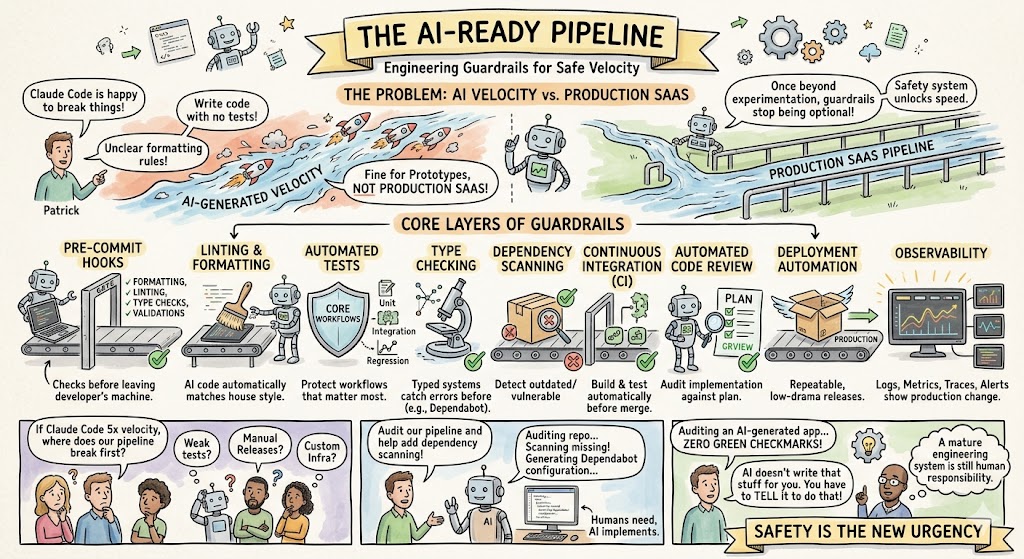
Claude Code will happily work without guardrails. It will write code even if there are no tests. It will modify files even if your formatting rules are unclear. It will refactor old systems even if there is no continuous integration. That is fine for prototypes. It is not fine for production SaaS.
Once you move beyond experimentation, the guardrails stop being optional.
Patrick described the issue clearly: “Those guardrails are not actually optional once you get into a business environment, once you get moving and get beyond prototype stage.”
The AI-ready pipeline has several layers. Some are traditional engineering practices that good teams have wanted for years. AI simply makes them more urgent.
The core layers are:
- Continuous integration: every change should automatically build and test before merge.
- Pre-commit hooks: formatting, linting, type checks, and basic validations should run before code leaves the developer’s machine.
- Automated tests: unit tests, integration tests, and regression tests should protect the workflows that matter most.
- Linting and formatting: AI-generated code should match your house style automatically.
- Type checking: typed systems help catch errors before production.
- Dependency scanning: tools like Dependabot can detect vulnerable or outdated packages.
- Automated code review: a clean-context review agent can audit the implementation against the plan.
- Deployment automation: releases should be repeatable and low-drama.
- Observability: logs, metrics, traces, and alerts should show whether production behavior changed.
For founders, the point is not to memorize each tool. The point is to ask your engineering team a simple question: “If Claude Code increases output 5x, which part of our pipeline breaks first?”
That answer tells you where to invest.
Maybe your tests are weak. Maybe releases are too manual. Maybe QA is entirely human. Maybe the codebase has no dependency scanning. Maybe your CI config lives somewhere Claude cannot see. Maybe your infrastructure setup is so custom that no product person can safely run the app locally.
Whatever the issue is, Claude Code can often help fix it. In the recording, Patrick showed how he asked Claude to help add dependency scanning to a project. Claude recognized the project was hosted on GitHub and generated a Dependabot configuration. He did not need to remember the exact syntax. He just needed to know the system needed dependency scanning.
That is a very practical lesson. You do not need to know every implementation detail before improving your engineering pipeline. You can ask Claude Code to audit what is missing, explain the gaps, and create remediation tasks.
One participant ran AI-generated sample code through the readiness audit and got zero green checkmarks. Patrick’s response was important: “AI doesn’t write that stuff for you. You still have to tell it to do that.”
That should be a wake-up call for anyone building with AI. Claude may create a working app, but it will not automatically create a mature engineering system around that app unless you ask for it.
Testing Is the Safety Net That Lets You Move Faster
A strange thing happens when teams start using Claude Code: they often become more willing to write tests.
Not because engineers suddenly love writing tests, but because the cost drops. Claude is good at generating test suites. It can inspect a function, understand expected behavior, and draft unit tests quickly. It can write regression tests for bug reports. It can help characterize how old code behaves before your team changes it.
That last point is especially important for existing SaaS products.
In legacy systems, the code is often the real specification. The documentation may be outdated. The product managers who wrote the original requirements may be gone. The customer behavior may include years of small expectations and edge cases. Before refactoring, you need tests that capture what the system currently does.
Patrick acknowledged the irony: “I know it sounds silly, because it’s AI writing tests to stop AI from breaking itself.”
But it is not silly. It is smart.
The key is to clear context. If Claude writes tests in one session and then, later, a clean-context Claude session refactors the code, those tests act as an independent guardrail. The refactoring agent does not “remember” writing the tests. It just has to satisfy them.
That is how AI-generated tests become useful. They are not perfect, but they create executable expectations that can be run automatically.
For SaaS teams, the priority should not be “test everything.” That is too broad and usually unrealistic. Start with the workflows where regressions are most expensive: billing, permissions, login, onboarding, reporting, imports, exports, integrations, notifications, and any customer-facing workflow tied to revenue or trust.
If one broken permission rule exposes data incorrectly, test it. If one billing bug creates support chaos, test it. If one reporting regression affects executive dashboards for 200 customers, test it.
Testing should follow risk.
QA Needs a Clean Context
One of the most valuable ideas in the transcript was using a separate, clean context for review.
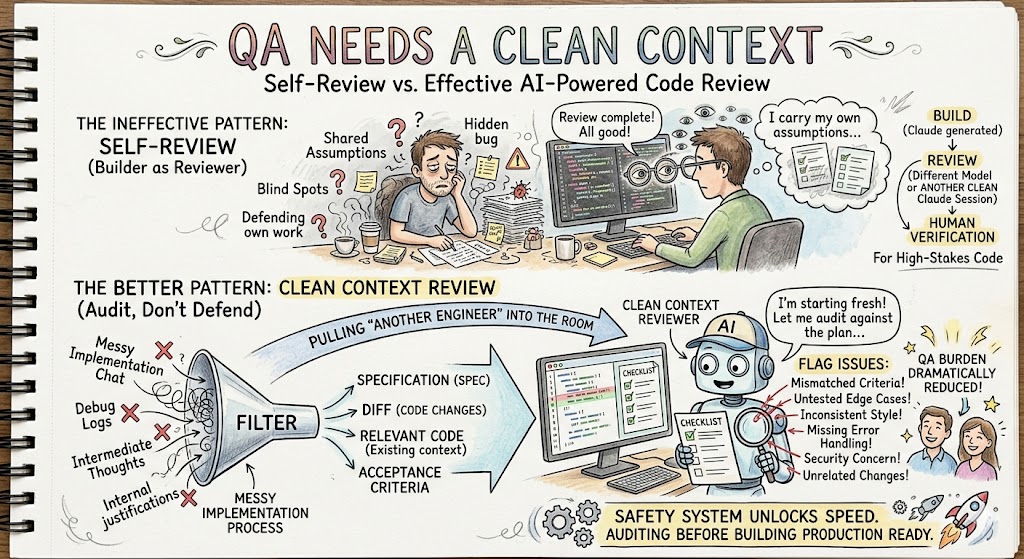
When a human engineer builds a feature and then reviews their own work, they carry all their assumptions with them. AI has a similar issue. If Claude just spent an hour implementing something, asking the same context to validate itself may not be enough. It may share the same blind spots.
A better pattern is to create a clean-context review.
Patrick described it as “pulling another engineer into the room who wasn’t there when you built the thing in the first place.”
That is exactly how AI code review should work. The review agent should start fresh. It should receive the spec, the diff, the relevant code, and the acceptance criteria. It should not receive the whole messy implementation conversation. Its job is not to defend the work. Its job is to audit it.
For high-stakes code, you can even use a different model. If Claude generated the code, another model or another clean Claude session can review it. The point is not that AI replaces human review entirely. The point is that AI can provide an additional review layer before a human spends time on it.
That can reduce QA burden dramatically.
Instead of asking a senior engineer to read every line first, you can have an automated reviewer flag possible issues: mismatched acceptance criteria, untested edge cases, inconsistent style, missing error handling, security concerns, or changes that appear unrelated to the requested work.
This becomes especially valuable when Claude Code is producing more output than the team can manually inspect at the old pace.
Shipping Is Part of the AI System
A lot of teams focus on development speed and forget release speed.
That is a mistake.
If your team can now build 10 things in the time it used to build two, but your release process still happens monthly, the business does not benefit quickly. Worse, the release gets riskier because more changes pile up together. Bigger releases are harder to debug. They create more fear. And fear slows the team back down.
Patrick made the point bluntly: “None of this means anything if you can’t get what you’re doing in front of your customers as fast as you want to get it in front of them in the first place.”
That is the shipping lesson.
AI coding changes the economics of building software, but the value only appears when customers receive working improvements. Shipping is where product velocity becomes business value.
This does not mean every SaaS company needs to deploy 10 times a day. Some products, industries, and customer bases require more controlled release cycles. But if the idea of frequent deployment sounds laughable because your company deploys once a quarter, you have a bottleneck that AI will expose.
Shipping should become more automated, more observable, and more reversible. Teams need smaller releases, better rollback options, feature flags where appropriate, and production monitoring that tells them whether a release changed customer behavior or error rates.
The safer shipping becomes, the more comfortable the team becomes releasing smaller changes more often.
That is how AI development velocity turns into actual product velocity.
The Backlog Can Become the Bottleneck Too
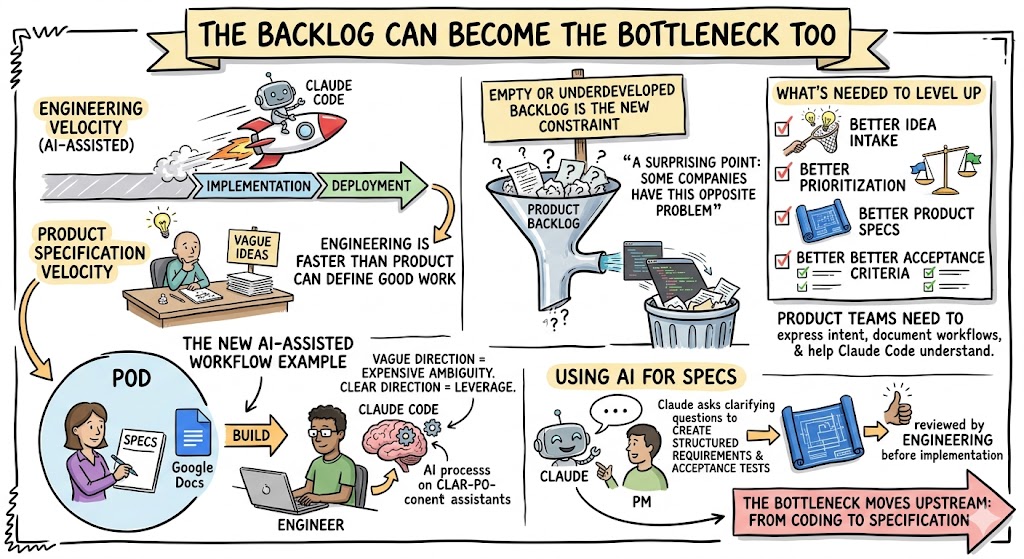
A surprising point from the recording was that some companies run into the opposite problem: the engineering backlog gets empty or underdeveloped because the team can now move faster than product can define good work.
That is not a bad problem, but it is still a problem.
If engineering velocity goes up and product specification velocity does not, you get a new bottleneck. The company needs better idea intake, better prioritization, better product specs, and better acceptance criteria.
Ryan shared a practical example of a product manager and engineer working as a pod, where the product person writes specs in Google Docs or Jira and the engineer uses Claude Code to build from them. That workflow can increase throughput, but only if the specs are clear enough.
This is where product teams need to level up. In an AI-assisted engineering organization, vague product direction creates expensive ambiguity. Clear product direction creates leverage.
A product manager does not need to become a full-time engineer. But they do need to get better at expressing intent, documenting workflows, defining acceptance criteria, and helping Claude Code understand what matters.
In many companies, product managers may even use Claude to create the first version of a spec. Claude can interview them, ask clarifying questions, create a structured requirements document, and generate acceptance tests. That document can then be reviewed by engineering before implementation.
This changes the product development workflow. The bottleneck moves upstream from coding to specification.
Use Bug Reports as QA Intelligence
One of the strongest practical ideas from the discussion was using bug reports and support tickets as input for Claude Code.
Most established SaaS companies have recurring bug patterns. The same module breaks repeatedly. The same customer workflow creates support tickets. The same integration fails in slightly different ways. These bugs often feel like isolated annoyances, but they may reveal deeper architectural issues.
John suggested feeding Claude a set of Jira tickets that show a pattern around a specific problem and asking it to refactor the code to make the problem go away.
That is a very smart use case.
Instead of asking Claude to “clean up the codebase,” ask it to analyze 30 bug reports tied to a recurring category. Ask it to inspect the related code. Ask it to find the architectural root cause. Ask it to propose a test plan and a refactoring plan. Ask it to estimate the safest sequence of changes.
This connects refactoring directly to business value.
Patrick described the hidden cost of this kind of noise: “If you give a software engineer eight bugs a day, I guarantee they’ll do nothing else.”
That line should hit home for every founder. Bugs are not just bugs. They create context switching. They interrupt deep work. They delay roadmap items. They hurt morale. They train customers to distrust releases. And they consume the attention of your most valuable technical people.
Claude Code can help reduce that drag. It can triage bug patterns, write regression tests, propose refactors, and help the team finally eliminate recurring issues that have quietly taxed the company for years.
That may be one of the highest-ROI uses of AI coding: not building more features, but reducing the operational noise that keeps your team from building the right ones.
Security and Trust Still Need Human Ownership
Testing and shipping with Claude Code also raises security questions.
Teams are right to ask what happens when Claude has access to source code, Jira tickets, support tickets, and internal docs. The answer depends on your plan, configuration, vendor settings, and internal security standards. Enterprise teams should review privacy settings, data retention, access controls, and approved usage patterns before broad rollout.
But the transcript raised another security concern that is just as important: plugins, MCP servers, skills, and external integrations.
If you connect Claude Code to Jira, Google Docs, support tickets, GitHub, or customer feedback systems, you are giving it more context. That context is valuable. It is also an attack surface.
A trusted internal Jira ticket is different from an untrusted support ticket created from a customer email. If external text can enter Claude’s context, your team needs to think about prompt injection, filtering, and source trust.
This does not mean you should avoid integrations. They may be the key to making Claude truly useful inside your company. But you should separate trusted and untrusted sources, review MCP servers carefully, avoid installing random plugins, and create company standards for what tools are approved.
Security is not a reason to avoid AI coding. It is a reason to implement it deliberately.
A Practical Starting Point
The fastest way to get started is to run an AI coding readiness audit against your codebase. The transcript described a prompt that checks for the main layers of an AI-ready pipeline. Even if you do not use that exact prompt, your team can create a similar audit.
Ask Claude Code to inspect the repository and answer:
- Do we have CI, automated tests, pre-commit hooks, linting, formatting, type checking, dependency scanning, automated review, deployment automation, and observability?
- Which of those systems are missing, weak, or invisible to Claude because they live outside the repo?
- What are the top five remediation tasks that would most improve our ability to use AI coding safely?
- Which customer-critical workflows need regression tests first?
- What release bottleneck will stop us from benefiting from faster development?
That one exercise can turn AI coding from a vague initiative into an actionable engineering roadmap.
If the audit says your biggest weakness is dependency scanning, add Dependabot or an equivalent. If it says tests are missing, start with the riskiest workflows. If it says CI is missing, prioritize it. If it says deployment automation is weak, fix that before scaling AI-generated development.
The goal is not to get every checkbox green in one week. The goal is to remove the biggest bottlenecks one by one.
Final Thoughts
Claude Code can help SaaS teams build faster, but faster coding alone is not the win. The real win is faster, safer value delivery.
That means better specs, stronger tests, automated quality gates, clean-context reviews, dependency scanning, deployment automation, and observability. It means treating QA and shipping as part of the AI system, not as old-world processes that happen after the exciting AI work is done.
The companies that do this well will get a real advantage. They will not just generate more code. They will reduce regressions, ship smaller changes more often, modernize old systems, and free their best engineers from repetitive bug noise.
The founder takeaway is simple: before asking why Claude Code has not made your team 5x faster, look at the pipeline around it. If testing, QA, review, and shipping are still moving at the old speed, that is where the next breakthrough is hiding.