
Prototyping with Claude Code and Lovable
A practical founder-focused guide to using Lovable, Claude Artifacts, Claude Design, and Claude Code to turn product ideas into clickable prototypes, validate workflows faster, and hand stronger specs to engineering. It explains how AI prototyping shortens the path from idea to product while keeping the right balance between speed, strategy, and production-ready discipline.

If you’ve built software for any length of time, you know the gap between idea and execution can be enormous.
You see a product opportunity. You know the customer pain. You can describe the workflow. You can imagine the screens. But getting from that idea to something someone can click on usually requires a lot of translation. You write a product spec. A designer turns it into mockups. Engineering reviews it. The roadmap shifts. Priorities change. A few weeks later, if you’re lucky, you finally see a first version.
That world is changing fast.
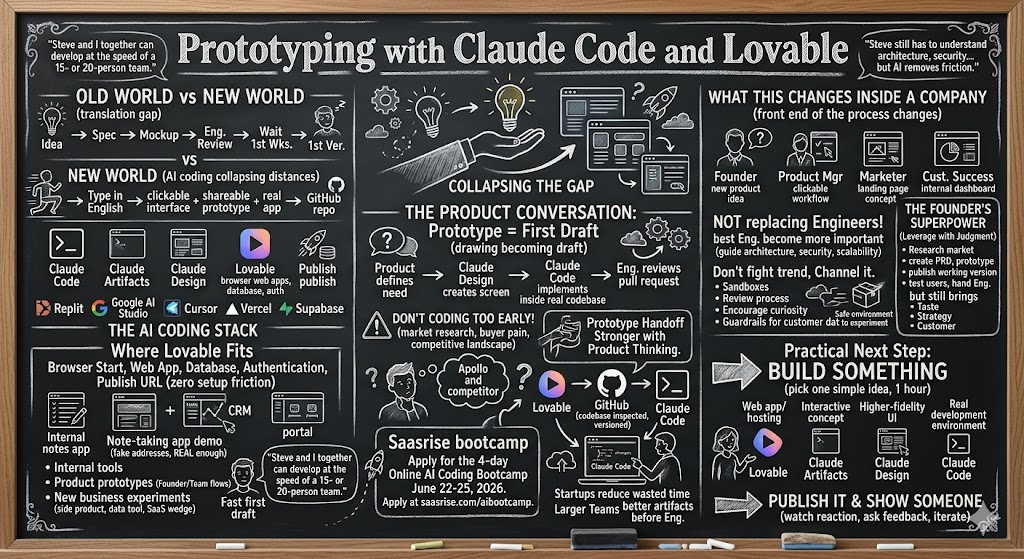
With tools like Claude Code, Claude Artifacts, Claude Design, Lovable, Replit, Google AI Studio, Cursor, Vercel, and Supabase, the distance between “I have an idea” and “here’s a working prototype” is collapsing. You can now type what you want in English and get a real app, a clickable interface, a shareable prototype, or even a GitHub repo that an engineer can continue building from.
You can put your R&D team and product team in our upcoming four-day online AI Coding Bootcamp June 22-25, 2026. Apply at saasrise.com/aibootcamp.
I’ve been building SaaS companies for 23 years, but I’ve always been the non-technical founder. I’ve been the product owner, the product strategist, the CEO, the person who deeply understands the customer and the market, but I’ve always partnered with a technical builder to turn the vision into reality.
That used to mean I needed to explain everything through docs, wireframes, screenshots, Loom videos, and long meetings. Now, I can sit down on a Saturday, build a working prototype in Claude Artifacts or Google AI Studio, send the link to an engineer, and say, “This is what I mean.”
That is a completely different way to build.
As I said in the session, “We just started typing in English what we wanted, and once I had something that visually looked like what I wanted, we were able to actually build it live.” That sentence captures the shift. The prototype is no longer just a drawing. It can become the first draft of the product itself.
The prototype is now the product conversation
One of the products that made this real for me was Pulse.bot.
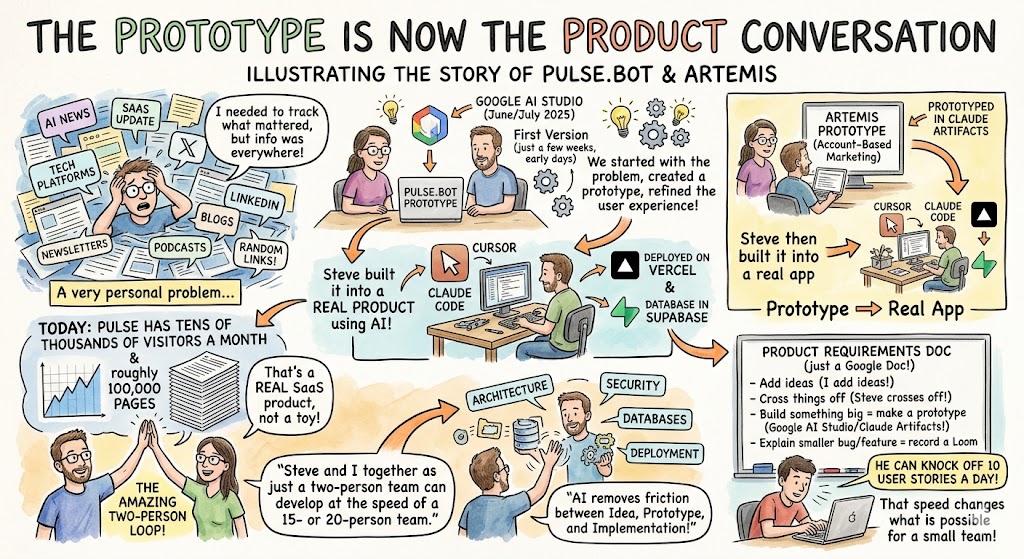
I had a very personal problem. I needed to stay current on everything happening in AI, SaaS, and the major technology platforms. But the information was coming from everywhere: newsletters, X, LinkedIn, blogs, product announcements, podcasts, and random links people sent me. I wanted one place to track what mattered.
So Steve Canfield and I started building Pulse.
We prototyped the first version in Google AI Studio in June and July of 2025, back when these tools were still much earlier. Then Steve built it out into a real product using Claude Code inside Cursor, deployed on Vercel, with Supabase as the database. Today, Pulse has tens of thousands of visitors a month and roughly 100,000 pages. It uses AI to summarize news and content across categories.
That’s not a toy project. That’s a real SaaS product.
And the way we got there was not by starting with a six-month roadmap or a giant Jira board. We started with the problem, created a prototype, refined the user experience, and then turned that prototype into a working application.
Later, we used a similar approach for Artemis, an account-based marketing list-building tool. I prototyped the initial version in Claude Artifacts. Steve then built it into a real app with Cursor, Claude Code, Vercel, and Supabase.
The amazing thing is how fast this two-person loop can move. “Steve and I together as just a two-person team can develop at the speed of a 15- or 20-person team.” That’s not because AI removes the need for technical skill. Steve still has to understand architecture, security, databases, deployment, and how to make the product actually work. But AI removes so much of the friction between idea, prototype, and implementation.
Our product requirements doc is often just a Google Doc. I add ideas. Steve crosses things off. If I want to build something big, I’ll make a prototype. If I want to explain a smaller bug or feature, I’ll write it up or record a Loom. We go back and forth. He can knock off 10 user stories a day.
That speed changes what is possible for a small team.
Where Lovable fits in the stack
Lovable is one of the easiest ways to experience this new world because it removes the setup friction.
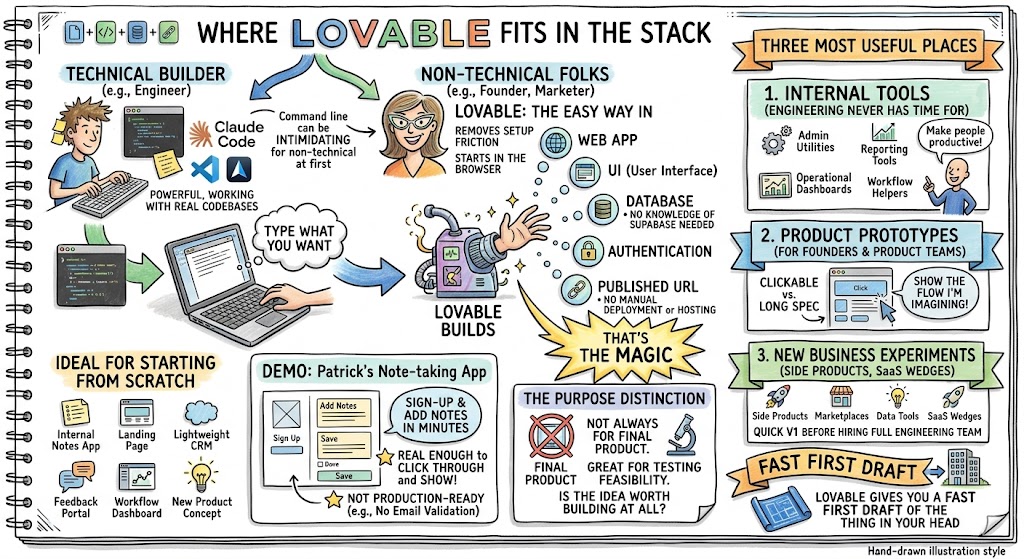
With Claude Code, you’re often working in the terminal or inside an IDE like Cursor or VS Code. That gives you a lot of power, especially when you’re working with real codebases. But for non-technical founders, marketers, operators, or product people, the command line can be intimidating at first.
Lovable starts in the browser. You open the site, type what you want, and it begins building. It can create a web app, generate a user interface, add a database, set up authentication, and publish the app to a URL. You don’t have to know what Supabase is. You don’t have to think about hosting. You don’t have to manually deploy anything.
That’s the magic.
Lovable is especially useful when you’re starting from scratch. You might build an internal notes app, a landing page, a lightweight CRM, a customer feedback portal, a workflow dashboard, or a new product concept. In a few minutes, you can have something real enough to click through and show someone.
During the demo, Patrick asked Lovable to build a simple note-taking app with accounts, authentication, and backend storage. Within a few minutes, it had created the app, published it, and allowed people to sign up and add notes. It was not production-ready. There was no email validation, so people could sign up with fake addresses. But it was real enough to show what the tool can do.
That distinction matters.
Lovable is not always the right place to build your final product. But it is a great place to test whether the idea is worth building at all.
Here are the three places I see tools like Lovable being most useful:
- Internal tools your engineering team never has time to build. Every company has little operational dashboards, admin utilities, reporting tools, and workflow helpers that would make people more productive but never make it onto the roadmap.
- Product prototypes for founders and product teams. Instead of writing a long spec and hoping people understand it, you can create something clickable and say, “Here’s the flow I’m imagining.”
- New business experiments. If you have an idea for a side product, marketplace, data tool, or SaaS wedge, you can build a quick first version before hiring a full engineering team.
That’s where Lovable shines. It gives you a fast first draft of the thing in your head.
Claude Artifacts, Claude Design, and the Anthropic ecosystem
A year ago, I used Google AI Studio more often for prototyping. Today, I find myself using Claude Artifacts and Claude Design more and more.
Claude Artifacts is great for quick interactive prototypes. You can build a calculator, workflow tool, landing page, dashboard, or simple web app right inside the Claude browser interface. You can publish the artifact and share it with someone. For a product owner, that is incredibly useful.
I said this directly: “For me, I use Google AI Studio and Claude Artifacts for the prototyping phase before it goes to an engineer.” That is exactly how I think about these tools. They help me get the idea out of my head and into a form that someone else can understand.
Claude Design is newer, and I think it may become very important for companies that already have established products. Building something from scratch with AI is relatively easy. Building something that matches your existing design system, brand standards, typography, spacing, components, and information architecture is much harder.
That’s why design system support matters.
If your company already has a Figma library, brand guidelines, or a product design system, you don’t want AI creating random screens that look like they came from a different company. You want AI to respect your existing UI patterns. Claude Design is moving in that direction. You can provide design context and ask it to create new screens or workflows that align with your current product.
That is a big deal for product teams.
One of the biggest challenges in AI-assisted product development is not creating something that looks good in isolation. It is creating something that fits into an existing product. A new dashboard widget, a new onboarding step, a new settings page, a new analytics view, or a new customer portal screen all need to feel native to the product.
That is where the workflow starts to look like this: product defines the need, Claude Design helps create the screen, Claude Code implements it inside the real codebase, and engineering reviews the pull request.
That is the future product development loop.
The handoff is the key
The most important part of AI prototyping is not the prototype itself. It is the handoff.
A prototype is valuable because it makes the idea concrete. But if the handoff to engineering is poor, the prototype becomes another throwaway artifact. It might look cool, but it doesn’t actually accelerate production.
The handoff gets stronger when the prototype includes the product thinking behind it.
When Steve takes one of my prototypes and turns it into a real application, he doesn’t just copy the interface. He studies the design, asks what each piece is supposed to do, and turns it into a plan. As Steve said, “A big part of doing things correctly is planning and creating a really in-depth PRD.”
That’s the piece a lot of people miss. AI makes it easy to start coding too early. Because you can create screens so quickly, you may be tempted to skip strategy, market research, user workflows, and product requirements. That is a mistake.
If you’re building something real that you plan to sell, don’t start with code. Start with the market. Start with the buyer. Start with the pain. Start with the workflow. Start with the competitive landscape.
For Artemis, I didn’t just say, “Build me an ABM tool.” I started with the idea that we were building an account-based marketing tool that could compete with Apollo in a specific way. Then I used AI to help research the market, study competitors, think through features, and build out a detailed PRD. That process took a few hours, and it was worth it.
I said this in the session, and I’ll say it again: “Don’t start coding if you’re actually building something real that you plan to sell until you’ve done four to five hours of market research.”
That advice is even more important now because AI makes it so easy to build the wrong thing quickly.

From Lovable to GitHub to Claude Code
One of the most useful things Lovable can do is connect to GitHub.
That turns the prototype from a browser-only experience into a codebase that can be inspected, versioned, modified, and handed to engineering. Once the code is in GitHub, a developer can pull it down locally, run it, inspect the structure, and decide what to keep.
Sometimes the code is useful. Sometimes it is better treated as a reference implementation. Sometimes the prototype’s UI is helpful, but the engineering team will rebuild the feature inside the existing architecture. All of those outcomes are fine.
The value is that you have moved from abstract discussion to something tangible.
In the demo, Patrick built a simple bio page in Lovable, synced it to GitHub, pulled it down locally, and opened it with Claude Code. Claude Code could then inspect the app, understand that it was a Node-based project, run the local development server, and begin making changes.
That workflow is powerful because it connects two worlds:
- Lovable gives non-technical builders a fast way to create and publish prototypes.
- Claude Code gives technical builders a way to inspect, modify, run, and integrate real code.
That is how you go from “cool demo” to “possible product.”
For startups and smaller teams, this can dramatically reduce wasted time. Instead of asking engineering to build five different ideas, the founder or product team can prototype five ideas, test them, and only bring the strongest one into the codebase.
For larger teams, the same principle applies. Product can create better artifacts before engineering starts. Marketing can prototype campaign pages. Ops can prototype internal tools. Customer success can prototype dashboards. Engineering can then decide what needs to be hardened, rebuilt, secured, or scaled.
Production is a different standard
It is important to be honest here. A working prototype is not the same as production software.
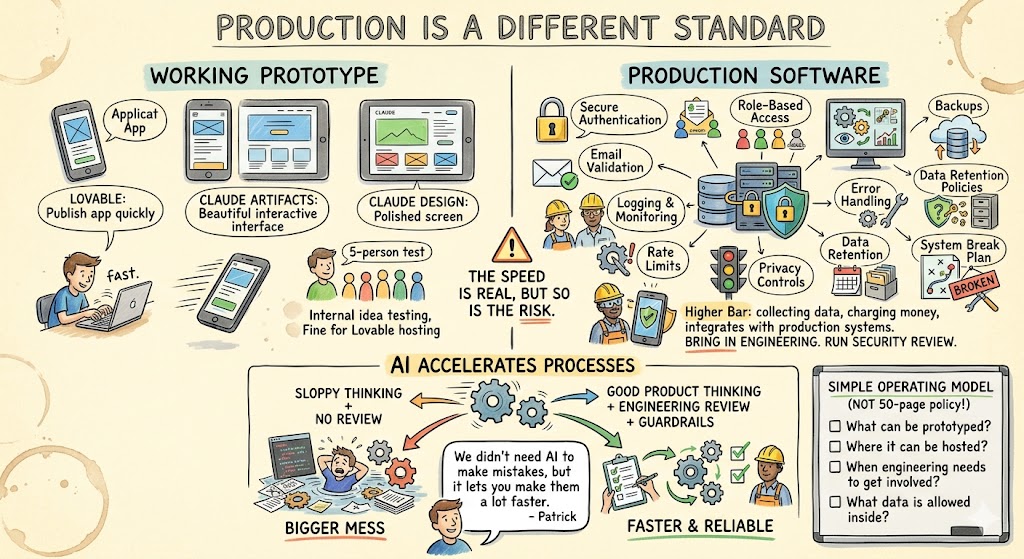
Lovable can publish an app quickly. Claude Artifacts can create a beautiful interactive interface. Claude Design can generate a polished screen. But production software needs more.
It needs authentication that is actually secure. It needs email validation. It needs role-based access if multiple user types exist. It needs logging, monitoring, backups, error handling, rate limits, privacy controls, data retention policies, and a plan for what happens when something breaks.
That doesn’t mean you shouldn’t use these tools. It means you should understand what stage you’re in.
If you are testing an idea internally with five people, Lovable hosting may be completely fine. If you are collecting customer data, charging money, or integrating with production systems, you need a higher bar. Bring in engineering. Run a security review. Understand what data is being stored and where. Use the platform’s security checks, but don’t assume they replace your own judgment.
The speed is real, but so is the risk.
One line from Patrick really stuck with me: “We didn’t need AI to make mistakes, but it lets you make them a lot faster.” That’s exactly right. AI doesn’t invent bad process. It accelerates whatever process you already have. If you have good product thinking, good engineering review, and clear guardrails, AI makes you faster. If you have sloppy thinking and no review process, AI helps you create a bigger mess.
That’s why every company needs an AI product development workflow. Not a 50-page policy that nobody reads, but a simple operating model that explains what can be prototyped, where it can be hosted, when engineering needs to get involved, and what data is allowed inside these systems.
What this changes inside a company
The biggest change is that software creation is no longer limited to engineers.
That does not mean engineers become less important. Actually, the best engineers become more important because they can guide the architecture, review the AI’s work, and make sure the product is secure and scalable.
But the front end of the process changes.
A founder can prototype a new product idea before asking for engineering time. A product manager can create a clickable workflow instead of writing a vague ticket. A marketer can build a landing page concept instead of waiting three weeks on a contractor. A customer success leader can prototype an internal dashboard that shows what the team actually needs.
This is going to create tension in some organizations.
Engineering teams may feel threatened when non-engineers start generating code. Product teams may get frustrated when engineering says the prototype cannot be used directly. Marketing may want to publish things faster than IT is comfortable with. Leaders will need to navigate that.
My view is simple: don’t fight the trend. Channel it.
Give people safe environments to experiment. Teach them what a prototype is and what it is not. Create a path for the best prototypes to be reviewed and productionized. Let people show what they built. Encourage curiosity. But keep strong guardrails around production systems, customer data, and security.
The companies that figure this out will move much faster than the companies that don’t.
The founder’s advantage
For founders, this is one of the most exciting moments I’ve seen in my career.
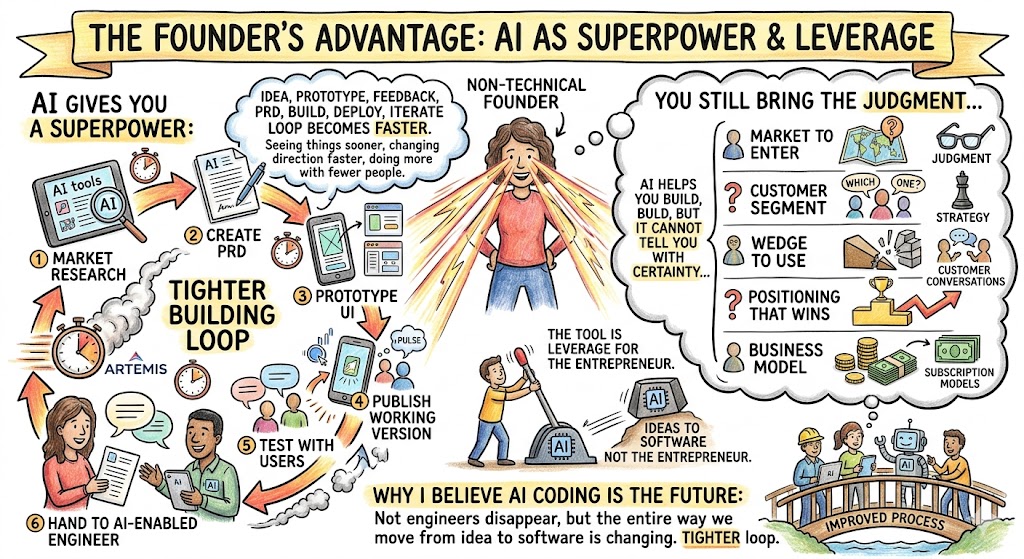
A non-technical founder can now do things that were impossible a few years ago. You can research a market with AI, create a PRD, prototype the UI, publish a working version, test it with users, then hand it to an AI-enabled engineer to build properly.
That’s a superpower.
But the founder still has to bring the judgment. AI can help you build, but it cannot tell you with certainty what market to enter, what customer segment to serve, what wedge to use, what positioning will win, or what business model will work. You still need taste. You still need strategy. You still need customer conversations.
The tool is not the entrepreneur. The tool is leverage for the entrepreneur.
When I look at Pulse and Artemis, what excites me is not just that we used AI. It’s that the entire building process got tighter. The idea, prototype, feedback, PRD, build, deploy, and iterate loop became faster. The communication between product owner and builder improved. We could see things sooner, change direction sooner, and get more done with fewer people.
That is why I believe AI coding is the future of software development. Not because every line of code will be written by AI. Not because engineers disappear. But because the entire way we move from idea to software is changing.
The practical next step
The best way to understand this is to build something.
Pick one idea that has been sitting in your head or on your team’s backlog. Not the biggest idea. Not the highest-risk production feature. Pick something simple enough that you can prototype it in an hour.
Use Lovable if you want a fast web app with hosting. Use Claude Artifacts if you want a quick interactive concept. Use Claude Design if you want a higher-fidelity UI that can align with a design system. Use Claude Code if you want to bring the code into a real development environment.
Then publish it and show someone.
Watch their reaction. Ask where they get confused. Ask what would make it useful. Ask whether the workflow matches the real problem. Then decide whether to throw it away, improve it, or bring it into engineering.
That is the new loop.
Prototype quickly. Learn quickly. Build the right things more often.
For founders, product leaders, and engineering teams, that is the real promise of Claude Code and Lovable. Not just faster code, but faster clarity.