Lessons From Running an AI Employee
A handful of SaaS founders compare notes on running AI employees inside real companies: where they break, what they cost, and what actually pays off once the novelty wears off.

A few weeks ago on one of our mastermind calls, the conversation turned to something almost every SaaS founder is quietly experimenting with right now: hiring an AI employee. Not a chatbot bolted onto a landing page, but something closer to a real teammate. You give it access to your inbox, your Slack, your CRM, your support desk, and it goes and does work. Several founders in the group are already running these day to day, and the discussion was more useful than any product demo, because founders were telling each other exactly what breaks and what pays off.
The promise is real, but so is the friction
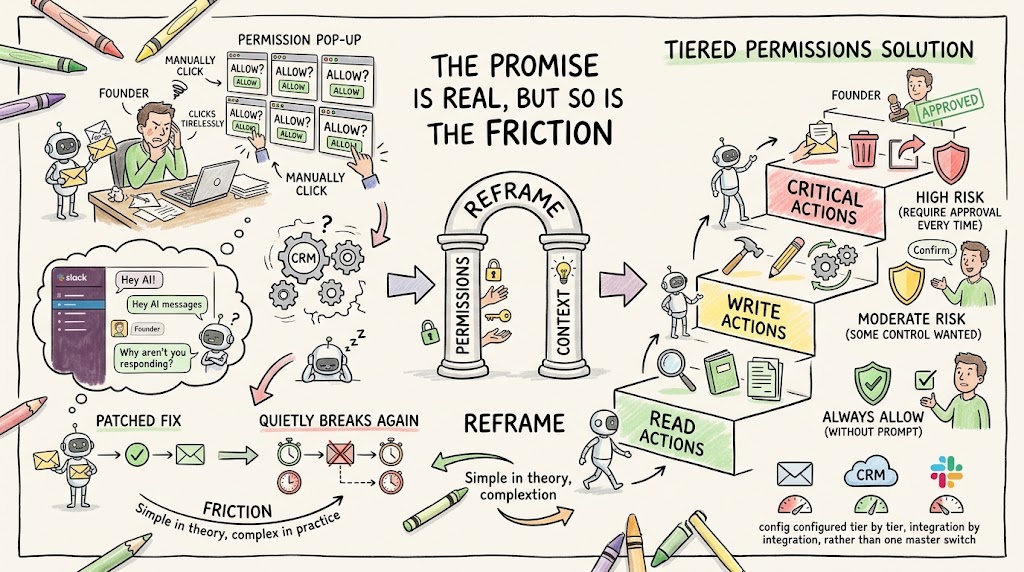
One founder in the group described trying to get his AI employee to read an email, decide what to do with it, and forward it to the right person on his team. Simple enough in theory. In practice, he kept hitting permission pop-ups asking him to verify the action, over and over, to the point where he was manually clicking allow just to keep a single workflow moving. The same thing happened with his CRM, where the tool was supposed to comb through emails and kick off downstream steps automatically. And when he tried to trigger a job by pinging the AI in Slack, it sometimes just did not pick up the message at all, which meant he was going back and forth typing ‘hey, I just messaged you, why aren’t you responding’ like he was managing a distracted new hire rather than software. Worse, a fix rarely stuck for good: he would patch a workflow, watch it run cleanly for a few hours, and then it would quietly break again with no obvious trigger.
This founder was not just complaining into the void, though. Another member of the group happens to build in the AI agent space himself, and he jumped in with a useful reframe. He said these breakdowns usually come from two different layers: permissions and context. Permissions is about what the AI is allowed to do without asking, and context is about whether it actually understands the situation well enough to act correctly. His own product solves the permission piece by splitting actions into three tiers: read, write, and critical, where critical covers things like deleting data or sending something external.
- Read actions. Low risk, so most tools let you set these to always allow without a prompt.
- Write actions. Moderate risk, changing something inside your own systems, usually where founders want a bit more control.
- Critical actions. High risk, deleting data or sending something to a third party, worth requiring approval on every one.
- The fix isn't universal. You typically configure this tier by tier, and sometimes integration by integration, rather than one master switch.
Where these tools genuinely struggle: third parties and two-factor authentication
The clearest pattern from the call is that AI employees are far more reliable inside a founder's own systems, the CRM, the support desk, the billing tool, than when they have to interact with someone else's. The founder who was fighting with permissions also tried something ambitious: having the AI log into his bank accounts, pull statements, and forward them to his bookkeeper. On paper that is exactly the kind of tedious task you would want to hand off. In practice, the workflow took nearly three hours to run each time, and it broke on almost every attempt, which is what happens when a process has that many hours and that many steps in which to go wrong. The culprit was two-factor authentication: a text message would land on his phone, and the AI had to somehow read that code to get past the login screen, a fragile chain of events even when everything else works. Every founder on the call agreed this was not a quirk of one particular tool. Two-factor authentication is an industry-wide barrier that anyone automating outside their own systems is going to run into sooner or later.
Another member of the group, who has been running a Slack-based AI teammate for about a month, had a noticeably different experience, and the contrast is instructive. He runs into permission prompts too, and agreed that two-factor authentication is a genuine barrier wherever it shows up. But he has not seen the same speed or reliability problems: a Slack message gets a response within a couple of minutes, and his scheduled jobs, like a 9am run every morning, execute on time without drama, a sharp contrast to the three-hour bank workflow that kept breaking for the other founder. The difference seems to come down to scope. He has not connected his AI employee to his own custom-built systems, only to established platforms like his support ticketing tool, a live chat product, his CRM, and Stripe, and those integrations have been steady, because mature APIs on established tools tend to behave more predictably than anything custom-built in house. If you want a low-risk way to judge how reliable a tool will be before trusting it with something higher stakes, a recurring job like a daily 9am report is a good first test.
What actually works: analysis, not just automation
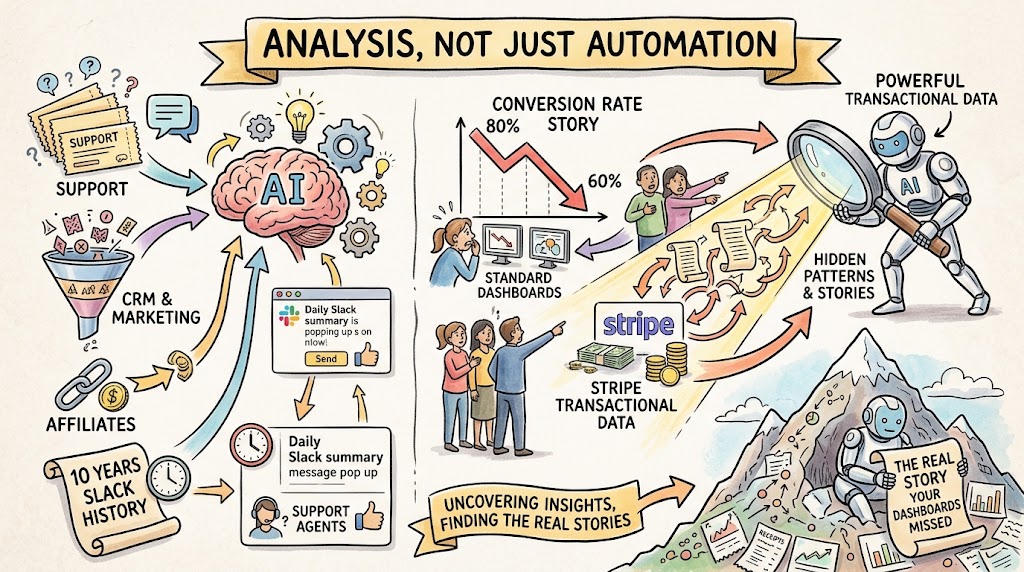
The most compelling parts of the conversation were not about automating tasks at all. They were about using the AI employee to analyze data the founders already had but had never really looked at closely. One member connected his AI teammate to his company's support ticketing system and live chat tool, and every morning it analyzes the previous day's tickets and posts a summary into the team's Slack channel, effectively running the support function's reporting on its own. He also hooked it into his CRM and, separately, into his affiliate software, and had it run a full analysis of his affiliate program that would have taken a person days to put together by hand.
- Daily support summaries. The AI reviews the prior day's tickets and posts a plain-language recap into Slack every morning.
- CRM and marketing analysis. Connected to the CRM, it surfaces patterns in the marketing funnel without a person pulling reports.
- Affiliate program review. A full analysis of an affiliate program ran through the AI instead of consuming a team member's week.
- Even a decade of Slack history got ingested. One setup started by reading ten years of internal chat, giving it company context from day one.
The strongest example was a founder whose trial-to-paid conversion rate had held steady around 80% for roughly ten years, then slid down to around 60% over the summer. Nobody on his team could pin down why just by eyeballing the dashboards. So he told his AI teammate to go analyze the company's Stripe data directly, and it surfaced patterns that simply were not visible in the standard dashboard view. The real value here has less to do with clicking buttons on your behalf and much more to do with sitting inside a mountain of transactional data and pulling out the story your dashboards were never built to show.
What it actually costs
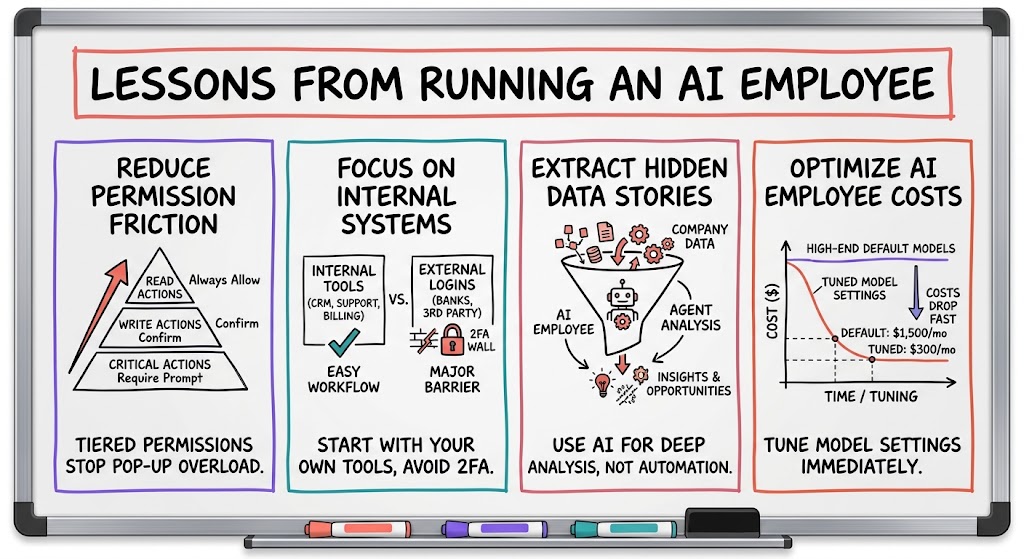
I have shared this before on our calls, but it is worth repeating with real numbers. My team started using an AI teammate back in April, and our first month we spent about $1,500 running it, mostly because we had it set to use the leading-edge model by default. We have since dialed that down, and now it runs closer to $300 a month for our whole team, covering a lot of sales database analysis and content creation. As I put it on the call, "we started out spending a lot, like $1,500 a month, and it's come down to about $300 a month now, for our whole team. For what it does for us, a lot of sales database analysis as well as content creation, we feel like it's a good value."
Another founder's numbers told a similar story. His first full month running his AI teammate came out to about $1,000, mostly because the tool defaults to the most expensive, top-end model unless you go in and change it. Once he reconfigured which model handled which task, he expected the following month to land closer to $500. He also pointed out that most of these platforms let you route through your own model provider account instead of paying the platform's markup, worth checking before you assume the sticker price is fixed.
- The default setting is usually the expensive one. Most platforms default to their top-end model, which quietly inflates your bill until you change it.
- Costs drop fast once you tune it. One founder went from roughly $1,500 to $300 a month; another expects to go from about $1,000 to around $500.
- You can often bring your own model account. Routing through your own provider instead of the platform's default can cut costs further.
- Judge cost against what it replaces. A few hundred dollars a month for sales analysis and content work is cheap next to a hire.
What to do before you hand over the keys
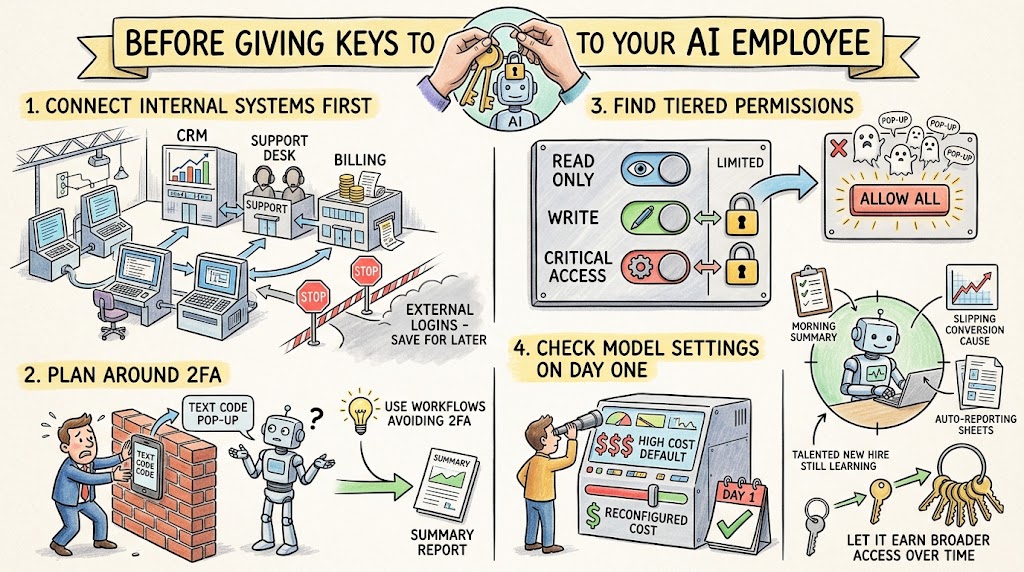
If you are thinking about deploying an AI employee in your own company, the founders on this call basically ran the experiment for you. Start with your own systems before you connect anything external, since that is where reliability is highest. Treat two-factor authentication as a wall you will hit, and pick workflows that avoid it where you can. Check whether the tool you are evaluating separates permissions into tiers, because an all-or-nothing allow button will wear you down with pop-ups fast. And look at the model settings on day one instead of month two, because the default configuration is often the most expensive one available.
- Connect internal systems first. Your own CRM, support desk, and billing tool are the safest place to start; save external logins for later.
- Plan around two-factor authentication. Pick workflows that avoid it where possible instead of hoping the AI will read your texts reliably.
- Look for tiered permissions. A read, write, and critical structure saves you from clicking allow on everything.
- Check the model settings immediately. Reconfigure away from the priciest default model before your first invoice, not after.
Every founder on the call is still running one of these tools, and most are getting real value out of it: a morning support summary, a root cause analysis on a slipping conversion rate, a few hundred dollars a month replacing hours of manual reporting. These tools behave less like finished software and more like a talented new hire still learning your company. Give it clear scope, start with your own systems, watch what it costs, and let it earn broader access over time.