
.png)
How to Set Up Outbound Campaigns in Instantly the Right Way (The Key Settings)
The success of an outbound campaign rarely comes down to the copy alone. In most cases, campaigns fail (or underperform) long before the first email is sent—because the technical foundation wasn’t set up correctly.

Instantly is an extremely powerful outbound engine, but it’s also unforgiving if configured the wrong way. A few misplaced settings, missing warm-up steps, or sudden spikes in volume can quickly damage your domain reputation and cut your inbox placement in half.
In this guide, we’ll walk through the key Instantly settings and setup steps that actually matter—the ones used by high-performing teams that send thousands of cold emails per day without burning domains or losing deliverability. If you want your outbound engine to run smoothly and scale predictably, these are the fundamentals that must be in place.
.jpg)
Start with the Right Infrastructure
Outbound email has strict rules. Google and Microsoft are quick to throttle or flag activity that looks unusual, and new domains or inboxes are treated with suspicion. This is why the “behind-the-scenes setup” matters even more than what’s inside your sequence.
The first requirement is having enough inboxes to spread the sending activity. A simple rule is: one inbox for roughly every 30 cold emails you want to send per day. If you want to send 300 per day, you’ll need around ten inboxes. If you want to send 3,000 per day, you’ll need closer to a hundred.
But inbox quantity alone isn’t enough. Every one of those inboxes needs a proper warm-up period—two to three weeks of gradually increasing activity so the email providers see natural, healthy sending behavior. Skipping this step is the fastest way to lose deliverability.
Once your inboxes are warmed, Instantly becomes capable of sending large volumes safely. Without this baseline in place, even the best-written outbound sequence will end up in spam.
Upload and Verify Your ABM List
Your outbound results are shaped heavily by the quality of your list. Instantly makes it easy to upload CSVs, import saved lists, or sync from SuperSearch, but verification is essential.
.jpg)
Unverified lists lead to hard bounces. Hard bounces lead to spam filters. And spam filters lead to your entire domain reputation collapsing almost overnight.
Whether you verify inside Instantly or through outside services like ZeroBounce or MillionVerifier, this step cannot be skipped. A clean list protects your sending reputation and stabilizes your inbox placement.
It also pays to enrich your list before sending. A simple LinkedIn URL included in your CSV unlocks Instantly’s full-profile enrichment, giving you job titles, summaries, interests, and other details that can power AI-personalized first lines or subject lines. These personalized variables can double engagement rates when used correctly.
Build a Well-Structured Sequence
Once the technical foundation is set, it’s time to build your sequence. The best-performing outbound sequences share a few characteristics.
They are short—usually under 75 words. Long cold emails simply get ignored. You have a three-to-six-second window where the prospect decides whether to keep reading. Concise messages win.
They are focused on a single objective per email. Some emails aim for clicks. Others aim for replies. Alternating between these goals improves both engagement and deliverability.
And they always open with something about the recipient, not the sender. Cold email isn’t a platform for explaining your company. It’s a medium for offering value or insight immediately. A great opening line makes the reader think, “This is relevant to me,” not “This person wants to sell me something.”
Instantly makes it easy to test variations within each step of a sequence—simply add multiple versions and let Instantly compare performance across opens, clicks, and replies. Over time, you’ll disable the weaker variants and continue scaling the winners.
Enable the Most Important Setting: Campaign Slow Ramp
If there is one setting inside Instantly that can make or break your outbound results, it’s Campaign Slow Ramp.
Without slow ramping, a new campaign begins sending at full volume across all inboxes immediately. This looks unnatural to email providers, especially if your warm-up period was short or your domain is new. Many teams unknowingly burn their inboxes within the first two weeks simply because they skipped this setting.
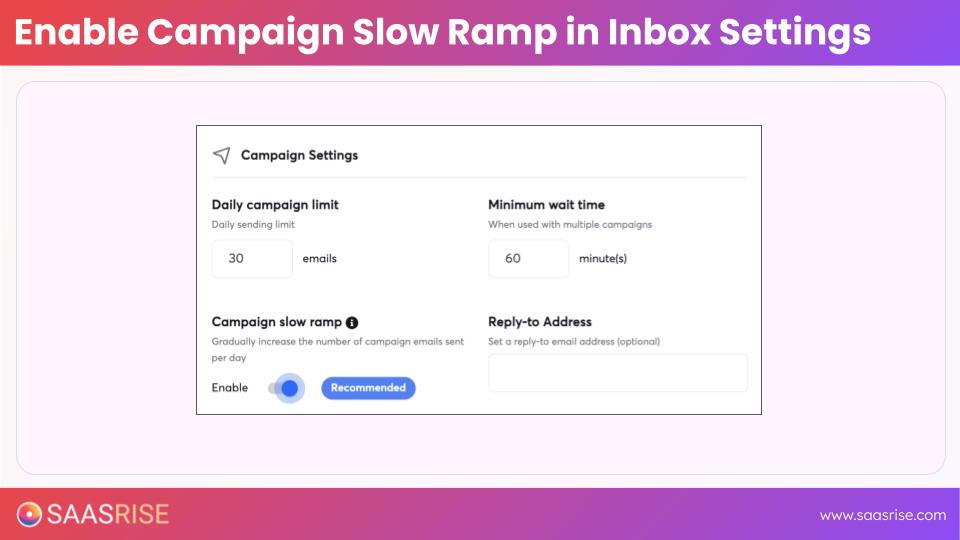
Campaign Slow Ramp does exactly what the name implies: it gradually increases daily sending volume over a two- to three-week period. This protects your domain, preserves your deliverability, and gives your sequence room to scale safely.
You’ll find this setting inside the Email Accounts section—open the bulk edit options and enable slow ramp for every inbox used in outbound. It should never be left off.
Monitor Your Inbox Placement Regularly
Even with the right setup, deliverability isn’t static. It can shift based on sending volume, engagement rates, or changes in your list quality. Instantly includes an inbox placement test that allows you to see how your emails are landing across providers.
You get two free tests per month, and for cold outbound teams, running a test every two weeks is best practice.
A warm email list should see inbox placement above 95%. Cold email is different—landing at around 80% is solid. If you see placement falling below that, it’s a signal to slow down sending, rest a percentage of your inboxes, or remove problem domains temporarily. Many high-volume teams use a rotation strategy where one-third of inboxes rest each month to maintain high performance.
Inbox placement directly determines whether your campaign succeeds. Checking it regularly is one of the simplest ways to safeguard your outbound system.
Launching the Campaign
.jpg)
After warm-up, verification, enrichment, sequence creation, and slow ramping are complete, you’re finally ready to launch. At this point, you should review:
• Are all merge fields mapped correctly?
• Are your variations in place?
• Is slow ramp turned on?
• Are your daily sending limits appropriate?
Only then should you resume the campaign and allow Instantly to begin sending.
Outbound is most effective when supported by additional channels, but only after your email foundation is running smoothly. Once outbound launches, your clickers become a high-value group who can be targeted by LinkedIn connection requests or retargeting ads on Meta, Google, LinkedIn, and Bing. These supporting layers increase familiarity quickly and help outbound convert at a higher rate.
Putting It All Together
When set up correctly, Instantly becomes far more than an email-sending tool. It becomes a predictable, scalable outbound engine. The right inbox volume, warm-up structure, list quality, enrichment, sequence design, and slow ramping settings create an environment where your emails consistently reach the inbox—and where engagement turns into pipeline.
Many teams try outbound, but only a small percentage build it the right way. Those who do find that outbound becomes one of the highest-ROI channels in their entire go-to-market motion.
If you get the technical foundation right, every other part of your outbound strategy becomes easier. Your emails land. Prospects click. LinkedIn follow-ups connect. Retargeting audiences grow. SDRs gain visibility into real buying signals. And cold accounts begin to warm.
Outbound is a system, not a single action—and Instantly is the engine that powers that system when configured correctly.