
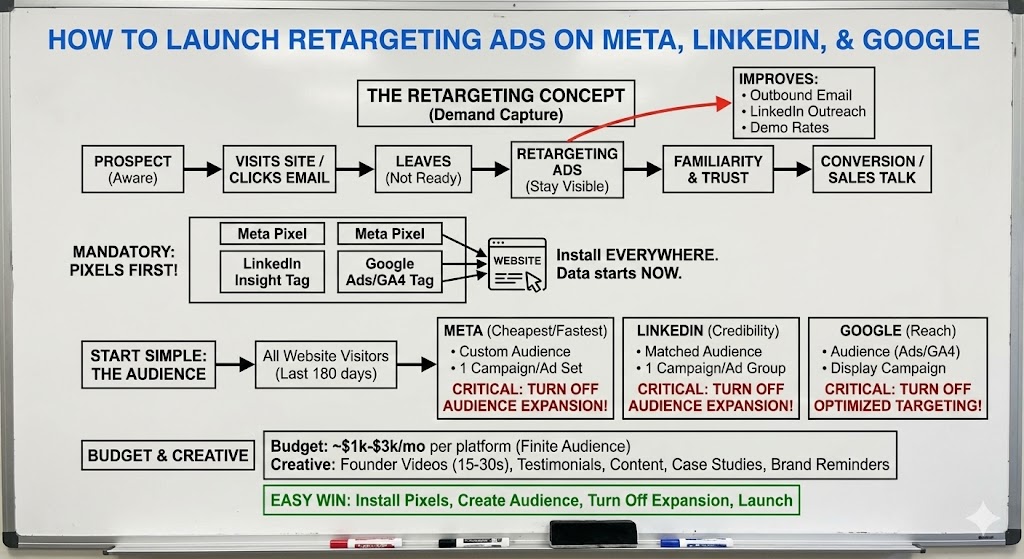
How to Launch Retargeting Ads on Meta, LinkedIn, and Google
If you’re a B2B SaaS company running ads and you’re not running retargeting, you’re skipping the highest-leverage, lowest-risk part of paid acquisition.

Retargeting isn’t flashy. It won’t magically create demand out of thin air. But when it’s set up correctly, it quietly improves almost everything else you’re doing: outbound email performance, LinkedIn outreach, demo conversion rates, and even how warm prospects feel when they finally talk to sales.
This post walks through exactly how to launch retargeting ads on Meta, LinkedIn, and Google, using the same approach we teach in Week 10 of the B2B SaaS Growth Program and implement across real client and SaasRise accounts.
What Retargeting Is (and Why It Works So Well)
Retargeting is not about finding new people. It’s about staying visible to people who already know you exist.
These are prospects who have:
- Visited your website
- Clicked an outbound email
- Read a blog post
- Watched a video
- Looked at a landing page and left
They’re not ready to buy yet — but they’re aware. And awareness is the hardest, most expensive thing to create in B2B.
Retargeting works because it reinforces familiarity during the waiting period of a long buying cycle. Instead of disappearing after one interaction, your brand stays present while the decision forms in the background.
That’s why retargeting sits firmly in demand capture, not demand generation. You’re not creating interest from scratch — you’re supporting momentum that already exists.
Before You Do Anything: Pixels Are Mandatory
Retargeting does not start in an ad account. It starts with pixels.
If your tracking pixels aren’t installed, you are not retargeting — no matter what your campaign is called.
At minimum, you need:
- Meta pixel
- LinkedIn Insight Tag
- Google Ads / GA4 tag
These need to be installed on every page, including subdomains like blogs, landing pages, or app environments. Retargeting audiences only build from the moment the pixel goes live. You cannot go back and capture past visitors.
This is why we push pixel installation early. Every week you delay is lost audience data forever.
Start Simple with Your Retargeting Audience
One of the most common mistakes teams make is over-engineering retargeting before they’ve ever launched it.
You do not need a complex funnel on day one.
Our default starting point is straightforward:
- All website visitors from the last 180 days
That single audience usually captures the majority of high-intent prospects for B2B SaaS companies. You can add more segmentation later — pricing page visitors, demo viewers, video watchers — but simplicity wins early.
The goal is to get retargeting live, not perfect.
How to Launch Retargeting on Meta (Facebook & Instagram)
Meta is usually the cheapest and fastest place to get retargeting working, which is why we almost always start there.
The setup itself is simple. You create a custom audience based on website visitors with a 180-day window, then build one campaign dedicated entirely to retargeting, with a single ad set targeting only that audience.
The most important part — and the most commonly missed — is turning off audience expansion.
Meta will default to “helping” you by showing ads to people who look similar to your visitors. That completely breaks retargeting. If expansion is on, you’re no longer retargeting — you’re running cold ads under a different name.
Once expansion and off-platform placements are disabled, you can launch with a small set of ads and let the system run.
.jpg)
How to Launch Retargeting on LinkedIn
LinkedIn retargeting is more expensive than Meta, but it plays a different role. It reinforces credibility, especially for mid-market and enterprise buyers who live on LinkedIn.
You’ll create a website matched audience using your domain URL, usually with “starts with” logic so all pages and subdomains are included. From there, you create a dedicated retargeting campaign with a single campaign/ad group targeting that audience.
Just like Meta, LinkedIn enables audience expansion by default. And just like Meta, it needs to be turned off. If it’s on, LinkedIn will happily spend money on people who have never touched your site.
LinkedIn retargeting works best as reinforcement, not scale. Think trust, not volume.
.jpg)
How to Launch Retargeting on Google Display
Google retargeting gives you reach across the broader internet — news sites, blogs, YouTube, and display inventory — and it’s extremely effective when paired with Meta and LinkedIn.
You can create your retargeting audience either directly in Google Ads or in GA4. We often do both as a failsafe. The rule stays the same: all website visitors, 180-day window.
You’ll then create a Display campaign with a single ad group targeting only that retargeting audience.
The critical setting here is turning off optimized targeting. Google’s version of expansion will push your ads to people who have never been to your site if you leave it on. That’s not retargeting.
.jpg)
How Much Budget Retargeting Actually Needs
This surprises most founders.
Retargeting does not need large budgets. The audience is finite.
For most B2B SaaS companies:
- $1k–$3k per month on Meta
- $1k–$3k per month on LinkedIn
- $1k–$3k per month on Google Display
Retargeting is usually 10–20% of total ad spend. Its job isn’t scale — it’s efficiency. If you try to force scale, frequency explodes, CTRs drop, and performance decays.
That’s not a signal to spend more. It’s a signal to generate more new demand upstream.
What Actually Works as Retargeting Creative
Retargeting ads shouldn’t feel aggressive. They should feel familiar.
The formats we consistently see work best are:
- Short founder videos (15–30 seconds)
- Testimonials or social proof
- Blog or content promotion ads
- Case study or results-focused ads
- Simple brand reminders with a clear value proposition
You’re not trying to force a demo. You’re reminding people why you’re credible while they make up their mind.
The Hidden Value of Retargeting
The real power of retargeting isn’t just conversions.
It improves:
- Outbound email reply rates
- LinkedIn connection acceptance
- Sales call quality
- Trust and brand recall
When someone sees your email and your ads and your LinkedIn presence, conversations change. You’re no longer a stranger — you’re a familiar brand.
That’s why we always pair:
- Outbound email
- Matched audience ads
- Retargeting ads
Together.
Final Thought: Retargeting Is the Easiest Win in B2B Ads
If ads feel overwhelming, start here.
Retargeting is:
- Easy to set up
- Low budget
- Fast to validate
- High leverage across all channels
You don’t need perfection. You need it live.
Install the pixels. Create one clean audience. Turn off expansion. Launch a few simple ads.
That alone will put you ahead of most B2B SaaS companies.