
How to Do Web Analytics in a Privacy Compliant Way
A founder in our mastermind just got hit with a privacy lawsuit over a missing cookie banner, which turned into a much bigger conversation about how broken most companies' analytics actually are. Here is how to fix both problems at once.

A member of our SaaS mastermind opened a recent session with a problem I've started hearing more and more: he got served by a privacy troll lawyer. These are attorneys who specialize in finding small businesses without a cookie banner, sending a demand letter, and settling for a few thousand dollars before it ever gets close to court. His privacy counsel confirmed it. This particular lawyer does this constantly, and he goes after companies that are big enough to pay but too small to want the legal fight.
The advice from counsel was simple: put up a cookie banner. So he did. And then his analytics fell off a cliff. He came to the group half expecting us to tell him something had broken. What we actually told him was more useful, and it applies to almost every SaaS company running Google Analytics today, banner or no banner.
The cookie banner isn't the problem. Your baseline traffic number is.
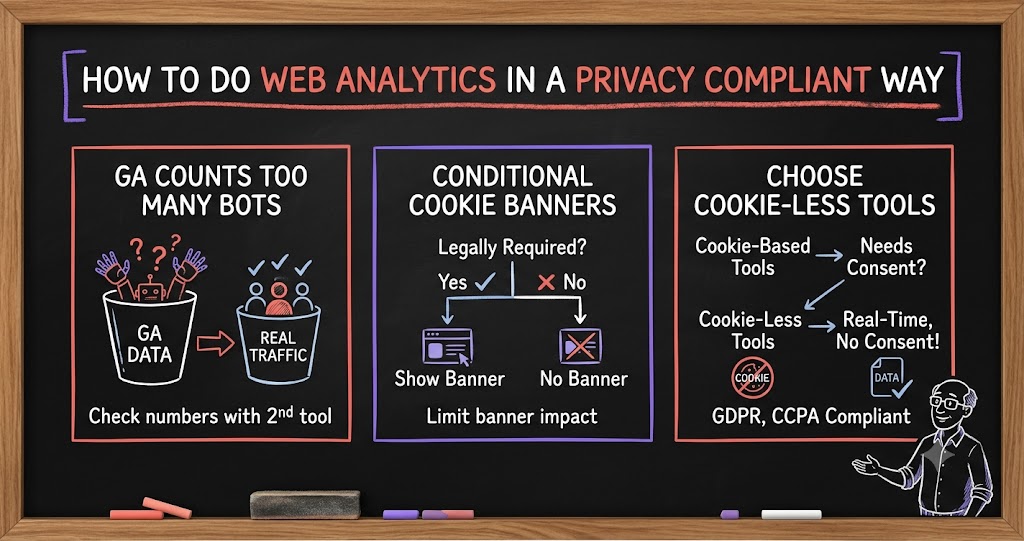
Once the banner went live, his real-people traffic looked like it had cratered. It hadn't. What happened is that Google Analytics stopped counting bots, scrapers, and other non-human traffic that never should have been in the number in the first place. Google Analytics has done a genuinely bad job over the last several years keeping up with bot filtering, and for a lot of companies, that means a huge share of the traffic in the dashboard was never real people to begin with.
I've seen this on our own site. Google Analytics shows saasrise.com getting 381,000 active users and 394,000 sessions over a recent 30 day period. Plausible, which filters cybersecurity bots more aggressively, shows roughly 17,400 real people over almost the same window. That's about 5% of what Google Analytics claims. Every time we send an email to our list, which is maybe once or twice a week, GA shows a spike of 50,000-plus "active users" that day. That's not real. I've simply stopped trusting Google Analytics as a source of truth, and I'd encourage you to check your own numbers against a second tool before making any decision based on GA traffic alone.
The tell is usually in the pattern, not just the total. If your visitor count drops sharply but your average time on page and engagement go up, that's a good sign the drop is bots leaving the sample, not real users disappearing. A founder who sees this happen right after installing a cookie banner should treat it as the dashboard finally telling the truth, not as a sign something broke.
Do you actually need the banner everywhere?
This is a genuine legal question and I'm not a lawyer, so treat this as a prompt to ask your own counsel rather than an answer. But it's worth asking directly: does your cookie banner need to show for every visitor, or only for visitors in states or countries where it's actually required? California has real cookie and privacy disclosure requirements, and there are a small number of other states with similar rules. Most of the rest of the U.S. has no such requirement today.
Most cookie banner tools have a setting to show the banner conditionally based on visitor location rather than globally. If your legal counsel confirms that's a defensible approach for your business, it's worth turning on. It won't eliminate the accuracy problem entirely, since real analytics tracking is still blocked for whichever visitors do see the banner and decline, but it narrows the blast radius considerably.
The tool question: a cookie-less alternative
The other lever, separate from where the banner shows, is what you're using to track in the first place. We use Plausible, which doesn't use cookies and doesn't tie any data back to an individual person. It was built specifically to be compliant with GDPR, and my read (again, not legal advice) is that a tool designed to satisfy GDPR's requirements should generally hold up under California's law and the UK's law as well, since GDPR is typically the stricter standard among the three.
Because it's cookie-less, Plausible doesn't need visitor consent the same way a cookie-based tool does, so you get a real number of visitors without waiting on banner click-through rates. It's also inexpensive, generally in the $30 to $40 a month range depending on your traffic volume, which makes it an easy add alongside whatever else you're running rather than a replacement you have to justify on its own.
One member on the call asked specifically whether Webflow's built-in analytics package might be a good enough substitute if you're already on that platform. My honest answer: I use Webflow, I looked at its analytics for about twenty minutes, and I don't use it. It's not built with the same rigor around bot filtering and it doesn't give you the kind of clean, cookie-less number that Plausible does.
Web analytics, product analytics, and marketing attribution are three different jobs
The privacy conversation surfaced a bigger point worth spelling out clearly, because I see founders conflate these three categories constantly and end up either overpaying for the wrong tool or trying to force one tool to do a job it wasn't built for.
- Web analytics answers who visited your site and what they looked at. This is Plausible's job, and for most SaaS companies it's a lightweight, inexpensive layer.
- Product analytics answers what logged-in users do inside your actual product: feature adoption, activation funnels, retention cohorts. This is where tools like Mixpanel, Amplitude, and PostHog live. They're more bespoke and considerably more expensive, often landing somewhere around five figures a year depending on usage, though Mixpanel tends to run a bit cheaper than Amplitude at comparable volume.
- Marketing and ad attribution answers which channel, campaign, or ad actually drove a visitor to convert. Point solutions built specifically for attribution tend to outperform general analytics tools here.
- Consolidated platforms are starting to show up too. One vendor on the call, a company called ThriveStack, is building toward replacing the whole stack (web analytics, product analytics, and revenue tooling like ChartMogul) with a single system that stitches usage data together end to end, so you're not paying for three or four separate subscriptions that don't talk to each other.
If I were building a SaaS company today and had the budget to do it right, I'd run Plausible for web analytics, Mixpanel or Amplitude for product analytics, and a dedicated attribution tool for marketing funnel tracking. Google Analytics used to be capable of covering pieces of all three reasonably well. It just hasn't kept pace with investment over the last decade, and the bot-filtering problem alone is reason enough to stop treating it as your source of truth.
One more wrinkle worth watching: AI assistant traffic
A newer twist that came up in the same conversation: visits originating from AI assistants like ChatGPT, Claude, and Perplexity now show up as their own distinct traffic pattern, separate from both human visitors and traditional bots. Within Google Analytics you can set up a channel specifically to track this AI referral traffic and see which of your pages are actually getting surfaced or cited by these tools. One member mentioned this traffic is running close to 30% of their direct traffic on some days, though attribution here is still genuinely fuzzy industry-wide.
It's not the same problem as the bot-traffic issue above, since this is real interest from AI tools pulling your content into an answer somewhere, but it's a new category worth watching separately rather than lumping into either your "bot traffic" or your "real visitor" bucket. Expect analytics tools to get more precise about this over the next year as it becomes a bigger share of how people actually discover content.
The bottom line for any founder staring at a cookie banner problem or a scary-looking traffic drop: check your real number against a second, cookie-less tool before you panic, get your legal counsel's read on whether the banner needs to be universal or conditional, and make sure the analytics tool you're leaning on is actually built for the specific question you're asking it. Most of the anxiety around this topic comes from treating Google Analytics as gospel when, for a lot of companies right now, it simply isn't.
A quick gut check before you touch anything
Before you change tools, change banner settings, or panic over a traffic chart, it helps to walk through a short set of questions with whoever owns your analytics. This isn't a legal checklist, just a practical one for getting oriented before you make a decision.
- Where are your visitors actually located? If the bulk of your traffic isn't coming from California or the handful of other states with similar rules, a universal cookie banner may be doing more damage to your data than your legal exposure requires, though that call is your counsel's, not yours.
- Does your bot-filtered number match a cookie-less tool's number? Run Plausible or a similar tool alongside Google Analytics for a month before you decide GA is telling you the truth.
- Which of the three analytics jobs are you actually trying to solve? Web traffic, product usage, and marketing attribution are different questions, and a single dashboard rarely answers all three well.
- Is anyone tracking AI assistant referral traffic separately yet? It's small for most companies today, but it's growing fast enough that it's worth a dedicated channel rather than getting buried in "direct."
None of this requires a big budget or a long project. Most founders can get a second, cookie-less analytics tool running in an afternoon, and the clarity it gives you about what's actually happening on your site is worth far more than the thirty or forty dollars a month it costs. The privacy compliance question and the data accuracy question look like two separate problems when you first run into them. In practice, solving one properly tends to clean up the other, because the tools built to respect visitor privacy are often also the ones doing a better job of counting real humans in the first place.