
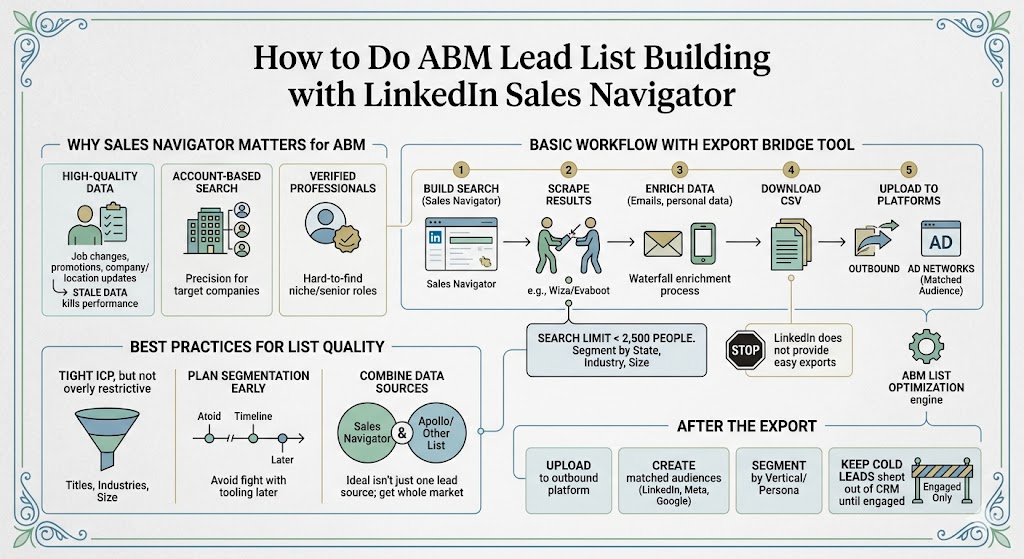
How to Do ABM Lead List Building with LinkedIn Sales Navigator
A step-by-step look at how to use LinkedIn Sales Navigator to build fresher, more accurate ABM lead lists, export them properly, and turn them into usable audiences for outbound and ads.

Why Sales Navigator Still Matters for ABM
If you sell into professionals, especially senior decision-makers, LinkedIn Sales Navigator is still one of the best places to build a high-quality ABM list.
Not because it’s the cheapest. It isn’t. Not because it’s the easiest to export. It definitely isn’t. But because the underlying data is often fresher than what you’ll get from most broad contact databases.
That freshness matters more than people think. Job changes, promotions, company changes, and location updates all affect targeting quality. In B2B, stale data quietly kills performance. You think you’re reaching the right people, but you’re actually emailing someone who left six months ago, changed roles, or moved into a totally different buying context.
That is why I keep coming back to this point: “Because the data is very recent, you often get really high-quality data.” That’s the real reason to use Sales Navigator.
Start With ICP Clarity, Not Search Filters
The best way to approach it is to start with a very specific ICP. Decide who the buyer is, what industries matter, what geographies matter, and what company characteristics define the accounts you actually want.
Once you’re inside Sales Navigator, you’ll typically filter by current job title first. Then layer in industry, geography, company headcount, and any relevant behavior filters. You can get surprisingly granular here. You can filter by whether someone posted recently, changed jobs, or fits a specific type of company. That makes it excellent for building lists that feel current rather than theoretical.

And that matters because your ABM list is not supposed to be a random pile of contacts. It is supposed to be a strategic map of the market you want to dominate.
The First Limitation: LinkedIn Does Not Want Easy Exports
The first practical limitation to understand is that LinkedIn does not want to make exporting easy. “LinkedIn does not provide a way to export people, sadly.” That means you need a bridge tool to turn your search into a usable list.
Most teams use something like Wiza, Findymail, or Evaboot for this step. The workflow is simple in concept:
- Build your search in Sales Navigator.
- Use an export tool to scrape the search results.
- Enrich for work emails, and optionally personal emails or phone numbers.
- Download the data into CSV format.
- Load it into your outbound platform and ad platforms.
The catch is that you need to manage the search size carefully. This is where a lot of teams get tripped up.
Sales Navigator effectively limits you to the first 100 pages of a result set, with 25 leads per page. That means you can only work with around 2,500 people at a time from a given search. If your result set is larger, you need to segment it down.
This is one of the most important tactical lessons from the training: “You’re going to have to make sure this number is always 2,500 people or less. Otherwise, you’ll never get the rest of them.”

That changes how you build searches.
Instead of one giant national search, you may need to break the market into smaller chunks by state, metro area, industry, company size band, or title family. It’s a little more manual, but it gives you more control and makes the data extraction process workable.
Why Sales Navigator Is So Good for Account-Based Searches
The other advantage of Sales Navigator is account-based searching. You can start from a company list and then pull in the right people at those companies. That makes it especially strong when you already know the accounts you want and simply need the right contacts inside them.
For example, if you have a list of 500 target accounts, Sales Navigator can help you find the heads of sales, revenue operations leaders, founders, or other buyers at those companies with more precision than many broad databases.
That’s why I think of it as a premium-quality source for the part of your ABM list that matters most.
The Economics of Using Sales Navigator
It is also worth paying attention to the economics. Sales Navigator itself is relatively affordable compared with what it can unlock. “This is a tool that costs $120 a month, and it’s worth it certainly for a month to get the data.” That’s true. The bigger cost is usually the export and verification layer, not the subscription itself.


Still, if you are selling higher-ACV products, that cost is usually easy to justify. You are paying for accuracy, recency, and relevance. Those three things tend to matter much more than shaving a few cents off the cost per contact.
Another reason to use Sales Navigator is that it often surfaces professionals who are hard to find cleanly elsewhere. If your market includes niche operators, senior functional leaders, or people whose value comes from their exact current role, LinkedIn is usually where that truth is updated first.
That freshness is why I continue to recommend it for high-value segments. “If you have a high ACV, it’s worth doing it this way.”
Best Practices That Improve List Quality Fast
A few best practices make the process much smoother.
First, keep your ICP filters tight, but not absurdly tight. If you over-restrict by title, you may accidentally exclude people who matter but use slightly different wording in their profile. This is especially common in mid-market companies, where titles are messy.
Second, plan your segmentation before exporting. If you know a search is going to exceed 2,500 people, split it up first instead of fighting the tooling later.
Third, combine Sales Navigator with at least one other data source. This is not because Sales Navigator is weak. It is because no single data source gives you the whole market. Some people will appear in LinkedIn and nowhere else. Others will appear in Apollo or a niche list and not cleanly in LinkedIn. The strongest ABM list is usually a blended one.
That is why one of my favorite reminders from the training is, “The ideal isn’t to just get one lead source exported.” You want comprehensive coverage, not emotional loyalty to a single tool.
What to Do After the Export
Once you have the CSV, the work is not done. The next move is to put that list to work in the right systems.
That means:
- Uploading it into your outbound sending platform.
- Turning it into matched audiences on LinkedIn, Meta, and Google where possible.
- Segmenting it by vertical or persona if you need distinct messaging.
- Keeping cold leads out of the CRM until they actually engage.
That last one matters just as much here as it does with any other list source. “Don’t bring them into Salesforce. Don’t bring them into HubSpot until they’ve taken action.” If you ignore that, you create both cost and deliverability problems for yourself.
Final Thought
Used well, LinkedIn Sales Navigator gives you something extremely valuable: a high-confidence list of real professionals in the exact roles and companies you care about right now.
And in ABM, that kind of list quality is not a nice-to-have. It is the difference between spraying activity and actually building market coverage.