
How to Do ABM Lead List Building with Clay
A practical guide to using Clay to build and enrich high-quality ABM lead lists, including work emails, personal emails, mobile numbers, and the data fields that make outbound and matched audience ads work better.

Clay is one of those tools that can feel a little overwhelming the first time you open it. There are a lot of buttons, a lot of enrichments, and a lot of ways to spend money faster than you intended. But once you understand what it’s actually good at, it becomes one of the most powerful list-building tools in a B2B growth stack.
What Clay Is Actually Best For

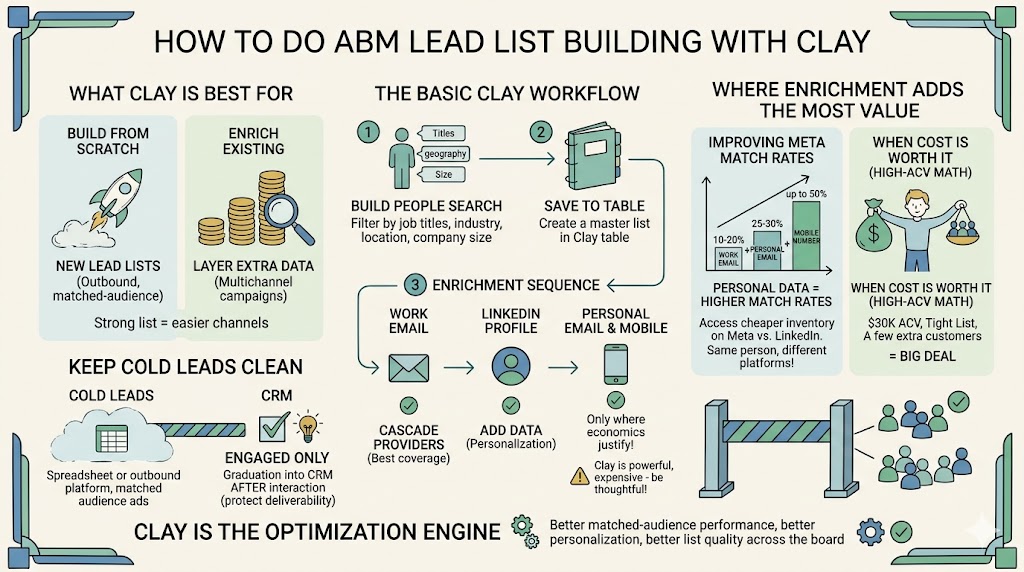
The simple way to think about Clay is this: it helps you either build a lead list from scratch or enrich an existing one with the extra data that makes outbound and matched-audience advertising work better.
That matters because an ABM list is not just a spreadsheet. It’s the foundation for outbound email, LinkedIn follow-up, matched audience ads, and retargeting. If the list is weak, every channel downstream gets weaker. If the list is strong, everything gets easier.
As I often say, “The real goal isn’t to just get one lead source exported. It’s to build a comprehensive list combining data from multiple lead tools.” That mindset matters. Clay is not always the cheapest source of names, but it is often the best place to turn a decent list into a much better one.
Start With a Tight ICP Before You Touch the Filters
One of the best ways to use Clay is to start with a very clear definition of your ideal customer profile. Before you touch filters, get specific on the basics: job titles, industries, geography, company size, and any obvious exclusions. Clay is powerful, but it still responds to the quality of your targeting.
Once you do that, the interface starts to make more sense. You’re not just clicking filters because they exist. You’re shaping a real market.
The Basic Clay Workflow for ABM List Building
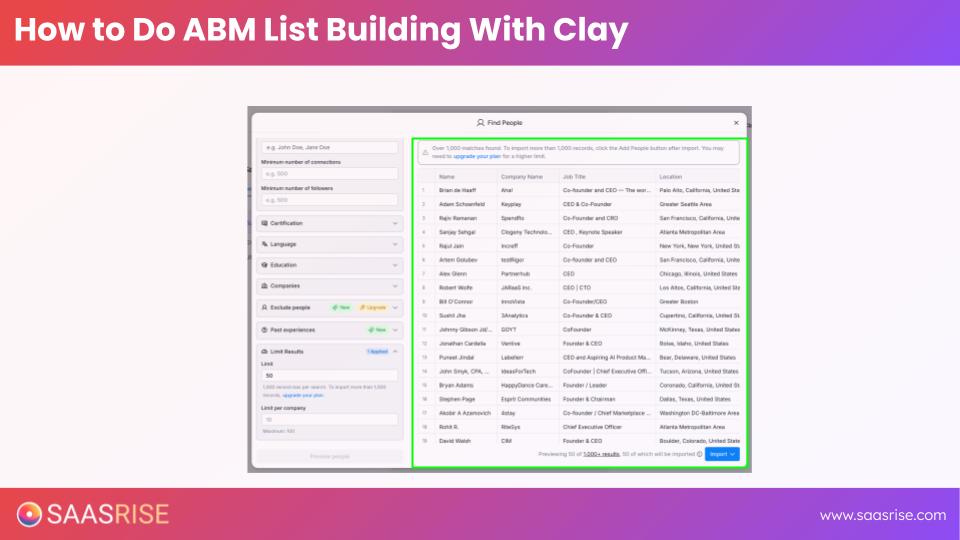
Once you’re inside Clay, the workflow is fairly straightforward. You start by building a people search. That usually means selecting job titles, company attributes, geography, and employee count. If you’re selling into software companies, for example, you might filter for founders and CEOs, narrow by software and internet, then tighten by geography and company size until the list actually resembles your market.

From there, Clay lets you save that search into a table and begin enriching it. This is where the platform becomes especially useful. You’re not just looking at names and company domains anymore. You’re layering in the fields that make the list usable for real campaigns.
Here’s the core sequence I recommend:
- Build the people list around your ICP.
- Save it into a Clay table.
- Enrich for work email first.
- Add LinkedIn profile data if you want personalization later.
- Add personal email and mobile data only where the economics justify it.
Where Most Teams Overspend in Clay
That last point is where most teams need more discipline. Clay can absolutely enrich a list with work emails, LinkedIn summaries, recent posts, funding history, personal emails, and mobile numbers. The question is not whether it can. The question is whether you should pay for all of it on every record.
One line from the training captures this perfectly: “Clay is very powerful. It’s also very expensive, so just be thoughtful about how you’re using it.” That is exactly right.
If you only need a clean work-email list for outbound, start there. If you are going after a high-ACV market and want multichannel air cover, then the extra enrichment starts to make a lot more sense.
The reason work email comes first is simple. Without it, you can’t do much. Work email is the minimum viable field for outbound email and the first layer of matched audience building. Clay’s waterfall enrichment process is especially helpful here because it checks multiple data providers instead of relying on just one. That tends to push email coverage much higher than single-source tools.
And that is one of the real advantages of Clay. “It doesn’t just check one source. It checks many.” In practice, that means better coverage, fewer gaps, and less time trying to manually patch holes in your data.
Why Clay Matters So Much for Meta Match Rates
Where Clay becomes especially valuable is when you want to improve Meta matched audience performance. A lot of B2B teams make the mistake of uploading only work emails to Meta and then wonder why their match rates are weak. The issue is obvious once you think about how people actually use Facebook and Instagram. They didn’t sign up for those platforms with their work email. They signed up with personal email addresses and, in many cases, mobile numbers.
That’s why enrichment matters so much.
As I explain it, “If you don’t do the personal email enrichment on Meta, you will get roughly 10 to 20 percent match rates.” Add personal emails, and that usually rises into the 25 to 30 percent range. Add mobile numbers too, and you can sometimes push toward a 50 percent match rate.
That can completely change the economics of your ad program.
Why? Because now you’re not just matching more people. You’re also getting access to the much cheaper inventory on Meta compared with LinkedIn. This is one of the most important strategic points in the whole process. “The same person you target on LinkedIn at 2 p.m. is also on Instagram at 9 p.m. and Facebook on Saturday night.” If you can match them there, you can often buy impressions dramatically more cheaply.
When the Enrichment Cost Is Worth It
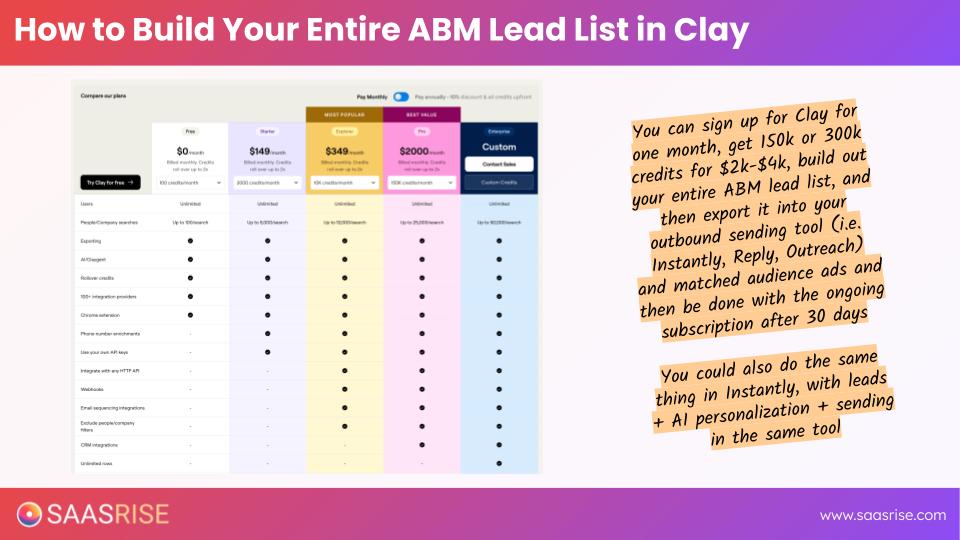
This is where high-ACV math matters. If you sell something for $30,000 a year and you have a tightly defined list of 6,000 people, spending a few thousand dollars once on enrichment can be entirely rational. Ten extra customers in a market like that is a very big deal. On the other hand, if you sell a lower-priced product, you need to be much more selective about which enrichments you buy.
A useful rule of thumb is to tier your list. Your highest-fit accounts get the richest enrichment. Your broader list gets only the fields you actually need.
That might look like this:
- Tier 1 accounts: work email, LinkedIn profile data, personal email, mobile number.
- Tier 2 accounts: work email and light LinkedIn enrichment.
- Tier 3 accounts: work email only.
That approach keeps your Clay bill under control while still giving your best accounts the full ABM treatment.

Keep Cold Leads Out of Your CRM
Another important point: keep cold leads out of your CRM until they have actually engaged. One of the clearest lessons from the transcript is this: “Do not import cold leads into a CRM system.” That’s not just about software cost. It’s also about protecting your warm-domain deliverability and keeping your system clean.
In practice, cold leads should usually live in three places first: a spreadsheet or cloud table, your outbound platform, and your ad networks as matched audiences. Once they click, reply, or raise their hand, then they can graduate into the CRM.
Use Clay as the Cleanup and Optimization Layer
If you want to get even more out of Clay, use it as the central cleanup layer after pulling records from multiple sources. Maybe you start with Apollo, add a LinkedIn Sales Navigator export, and bring in a niche industry list. Clay can then help you standardize fields, enrich gaps, and prepare one usable master audience.
That is ultimately the right way to think about the platform. Clay is not just a list builder. It is an ABM list optimization engine.
Final Thought
If you use Clay well, the payoff is real: better work-email coverage, better matched-audience performance, better outbound personalization, better phone coverage for higher-ACV motions, and better list quality across the board.
As I like to put it, “The ideal isn’t to just get one lead source exported. It’s to build a comprehensive list of everyone in your target market.” Clay is one of the best tools available for doing exactly that.