
How To Create SaaS Ad Creatives for Meta, LinkedIn, & Google
If you’re a B2B SaaS founder, chances are ads feel either intimidating, expensive, or both.They shouldn’t.I want to demystify ad creation for SaaS companies and show you how to create effective ad creatives for Meta, LinkedIn, and Google without needing a big design team, a massive budget, or weeks of prep.

This is exactly how we approach ad creation inside the B2B SaaS Growth Program, and it’s the same approach we’ve used across iContact, SaasRise, and the SaaS companies we actively manage ads for today.
The goal isn’t perfection. The goal is momentum.
Start With the Right Mindset: Ads Are a System, Not a One-Off
Before we talk about creative, it’s important to zoom out.
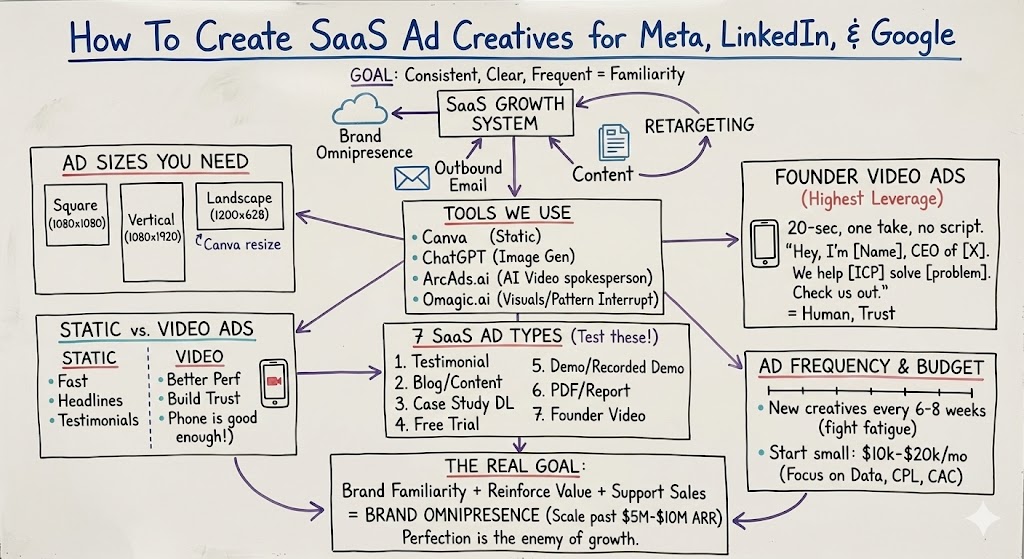
Ads don’t work in isolation. They work when they’re part of a broader growth system that includes outbound email, content, and retargeting. The role of ads is brand omnipresence—making sure your ICP keeps seeing you everywhere until the timing is right.
That means your ads don’t need to be “clever.” They need to be consistent, clear, and frequent.
If you’re waiting to launch ads until everything is perfect, you’re already behind.
The Only Ad Sizes You Actually Need
You can ignore 90% of the noise around ad specs.
For SaaS, you only need to worry about three formats:
- Square (1080×1080)
- Vertical (1080×1920)
- Landscape (1200×628)
If you create these three, you’re covered across Meta, LinkedIn, and Google Display.
Canva makes this easy because you can design once and resize in seconds. Don’t overthink it.
Static Ads vs. Video Ads (You Need Both)
Every SaaS company should run a mix of static and video ads.
Static ads are fast to create and great for headlines, testimonials, and simple value props. Video ads usually perform a bit better, but they don’t need to be high production.
Here’s the key takeaway most founders miss: your phone is good enough.
A 15–30 second iPhone video of you explaining what you do, who it’s for, and why it matters often outperforms polished studio content. It feels real. It builds trust.
We’ve seen this over and over again.
.jpg)
How We Actually Create SaaS Ads (Tools That Work)
Ad creation used to require designers and Illustrator. That’s no longer true.
Here’s what we use today:
Canva
Perfect for static ads. Logos, headlines, testimonials, screenshots, and CTAs. Anyone on your team can use it.
ChatGPT (Image Generation)
You can now upload your logo, give a simple prompt, and generate a usable ad image in minutes. This alone has eliminated weeks of design work for us.
ArcAds.ai
This is a game-changer for video. You can create realistic AI-generated spokesperson videos in minutes. We use this heavily for testing variations quickly.
Omagic.ai
Great for creating scroll-stopping visuals—your ad on a billboard, in Times Square, or inside a subway station. The goal isn’t realism; it’s pattern interruption.
The point isn’t to pick one tool. The point is to remove friction so ads actually get made.
The 7 SaaS Ad Types You Should Be Testing
You don’t need dozens of concepts. You need a small set of proven formats:
- Testimonial ads
- Blog or content ads
- Case study download ads
- Free trial ads
- Demo or recorded demo ads (for warmer audiences)
- PDF or report ads
- Founder video ads
Every one of these maps to a different stage of awareness. Early on, you’re educating. Later, you’re converting.
.jpg)
Founder Video Ads: The Highest Leverage Creative You Have
If you do nothing else, do this.
Record a 20-second video on your phone. One take. No script.
“Hey, I’m Ryan, CEO of X. We help [ICP] solve [problem]. If you’ve been thinking about [pain point], check us out below.”
That’s it.
These ads work incredibly well on Meta and LinkedIn because they feel human in feeds full of polished corporate content.
You don’t need energy. You need clarity.
Use Competitors’ Ads as Inspiration (Not Guesswork)
One of the easiest ways to improve your ads is to look at what’s already running.
Meta, LinkedIn, and Google all have public ad libraries. You can see your competitors’ live ads, their messaging, and their formats.
If someone has been running the same ad for months, it’s probably working.
Don’t copy. But absolutely learn.
How Often You Should Create New Ads
Ad fatigue is real.
As a rule of thumb, you should add new creatives every 6–8 weeks, especially for retargeting and matched audiences. You don’t need to delete what’s working—just introduce fresh variations and let performance decide.
Aim for “good enough” first. Optimization comes later.
Budget Reality Check (So You Don’t Stall)
You don’t need to spend a fortune to get started.
Most SaaS companies can learn a lot with:
- $10k–$20k per month across channels
- $1k–$3k of that on retargeting
- The rest split between demand gen and demand capture
The goal early isn’t scale—it’s data. Once you know your CPL and CAC by channel and ad type, scaling becomes math, not guesswork.
.jpg)
The Real Goal of SaaS Ad Creative
Your ads don’t need to convince someone to buy today.
They need to:
- Make your brand familiar
- Reinforce your value proposition
- Support outbound and sales follow-up
When ads, email, LinkedIn, and content all reinforce the same message, conversion gets easier everywhere else.
That’s brand omnipresence. And that’s how SaaS companies scale past the $5M–$10M ARR plateau.
If you want help implementing this system end-to-end—ad creation, targeting, outbound, and scaling—that’s exactly what we do inside the B2B SaaS Growth Program.
But even if you do this yourself, start now.
Create something simple. Get it live. Learn from the data.
Perfection is the enemy of growth.