
How to Build an ABM Leads List With Clay, Apollo, Instantly, and ListKit
A practical walkthrough for B2B SaaS teams on how to turn a target account list into a clean ABM leads list using Clay, Apollo, Instantly, and ListKit, then dedupe, segment, and use it across outbound, LinkedIn, and matched audience ads.

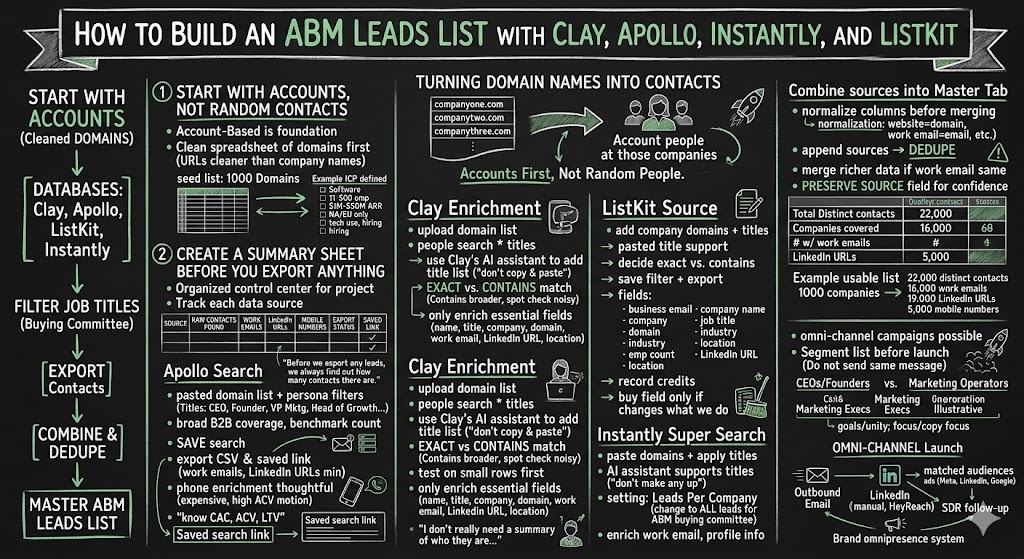
One of the most valuable assets you can build in a B2B SaaS company is a clean, comprehensive ABM leads list of your exact target market. I don’t mean a random export of “marketing people” from a lead database. I mean a real account-based list that starts with the companies you want to reach, then identifies the right buyers and influencers at those companies across multiple data sources.
For this example, let’s use a simple target market: CEOs, founders, and marketing team members at software companies. The same process works whether you’re targeting SaaS CEOs, heads of demand gen, VP Marketing, customer success leaders, IT buyers, revenue leaders, or any other specific buying committee. The workflow is straightforward: start with company domains, search those companies across multiple lead databases, filter by job titles, export the contacts, and then combine everything into one deduped master ABM list.
The big picture is simple. “We’re basically turning domain names into contacts.” That’s the way I think about this whole process. You begin with a list of companies that fit your ICP, usually as domains or website URLs. Then you use tools like Apollo, Clay, Instantly, and ListKit to find the actual people at those companies who match your buyer titles.
This is one of those marketing workflows where the details matter. Most teams do it too casually. They pull one list from one provider, assume it’s complete, load it into an outbound tool, and then wonder why their market coverage is thin. But no single lead database has perfect coverage. Apollo will find some people Clay misses. ListKit may find different records. Instantly may surface another set. When you combine the sources, dedupe them, and enrich the missing fields, you end up with a much stronger list.
And once you have that list, you can use it everywhere: outbound email, LinkedIn outreach, matched audience ads, retargeting, SDR follow-up, newsletter nurturing, and sales research.
That’s when ABM starts to become a system.
Start With Accounts, Not Random Contacts
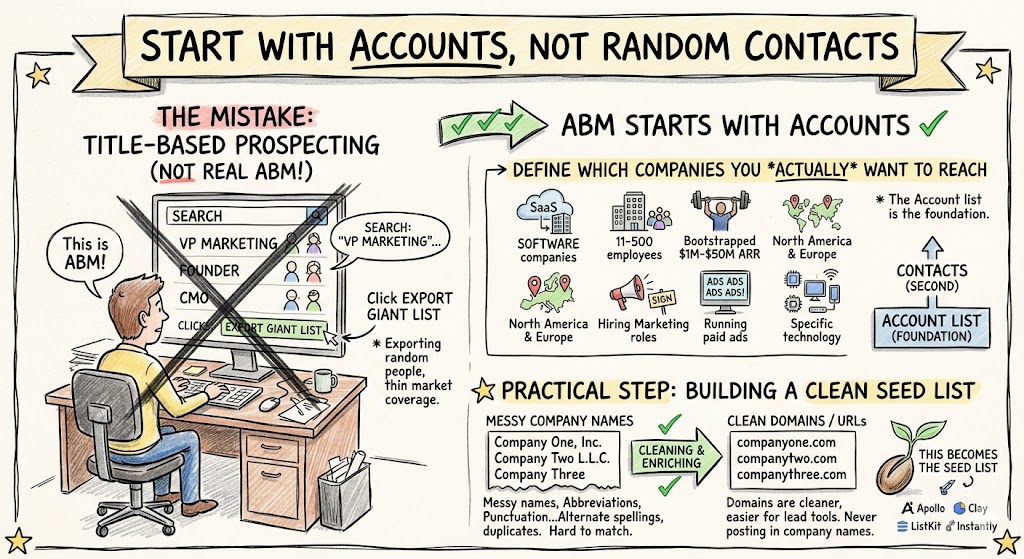
The first mistake I see teams make is starting with job titles instead of accounts. They go into a lead database and search for “VP Marketing” or “Founder” or “CMO,” export a giant list, and call it ABM. That’s not really ABM. That’s just title-based prospecting.
ABM starts with the accounts.
If your target market is software companies, then start by defining which software companies you actually want to reach. Maybe it’s SaaS companies with 11 to 500 employees. Maybe it’s bootstrapped software firms doing $1M to $50M in ARR. Maybe it’s North America and Europe only. Maybe it’s companies hiring for marketing roles, running paid ads, or using a specific technology.
The account list is the foundation. The contacts come second.
A simple company list might begin with 1,000 domains. Those domains are what you’ll use inside Apollo, Clay, ListKit, and Instantly. “You’re never posting in company names. You’re always posting in URLs.” Company names are messy. Domains are cleaner. Company names have abbreviations, punctuation, legal suffixes, alternate spellings, and duplicates. Domains are much easier for lead tools to match accurately.
So before you start searching, get your domains cleaned up.
If your spreadsheet has company names but no websites, enrich it first. If your websites include https://, trailing slashes, paths, or messy formatting, clean them. What you want is a simple list like:
- companyone.com
- companytwo.com
- companythree.com
That becomes the seed list for everything else.
Create a Summary Sheet Before You Export Anything
Before I start pulling leads, I always create a summary sheet. This sounds basic, but it keeps the whole project organized. List building gets messy quickly. You’ll run searches in multiple tools, get different counts, spend credits, export files, enrich emails, maybe buy phone numbers, and then bring everything back into one master spreadsheet.
If you don’t track what happened, you’ll lose the thread.
“I always like to have a summary sheet that just sort of explains what’s happening.”
That summary sheet should include each data source you’re using and the results from that source. For example, if you’re building a list of CEOs, founders, and marketing team members at software companies, you might create a Google Sheet called:
Software Companies ABM Leads List, May 2026
Then create columns for Apollo, Clay, ListKit, and Instantly. For each source, track the raw contacts found, contacts with work emails, contacts with LinkedIn URLs, and contacts with mobile numbers. You can also track credits used, export status, notes, and the saved search link.
This gives you a simple control center for the project. More importantly, it helps you decide what to export before you start spending credits. “Before we export any leads, we always find out how many contacts there are.” That’s the right discipline. First get the count. Then decide whether the search is good. Then export.
For example, Apollo might find 4,900 contacts. Clay might find 12,000. ListKit might find 7,400. Instantly might find 10,000. Before deduping, that may look like 34,000 records. After deduping and filtering for usable work emails, maybe the final master list is 18,000 to 24,000 contacts. The exact numbers will vary, but the process gives you visibility.
That visibility is what lets you manage list quality.
Build the First Search in Apollo
Apollo is usually one of the easiest places to begin. It has broad B2B coverage, it’s relatively intuitive, and it’s often a good benchmark for how big your reachable audience may be.
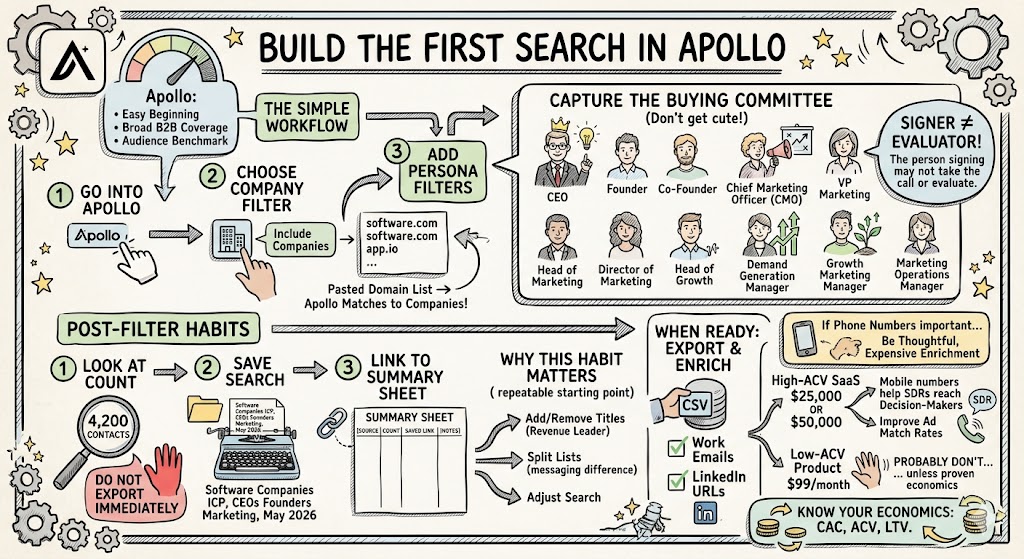
The workflow is simple. Go into Apollo, choose the company filter, and include a list of companies. Paste your domain list. Apollo will match those domains to companies in its database. Then add your persona filters.
For this software-company example, I’d likely start with job titles like CEO, Founder, Co-Founder, Chief Marketing Officer, VP Marketing, Head of Marketing, Director of Marketing, Head of Growth, Demand Generation Manager, Growth Marketing Manager, and Marketing Operations Manager.
The point is not to get cute. The point is to capture the actual buying committee.
If you sell to founders, you obviously want CEOs and founders. If you sell a marketing solution, you want senior marketing leaders and the people who may influence tool selection or campaign execution. In most SaaS buying committees, the person who signs the contract may not be the person who first takes the call or evaluates the product.
Once the filters are in place, look at the count. Do not export immediately. Save the search. Name it something obvious like:
Software Companies ICP, CEOs Founders Marketing, May 2026
Then paste the result count and saved search link into your summary sheet.
This habit matters because you may come back later and adjust the search. Maybe you decide to include Heads of Revenue. Maybe you remove junior marketing titles. Maybe you split CEOs and marketing leaders into different lists because the messaging will be different. A saved search gives you a repeatable starting point.
When you’re ready, export the results as a CSV. I generally prefer getting work emails and LinkedIn URLs at minimum. If phone numbers are important for your sales team, you can enrich those too, but be thoughtful. Phone enrichment can get expensive.
For a high-ACV SaaS product, it may be worth it. If your ACV is $25,000 or $50,000, mobile numbers can help SDRs reach decision-makers and improve ad match rates. If your product is $99/month, you probably don’t want to spend heavily on mobile numbers unless you’ve proven the economics.
This is the kind of place where knowing your CAC, ACV, and LTV matters.
Use Clay for Better Enrichment and Flexible Workflows
Clay is where list building can get very powerful. It’s also where you can burn credits if you’re not careful.
With Clay, you can upload your domain list as a company table or paste the domains directly into a company identifier filter. I usually prefer creating a company table if the list is large. It keeps things cleaner and makes it easier to reuse the same accounts later.
Once your company list is loaded, create a people search against those companies. Then apply your job title filters.
Clay’s AI assistant can save time here. In the recording, I tested using the AI feature to add a long list of job titles into the job title contains filter. It worked, which saved the painful process of adding titles one by one. “Use the AI thing. Don’t copy and paste. Use the AI thing by just saying, add all of these job titles to the job titles contains filter.”
That may sound like a small thing, but when you have 50, 80, or 120 job title variations, it matters.
For our example, you might paste in titles like CEO, Founder, Co-Founder, CMO, VP Marketing, Head of Growth, Head of Marketing, Demand Generation, Growth Marketing, Marketing Operations, Revenue Marketing, Lifecycle Marketing, and Performance Marketing.
One important choice is whether to use exact match or contains. Exact match is stricter. Contains is broader. If you use exact match for “Head of Marketing,” you may miss “Global Head of Marketing” or “Head of Product Marketing.” If you use contains, you’ll catch more variants, but you may also bring in some irrelevant people.
I usually start broader, then spot-check. If the list quality looks good, keep it. If it’s noisy, tighten the filters.
Once Clay returns a result count, add it to your summary sheet. Then decide what you actually need to enrich.
This is where discipline matters. Clay can enrich all kinds of fields: LinkedIn summaries, profile headlines, job histories, posts, company information, emails, and more. But just because Clay can enrich something does not mean you need it.
“I don’t really need a summary of who they are. I don’t really need the headline. I don’t need to know how many jobs they’ve had. That’s not particularly useful to matching on Meta, Google, Bing, or LinkedIn.”
For a basic ABM list, the essential fields are first name, last name, title, company, company domain, work email, LinkedIn URL, location, and maybe phone number. If you’re using AI-personalized outbound, then LinkedIn headlines and summaries can be valuable because they help you write better first lines. But if your goal is matched audience ads and simple outbound, don’t enrich unnecessary fields.
Run a small test first. Clay often lets you run the first few rows before running the entire table. Look at the output. Make sure the work emails are appearing. Make sure the titles match. Make sure the companies are right. Then run the full list.
If you’re enriching 12,000 contacts, it may take time. Be patient. Clay can process in the background, but you want to confirm that it’s actually running across the whole table, not just the first 10 rows.
When it’s done, export it into your Clay tab.
Use ListKit as Another Data Source
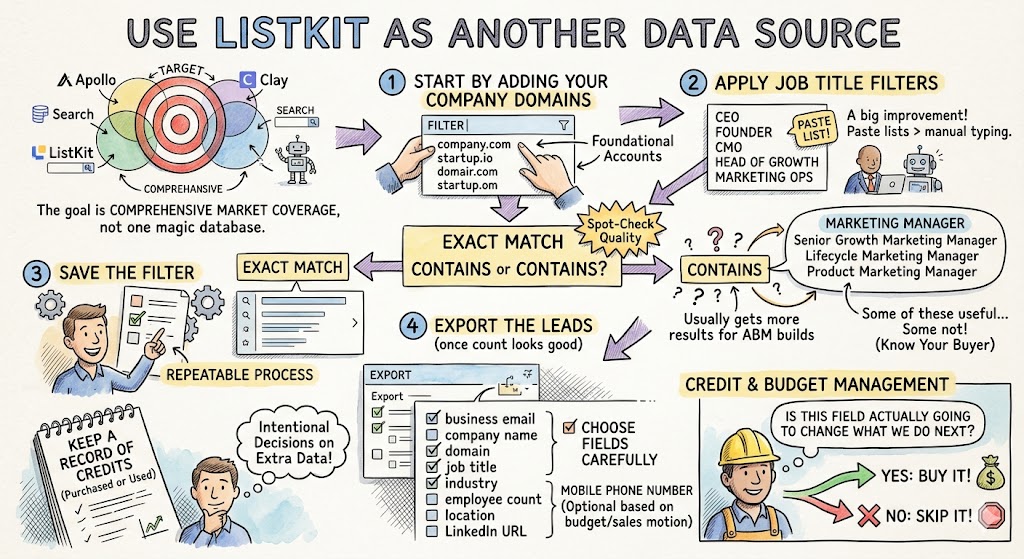
ListKit is useful because it may find records that Apollo and Clay don’t. Again, the goal is not to pick one magic database. The goal is comprehensive market coverage.
In ListKit, start by adding your company domains. Then apply the job title filter. In the recording, ListKit successfully accepted a pasted list of job titles, which was a big improvement over having to type each title manually.
For the software-company target market, you would paste in the same CEO, founder, and marketing-title list. Then decide whether to use exact match or contains.
Contains will usually give you more results. That’s often what you want in an ABM build, as long as you spot-check quality. For example, “marketing manager” with contains may pick up “Senior Growth Marketing Manager,” “Lifecycle Marketing Manager,” and “Product Marketing Manager.” Some of those may be useful. Some may not. You need to know your buyer.
Once the count looks good, save the filter. Then export the leads.
In the export settings, choose fields carefully. I’d typically want business email, company name, company domain, job title, industry, employee count, location, and LinkedIn URL. Mobile phone number is optional based on your budget and sales motion.
This is also where you should keep a simple record of credits purchased or used. In the transcript, there was a moment where additional credits were needed to export more enriched fields. That is normal in these tools, but you want to make those decisions intentionally.
If you’re building a list for your own team, ask: is this field actually going to change what we do next? If yes, buy it. If no, skip it.
Use Instantly Super Search to Add More Coverage
Instantly is best known as an outbound email platform, but Super Search can also help you build lists. It’s especially convenient if you plan to send outbound campaigns from Instantly anyway.
The workflow is similar. Go into Super Search, paste your domains, and then apply the job title filters. Instantly may also have an AI assistant that can add the job titles for you. In the recording, that worked after clarifying the instruction: add these job titles to the job titles filter, and don’t make any up.
That “don’t make any up” detail is worth remembering. AI tools can sometimes be too helpful. If you provide a list of target titles, you don’t want the tool inventing adjacent titles that don’t belong.
One setting to watch closely in Instantly is the number of leads per company. In the recording, the results were initially too low because the search was limited to one lead per company. Once that was changed to all leads, the result count increased substantially.
That’s a very common list-building trap.
For ABM, one lead per company is usually not enough. If you’re targeting software companies, you probably want multiple contacts at each account. A CEO, founder, CMO, VP Marketing, and Head of Growth may all matter. If the company is larger, you may also want marketing ops, demand gen, and performance marketing. Buying committees are real, especially in B2B SaaS.
Once the Instantly search looks right, enrich for work email and basic profile information. AI enrichment is useful if you plan to generate personalized cold emails inside Instantly, but it’s not always necessary for the initial list build.
Then export and bring the data into your Instantly tab.
Combine the Sources Into a Master List
Once you have exports from Apollo, Clay, ListKit, and Instantly, resist the urge to immediately dump everything into one messy spreadsheet. Keep the source tabs intact. Create separate tabs for Apollo, Clay, ListKit, and Instantly. Then create a master tab.
The reason is simple: source-level visibility helps you troubleshoot.
If one provider has poor email quality, you’ll see it. If one provider has better LinkedIn coverage, you’ll see it. If one source has a lot of duplicate or irrelevant records, you can isolate the issue. If you ever need to go back and re-export, you know where each contact came from.
Before merging, standardize the columns. Each tool uses different field names. One might say “Company Website.” Another might say “Domain.” One might say “Email.” Another might say “Work Email.” Normalize them before deduping.
A clean master list should include at least:
- First name, last name, full name
- Job title, company name, company domain
- Work email, LinkedIn URL, mobile phone, location
- Employee count, industry, source
This is one of only a few places where a little spreadsheet discipline saves a lot of pain later.
After the columns are standardized, append each source into the master tab and dedupe.
The best dedupe key is work email. If two records have the same work email, they are almost always the same person. If one record has a work email and another has a mobile number or LinkedIn URL, merge the richer data into one final record.
If work email is missing, use LinkedIn URL. If that is also missing, use full name plus company domain. Be careful with common names. Don’t accidentally merge two different people named John Smith just because they work at companies with similar names.
I also like to preserve the source field. If someone appears in both Apollo and Clay, mark the source as Apollo and Clay. That gives you a sense of overlap and data confidence.
Count the Usable Records, Not Just the Raw Records
Raw contact counts can be misleading. A platform may return 12,000 people, but only 7,600 may have usable work emails. Another may return fewer contacts but a higher percentage of emails. Another may have better LinkedIn URLs or mobile numbers.
That’s why your summary sheet should include final quality counts.
At the end, you want to know total contacts before deduping, total unique contacts after deduping, contacts with work emails, contacts with LinkedIn URLs, contacts with mobile numbers, and number of companies covered.
This gives your sales and marketing team a realistic view of the actual asset.
If you started with 1,000 software companies and ended up with 22,000 unique contacts, 16,000 work emails, 19,000 LinkedIn URLs, and 5,000 mobile numbers, that’s a very usable ABM list. You can send outbound email, run LinkedIn connection requests to engaged prospects, upload matched audiences to Meta and LinkedIn, and give your SDRs a much better account map.
If you only have 5,000 work emails and no LinkedIn URLs, the list may still be useful, but you’ll want to enrich further before launching a full omnichannel campaign.
This is why I like showing the summary table to the team. It’s not just “we built a list.” It’s: here’s exactly what we found, what’s usable, and what still needs enrichment.
Segment the List Before You Launch Campaigns
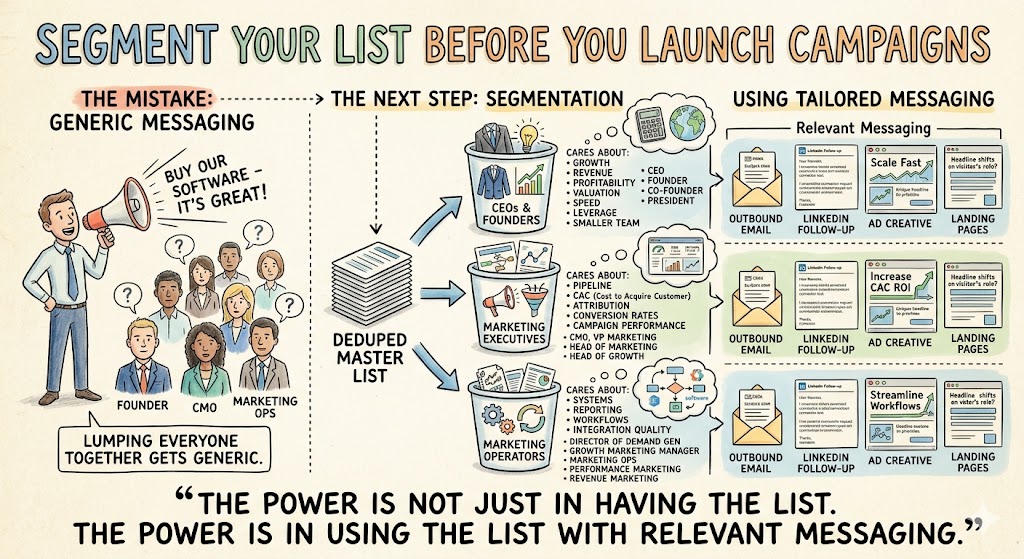
Once you have a deduped master list, the next step is segmentation.
Do not send the same message to CEOs, founders, CMOs, and marketing managers. They may all work at software companies, but they think about problems differently.
A CEO cares about growth, revenue, profitability, valuation, market position, and team productivity. A founder may care about speed, leverage, capital efficiency, and getting more done with a smaller team. A CMO cares about pipeline, CAC, attribution, conversion rates, campaign performance, and team output. A marketing operations person may care more about systems, reporting, workflows, and integration quality.
If you lump them all together, your copy gets generic.
For this example, I’d split the list into three practical segments: CEOs and founders, marketing executives, and marketing operators. CEOs and founders would include CEO, Founder, Co-Founder, and President. Marketing executives would include CMO, VP Marketing, Head of Marketing, and Head of Growth. Marketing operators would include Director of Demand Gen, Growth Marketing Manager, Marketing Ops, Performance Marketing, and Revenue Marketing.
Each segment can get different outbound copy, different LinkedIn follow-up, different ad creative, and different landing pages.
That’s when ABM starts to perform better. The power is not just in having the list. The power is in using the list with relevant messaging.
Use the List Across Outbound, LinkedIn, and Ads
A strong ABM list should not just sit inside an outbound email tool. It should power your whole go-to-market motion.
Upload the work emails into Instantly for cold outbound. Use LinkedIn URLs for HeyReach or manual LinkedIn outreach. Upload emails and mobile numbers into Meta, LinkedIn, Google, and other ad platforms for matched audience campaigns. Send the highest-value accounts to your SDR team for research and manual follow-up.
The list becomes the foundation of brand omnipresence.
A CEO at a software company might receive a useful outbound email from you, see your founder’s LinkedIn post a few days later, get retargeted with a case study, and then hear from an SDR after clicking a resource. That is a very different experience than one random cold email from a company they’ve never heard of.
This is why clean list building matters so much. If the list is bad, every channel downstream gets worse. Your outbound bounces. Your matched audience rates are low. Your SDRs waste time. Your ads reach the wrong people. Your reporting becomes noisy.
If the list is strong, everything else gets easier.
The Simple Version of the Whole Process
At the end of the recording, I summarized the whole thing in one sentence: “Get the domains for the companies, get the job titles, paste them in or use AI to get them in, and then export the lists.”
That’s really it.
There are details, of course. You need to save searches, track counts, manage credits, enrich emails, export CSVs, standardize columns, dedupe, and segment. But the core process is not complicated.
You’re taking a list of target accounts and turning it into a usable market map of the people you want to reach.
For a B2B SaaS company, that asset can be worth a lot. If your target market is CEOs, founders, and marketing leaders at software companies, a well-built ABM list gives you the ability to reach your market directly instead of waiting for them to find you.
That’s the real point.
The companies that win in B2B SaaS are not randomly marketing to whoever clicks. They define their market. They build the list. They create content for that audience. They run outbound and ads to that audience. They follow up with the people who engage. They keep showing up until the market knows who they are.
If you build the list properly, every other part of your growth system gets stronger.