
Do You Need an AI-Native CRM?
A new generation of CRMs reads your email, listens to your calls, and updates itself. Here is what one founder learned after switching, what it costs, and why another founder barely opens his CRM anymore.

A few weeks ago my team moved our CRM off GoHighLevel and onto Lightfield, one of the new AI-native CRMs. It was a one-year commitment at $1,000 a month, so it was not a casual decision. Soon after, I walked our mastermind through what we found, and the conversation that followed was one of the most useful we have had this year, because one member pushed back with a very different view: he rarely opens his CRM anymore and wonders whether he needs a new one at all.
I think both perspectives are right for different kinds of companies. Here is what the new tools do, what they cost, where they fall short, and how to decide whether one belongs in your stack.
What makes an AI-native CRM different
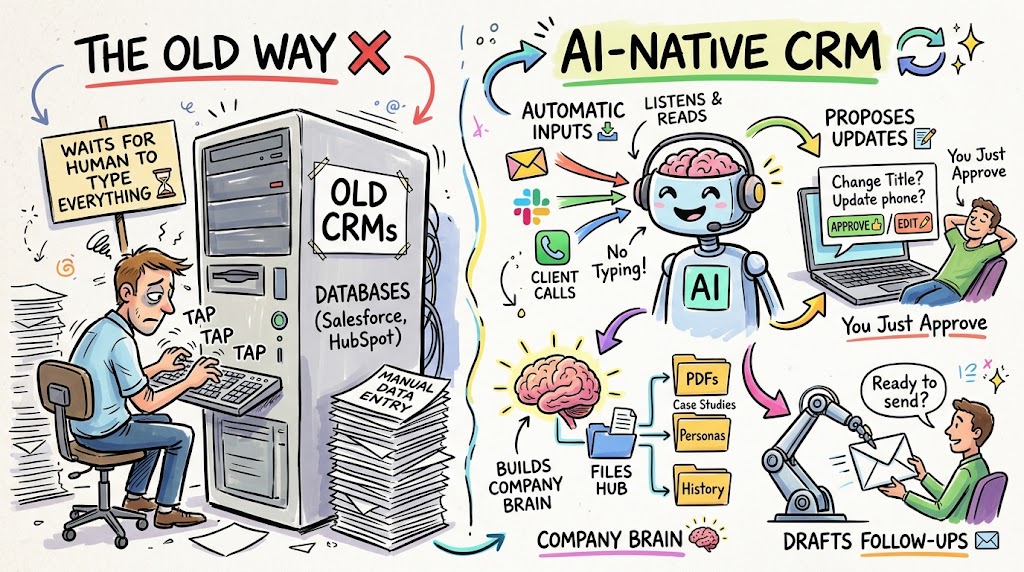
The older systems, including HubSpot, Salesforce, Pipedrive, and GoHighLevel, are databases that wait for people to type things in. The newer ones work in the opposite direction. Our CRM reads my email and my Slack messages, and it listens to my client calls, at least the one-on-one and small-group calls, though not the large masterminds. Based on that context, it updates records automatically and then suggests changes for me to approve.
Without any effort on my part, it proposes updates to phone numbers, job titles, and next steps on large deals. It also keeps a company knowledge base that I did not write myself. I fed it years of emails, PDFs, and slide decks, and it produced documents describing our case studies, our growth system, our ideal customer profile, and our buyer persona. Everything it drafts for me now draws on that context.
- It listens, so you do not have to type. Calls, emails, and messages feed the record automatically.
- It proposes updates. You approve or edit suggested changes instead of entering data by hand.
- It builds a company brain. A knowledge base keeps case studies, personas, and history in one place.
- It drafts follow-ups. You can approve each email or give it permission to send follow-ups on its own.
I compared it to the experience of using a coding tool with full context on your project. For the first time in a CRM, the system already knows what is going on, which saves a surprising amount of work.
What we actually use it for
The first thing I did was load the history. Our system now holds about 20,000 warm contacts and records for roughly 16,900 SaaS companies we have interacted with over the last three years, plus a synced inbox going back ten years. It also holds the pipeline for our client work. These are people who applied or talked with us, not cold lists.
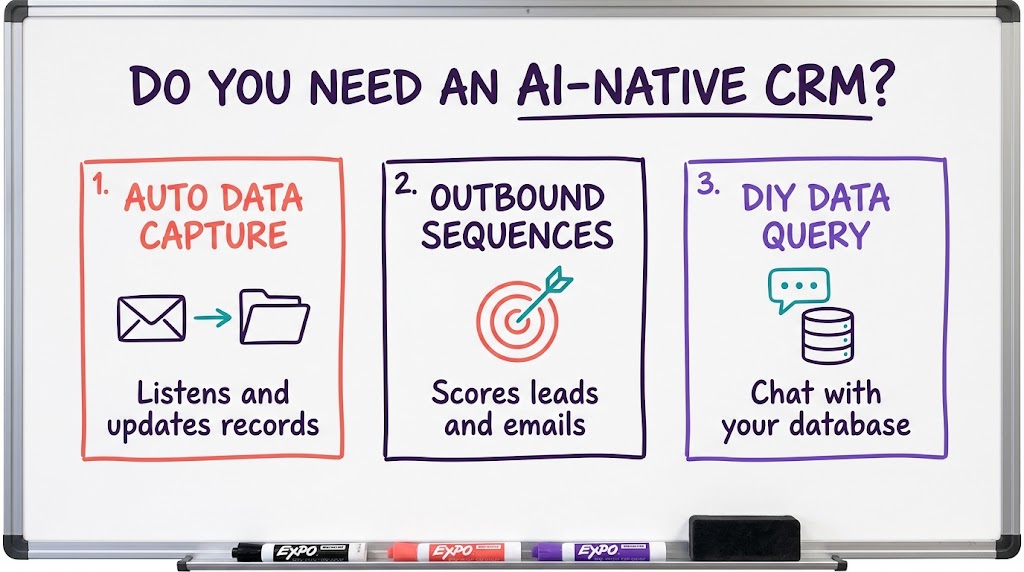
From there, I use it for several jobs that used to require separate tools. It builds lists of target accounts and contacts from our ideal customer profile, scores them, and sets up outbound email and LinkedIn sequences, which means it replaces the sequencing tool we used before. It also connects to Stripe and to a subscription metrics tool, and whenever I want a new dashboard or a change, I type the request into the chat.
- List building. It creates target accounts and contacts that match your ideal customer profile.
- Lead scoring. It ranks accounts so the team works the best opportunities first.
- Sequences. It runs outbound email and LinkedIn campaigns inside the same system.
- Dashboards on request. You describe what you want to see, and it builds the view.
Our current setup is simple compared with where it could go, but it already does the work of two or three separate subscriptions.
Migration was easier than I expected
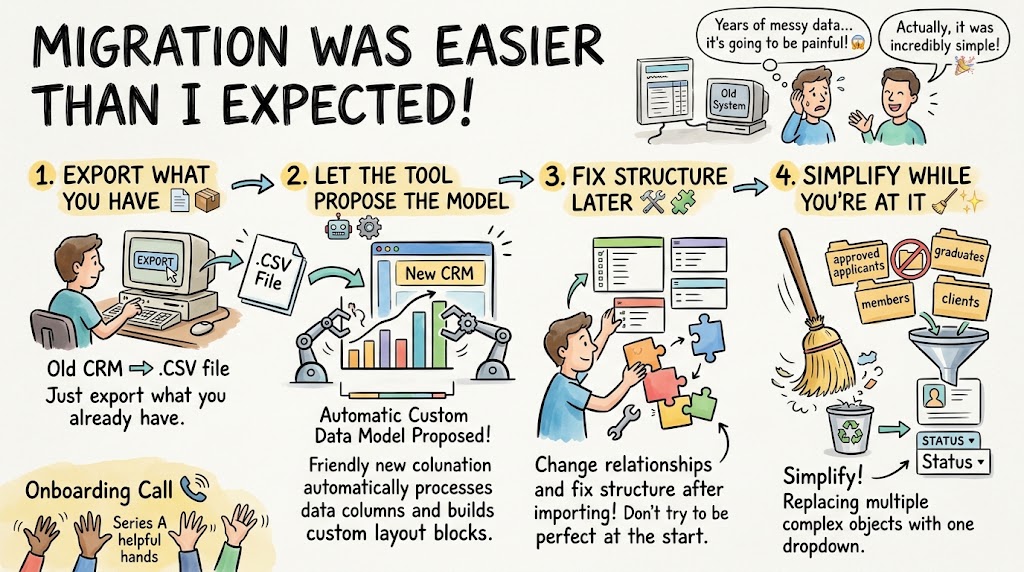
I worried about moving. Years of data, custom fields, and relationships can make a switch painful. In practice, it was simple. I exported a CSV from our old system, and the new CRM used the columns to build a custom data model automatically. I was not concerned about getting a relationship wrong at the start, because you can change the structure after the data is imported.
The vendor also offers as much onboarding help as you want. Since the company just raised a Series A and has around 5,000 paying customers, you can book calls with your onboarding expert until you are finished. One of the decisions we made was to simplify our data model. We had separate custom objects for members, clients, approved applicants, and graduates of our done-with-you program. We deleted those and used a single dropdown status field on each contact instead.
- Export what you have. A CSV from your old system is enough to start.
- Let the tool propose the model. The columns create the first version of your fields.
- Fix structure later. Relationships can be changed after import, so do not stall on perfection.
- Simplify while you are at it. A status field often replaces several custom objects.
If you are considering a move, use the migration as a chance to remove complexity you built up over the years.
The costs and the gaps
Price matters, so here is the picture. The entry plan is $89 per month per user, but it does not include workflows, automations, or email sequences. For a company doing active marketing, we needed the $1,000-a-month tier, which includes five seats and up to 250,000 contacts. It is not cheap at $1,000 to $2,000 a month. Compared with paying for both a marketing hub and a sales hub at a large CRM vendor, I find it relatively inexpensive.
The usage allowance has been generous so far. I have been a heavy user, integrating Stripe and several other tools, and I have not used up my allocation of about 450,000 credits during setup, so I am confident it will be enough. There are gaps, though, and you should know them before you sign.
- No native text messaging yet. I am told it is coming in a few weeks, and until then we connect Twilio, which takes an hour or two.
- No newsletters or warm email. We still use other tools, like SendGrid or Brevo, for that.
- Not a support desk. It does not replace a customer service product the way a service hub would.
- Seat limits apply. The plan we chose includes five seats, which suits a small sales team.
For my situation, two salespeople and a goal of about two new clients a month, these gaps do not matter. If you run a large service team, they might.
The counterargument: maybe you need no CRM at all
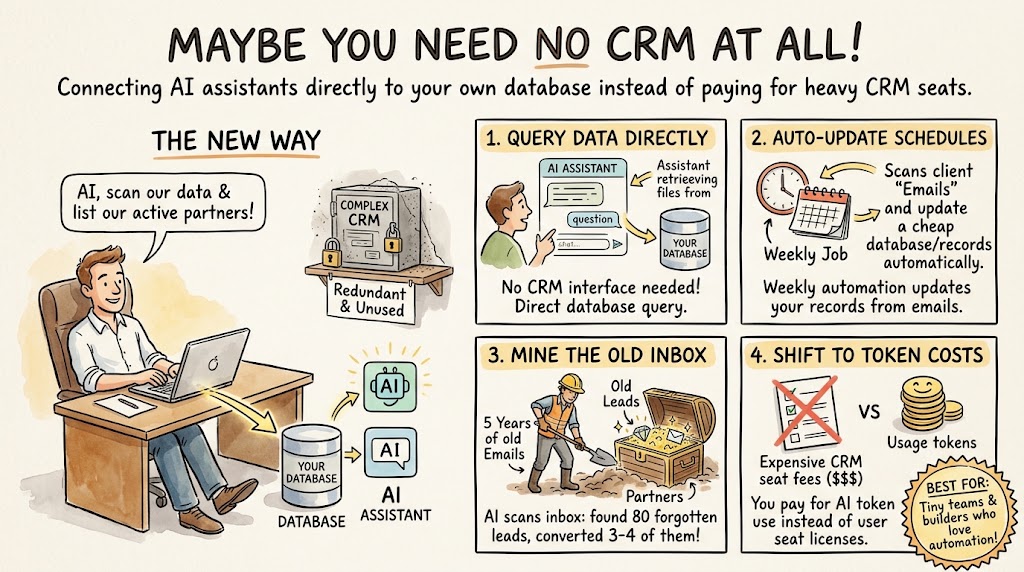
Now to the pushback. One founder told the group that he is using his CRM less and less. He has connected several AI services directly to his data, and he would rather ask a question in an assistant than open a CRM. His activity data lives in his own database, so it is just as easy to connect an assistant to that database. He is not opening the CRM on most days.
His examples were striking. He runs a weekly scheduled job that updates the opportunities in his existing, inexpensive CRM based on his client emails. He asked an assistant to scan five years of his inbox and list every partner his company had engaged with, with an update on each, in a spreadsheet. Three weeks earlier, he had it search his inbox for old cold leads, and it found 65 to 80 of them. He put them in a campaign and converted three or four. He is using millions of tokens and does not mind. To him, the CRM is becoming redundant, and he wonders whether a simpler one would serve him better than an AI-driven one.
- Assistants can query your data directly. If your records are in a database, you can ask questions without a CRM interface.
- Scheduled jobs can handle updates. A weekly automation can keep a basic CRM current from email.
- Old inboxes hold value. Mining past conversations can turn up leads and partners you forgot.
- Costs shift to tokens. You pay in model usage instead of software seats.
His approach works well for a company with few clients and a person who is comfortable building his own automations.
So which path fits you?
I asked him whether call context flows into his records automatically. It does not. He uploads a recording when needed and asks questions later. That is the key difference between the two approaches. An AI-native CRM captures context continuously and without effort, which matters if you have many deals, several salespeople, or a team that needs to share what it knows. A do-it-yourself setup gives you flexibility and lower software costs, but you provide the glue.
My suggestion is to match the tool to the size of your sales motion. If you have a handful of clients and enjoy tinkering, a simple CRM plus an assistant connected to your data may be all you need. If you have a team, a pipeline that changes daily, and a lot of calls, an AI-native CRM can save hours each week. A member on a free trial of Lightfield told the group it was strong, took a bit of time to learn, and was better than the tool he was paying for. A couple of other AI-native options are emerging as well, so try more than one before you commit.
- Count your deals and people. More volume and more teammates favor a system that captures context automatically.
- Test during a trial. Load a slice of real data and judge the suggestions it makes.
- Check the gaps. List the channels you need, such as texting and newsletters, and see what is missing.
- Price the whole stack. Compare the new subscription with the tools it would replace.
Whichever way you go, the direction is clear. Your customer records should update themselves, and you should be able to ask your data a question in plain language. Pick the version of that future that fits your team today, and plan to revisit it in a year.