
AI Coding: Using Claude Skills, MCP Servers, and Sub-agents
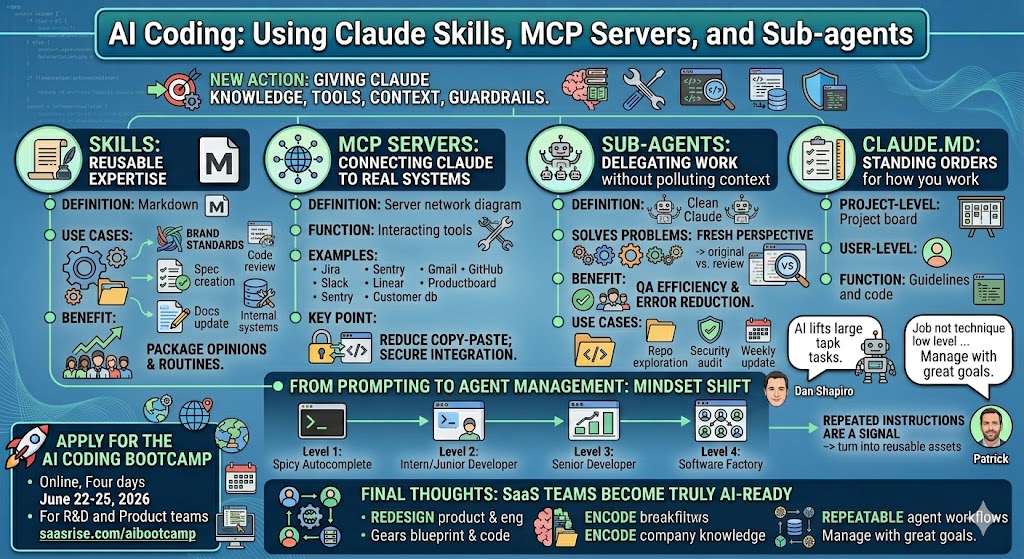
A practical guide for SaaS founders and product leaders on how Claude skills, MCP servers, sub-agents, and Claude.md files help teams turn AI coding from one-off prompting into a repeatable, company-wide development system.

AI coding is moving us from a world where software teams write every line of code by hand into a world where teams manage agents that write, test, inspect, and improve software alongside us. That shift sounds subtle at first, but it changes the job of a founder, product leader, CTO, and engineer. The new leverage is not just knowing how to prompt Claude Code. The new leverage is knowing how to give Claude the right knowledge, the right tools, the right context, and the right guardrails so it can operate inside your company’s real workflows.
That is where Claude skills, MCP servers, sub-agents, and Claude.md files come in. These are not just technical toys. They are the beginning of a new operating layer for SaaS teams: reusable knowledge, connected systems, delegated agent work, and standing instructions that help Claude behave more like a useful member of your product and engineering organization.
The big idea is simple: you are becoming an agent manager.
That phrase may sound funny, but it’s accurate. In the old software world, the engineer’s job was to understand the requirements, write the code, test the code, and ship the code. In the AI-assisted software world, more of the low-level work can be delegated. But delegation only works when the agent understands the goal, knows where to find context, has access to the right tools, and is reviewed by a system that catches mistakes.
As Patrick said in the recording, “Your job is not necessarily to figure out how to get stuff done at a technical low level. It’s how to figure out how to manage the agents by giving them great goals and the right context.”
That’s the mindset shift.
If you’re a SaaS founder, this matters because the teams that win with AI coding will not just be the teams that buy Claude Code licenses. They’ll be the teams that encode company knowledge into reusable systems, connect Claude to the tools where work already happens, and create repeatable agent workflows that improve every month.
From Prompting to Agent Management
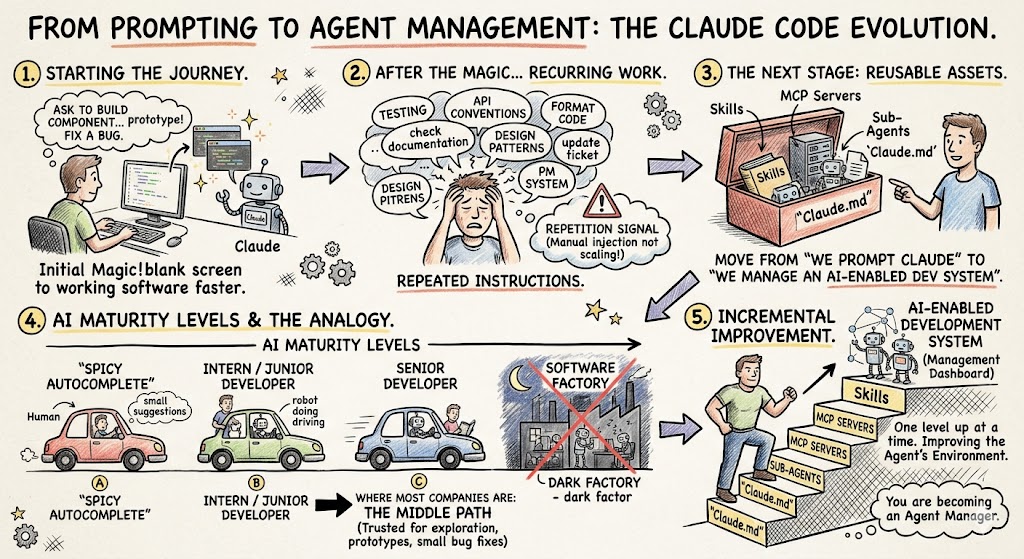
Most people start with Claude Code the same way. They open a terminal, ask it to build something, and watch it produce code. At first, that feels magical. It writes a component. It fixes a bug. It creates a quick prototype. It explains a confusing function. You go from blank screen to working software faster than before.
But after the initial magic, the real work begins.
You start noticing repeated instructions. You keep telling Claude how your company formats code. You keep reminding it to check documentation before using a new library. You keep asking it to follow your design patterns, write tests, use your API conventions, update tickets, or move tasks through your project management system.
That repetition is a signal.
It means you are holding important operational knowledge in your head and manually injecting it into every Claude conversation. That does not scale. The next stage is to turn those repeated instructions into reusable assets.
That’s where skills, MCP servers, sub-agents, and Claude.md come in. They move your company from “we prompt Claude” to “we manage an AI-enabled development system.”
Patrick used a helpful analogy from Dan Shapiro, comparing AI coding maturity to the evolution of self-driving cars. At the bottom, you have “spicy autocomplete,” where AI suggests code but the human does nearly everything. Then it becomes more like an intern or junior developer. Eventually, it becomes a senior developer or even a software factory, where the system can take on larger chunks of work with less direct handholding.
Most companies are somewhere in the middle. They trust AI for small bug fixes, prototypes, and exploration, but they’re not ready to let it operate fully autonomously. That’s fine. The point is not to jump overnight to a dark factory where software gets built while everyone sleeps. The point is to move one level up at a time.
And the way you move up is by improving the agent’s environment.
Skills: Reusable Expertise for Claude
Skills are probably the easiest starting point. A skill is a reusable instruction set that teaches Claude how to do something specific or gives it knowledge it would not otherwise have.
Patrick described skills as “on-demand expertise for Claude Code.” That’s a good definition. A skill might tell Claude how your company designs landing pages. It might explain your brand guidelines. It might give Claude a checklist for writing product specs. It might teach Claude how to interact with an old internal system. It might define a code review routine or a documentation workflow.
The key is that a skill is usually just a Markdown file. It is readable by humans and usable by Claude. That makes it approachable for product managers, founders, marketers, and engineers. You do not need to be a deep infrastructure engineer to understand what a skill says.
That’s a big deal.
In the recording, Patrick used a simple example: a front-end design skill. If you ask Claude to build a Kanban board without much direction, it will typically produce something safe, generic, and average. It won’t offend anyone, but it also won’t feel distinctive. When you load a front-end design skill, Claude has a design philosophy before it starts building. The same prompt can produce a much stronger interface because Claude has better taste encoded into the task.
Patrick put it simply: “It’s not magic. It’s just a Markdown file with opinions.”
That line captures why skills are so useful. They let your team package opinions, standards, routines, and institutional knowledge so Claude can reuse them.
For a SaaS company, that could include your brand voice, UI design system, product spec format, QA checklist, onboarding flow conventions, API style guide, outbound email rules, or support escalation logic. Anything your team repeats can potentially become a skill.
A marketing team might create a brand skill that says how headlines should sound, what words to avoid, how much white space to use in designs, how product screenshots should be framed, and where the latest brand guidelines live. A product team might create a product-spec skill that interviews the PM, asks clarifying questions, and produces requirements, acceptance criteria, edge cases, and out-of-scope notes. An engineering team might create a migration-planning skill that tells Claude how to evaluate old code before proposing a refactor.
The reason this matters is that skills are portable. Once created, they can be shared with other people on your team. Instead of each person figuring out their own prompts, you can encode the best workflow once and distribute it.
That’s how teams get leverage.
The Best Use Cases for Skills
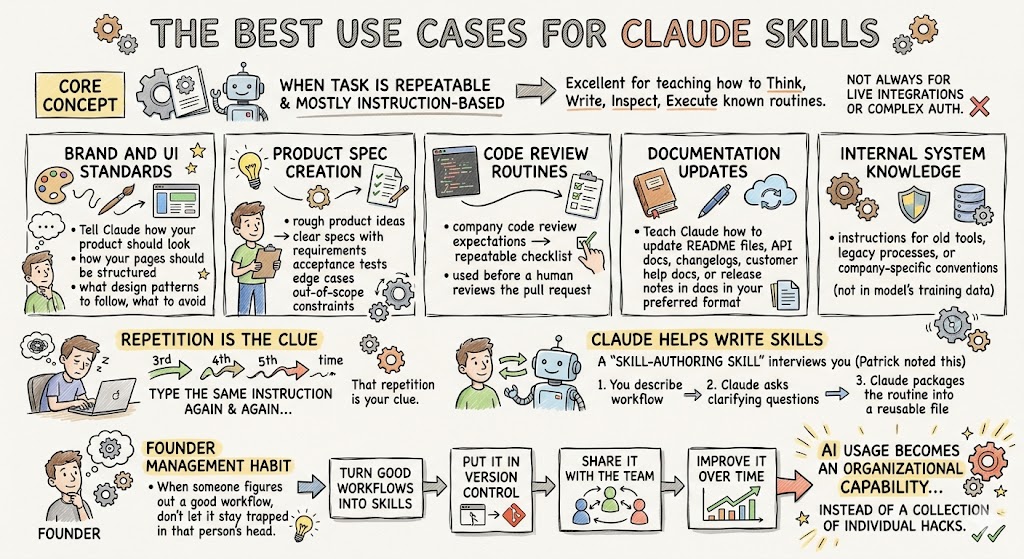
Skills work best when the task is repeatable and mostly instruction-based. They are not always the right choice for live integrations or complex authentication, but they are excellent for teaching Claude how to think, write, inspect, or execute a known routine.
Here are practical SaaS use cases for Claude skills:
- Brand and UI standards: Tell Claude how your product should look, how your pages should be structured, what design patterns to follow, and what to avoid.
- Product spec creation: Create a reusable process for turning rough product ideas into clear specs with requirements, acceptance tests, edge cases, and out-of-scope constraints.
- Code review routines: Package your company’s code review expectations into a repeatable checklist that Claude can use before a human reviews the pull request.
- Documentation updates: Teach Claude how to update README files, API docs, changelogs, customer help docs, or release notes in your preferred format.
- Internal system knowledge: Give Claude instructions for working with old tools, legacy processes, or company-specific conventions that are not available in the model’s training data.
A skill is often the right tool when you find yourself typing the same instruction for the third, fourth, or fifth time. That repetition is your clue.
And you don’t have to write skills from scratch by hand. Claude can help write them. Patrick noted that there is a skill-authoring skill that can interview you and help draft a new skill. That may sound recursive, but it’s exactly the kind of thing AI is good at. You describe the workflow, Claude asks clarifying questions, and then it packages the routine into a reusable file.
For founders, this is an important management habit. When someone on the team figures out a good Claude workflow, don’t let it stay trapped in that person’s head. Turn it into a skill. Put it in version control. Share it with the team. Improve it over time.
That is how AI usage becomes an organizational capability instead of a collection of individual hacks.
MCP Servers: Connecting Claude to Real Systems
Skills are great for reusable instructions and knowledge. MCP servers are different. MCP servers are how Claude gets tools.
MCP stands for Model Context Protocol. The practical explanation is this: an MCP server lets Claude interact with external systems through defined functions. Those systems might be Jira, Slack, Sentry, Gmail, GitHub, Linear, Productboard, a financial application, an ERP, a customer database, or your own internal SaaS application.
Patrick explained it this way: MCP servers can “inject knowledge” and “offer tools to the large language model.” Those tools might let Claude list Jira tickets, create GitHub issues, query a task-tracking system, pull error logs from Sentry, read product roadmap items, or call an internal API.
This is where AI coding starts to connect with the real operating systems of your business.
In a normal workflow, a product manager writes a spec in one place, an engineer copies part of it into Claude Code, Claude writes some code, the engineer updates a ticket, someone else reviews a pull request, and maybe a release note is written somewhere else. There is a lot of copy-paste between systems.
MCP servers reduce that copy-paste.
In Patrick’s demo, Claude Code was connected to a task-tracking system through an MCP server. Instead of copying a task description into Claude, he could ask Claude to look at the project, find the task, read the requirements, and act on them. Claude had tools available to list projects, list tasks, and update records.
That is a very different workflow.
Now imagine this inside a SaaS company. Claude can read the Jira ticket, inspect linked Confluence documentation, check the Figma design, look at related GitHub issues, inspect current code, and then propose an implementation plan. Or it can pull production errors from Sentry, find the likely source in the codebase, write a regression test, and suggest a fix.
That’s not a fantasy. That’s the direction this is going.
How MCP Servers Actually Work
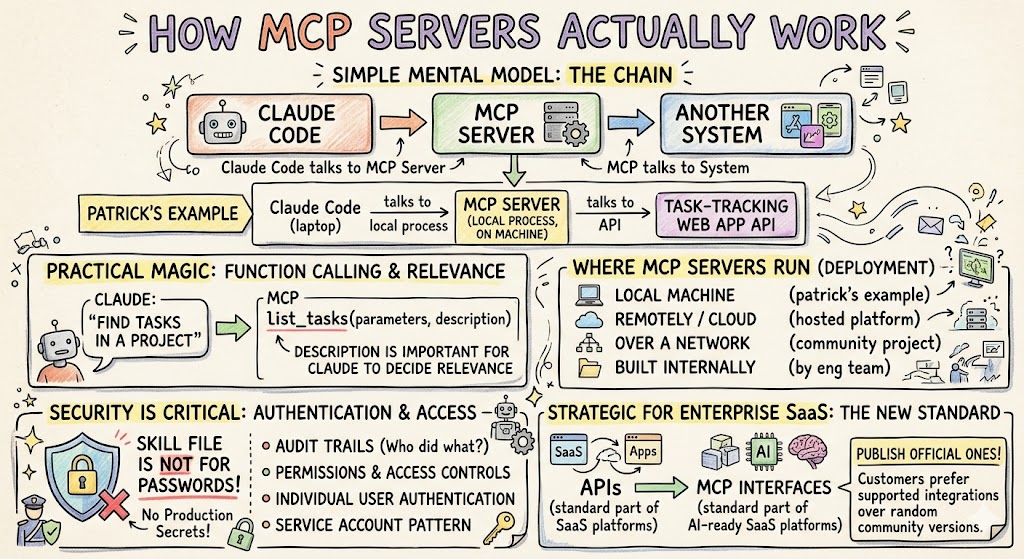
MCP can feel confusing because it uses the word “server,” and there are several ways to run one. The simplest mental model is this: Claude Code talks to an MCP server, and the MCP server talks to another system.
In Patrick’s example, Claude Code talked to a local MCP process running on his machine. That MCP process talked to a task-tracking web application through its API. So the chain looked like this:
Claude Code → MCP Server → External Application API
The MCP server exposes functions to Claude. Each function has a name, parameters, and a description. The description is important because Claude uses natural language to decide when a function is relevant. If you ask Claude to find tasks in a project, and the MCP server has a function called list_tasks, Claude can infer that this tool is useful.
That is the practical magic.
MCP servers can run locally, remotely, or over a network. Some are hosted by third-party platforms. Some are open-source community projects. Some are built internally by your engineering team. Some are authenticated as the user. Some use a service account. Some poorly designed ones may have no authentication, which is usually not what you want in a real business environment.
Authentication matters a lot. If Claude is accessing company systems, you need audit trails, permissions, and access controls. You want to know who did what. You want users to authenticate individually where appropriate. You want secrets handled safely.
A skill file is not the right place to store production passwords. If Claude needs to interact with a sensitive business system, use a proper integration pattern with authentication, secrets management, and access controls.
For enterprise SaaS companies, MCP servers may become a major product surface area. If your application has an API, someone can build an MCP server for it. You may not control whether customers or third parties build their own, but you can publish an official one that works well. If you do, customers are more likely to use your supported integration instead of a random community version.
That matters. In the same way APIs became a standard part of SaaS platforms, MCP interfaces may become a standard part of AI-ready SaaS platforms.
When to Use a Skill vs. an MCP Server
This is where a lot of teams get confused.
Skills and MCP servers can both extend Claude, but they solve different problems. A skill is usually knowledge or routine. An MCP server is usually a tool or live integration.
If you want Claude to follow your writing style, use a skill. If you want Claude to query your billing system, use an MCP server. If you want Claude to remember your design philosophy, use a skill. If you want Claude to create a Jira ticket, use an MCP server. If you want Claude to run a repeatable product-spec workflow, use a skill. If you want Claude to read live customer usage data from your app, use an MCP server.
There is overlap. A skill can tell Claude how to use a command-line tool. An MCP server can expose knowledge. But as a simple rule: use skills for reusable instructions, and MCP servers for connected actions.
Patrick made the point that skills are often the easiest way to try something. MCP servers are more technical but more powerful when you need authenticated access to real systems.
That’s how I’d think about it as a founder. Start simple. Encode repeated instructions as skills. Then, when you see a workflow where Claude needs to interact with a real system again and again, consider an MCP server.
For example, if your product team writes specs in Productboard and your engineering team works in GitHub, you might eventually want an MCP server that connects Claude to Productboard. One participant in the recording had already built a working MCP against Productboard’s API in under an hour using Claude. That is the kind of thing that would have sounded unrealistic two years ago and is now becoming normal.
The key is to treat it as architecture, not a hack. If the MCP server touches sensitive data or customer systems, build it with the same care you would bring to any internal integration.
Sub-agents: Delegating Work Without Polluting Context
Sub-agents are the third major concept. If skills are reusable knowledge and MCP servers are connected tools, sub-agents are delegated workers.
A sub-agent is like spinning up another Claude instance with a clean context to do a specific job. It can explore code, review changes, summarize findings, or perform a narrow task, then return only the useful summary to the main agent.
This solves two problems.
First, it helps manage context. If Claude needs to inspect a large codebase, that exploration can consume a lot of context. A sub-agent can do the exploration and return a summary, keeping the main conversation cleaner.
Second, it creates a second perspective. If Claude wrote some code and then you ask the same context to review it, the review may be biased by the implementation path it just took. A sub-agent starts fresh. It can inspect the result as if another engineer entered the room.
Patrick described it well: “Think of it as another window of Claude Code, with no context, but within the same directory that you’re working within.”
That makes sub-agents especially useful for code review. Ask the main agent to implement a feature. Then ask a clean-context sub-agent to review the diff against the spec. The sub-agent can look for missing tests, inconsistent style, edge cases, security issues, or deviations from the acceptance criteria.
Patrick said something I’ve seen over and over with AI coding: “I never cease to be amazed anymore that I ask Claude to write code, and it writes very functional, very good code, and then I ask a sub-agent to review its own code, and it almost always finds something.”
That’s the point. The second set of eyes matters, even when the second set of eyes is also AI.
For SaaS teams, sub-agents can become part of your QA and review system. They don’t replace human review, especially for sensitive production changes. But they can catch issues earlier, reduce the burden on senior engineers, and create a more consistent first-pass review.
Practical Sub-agent Use Cases
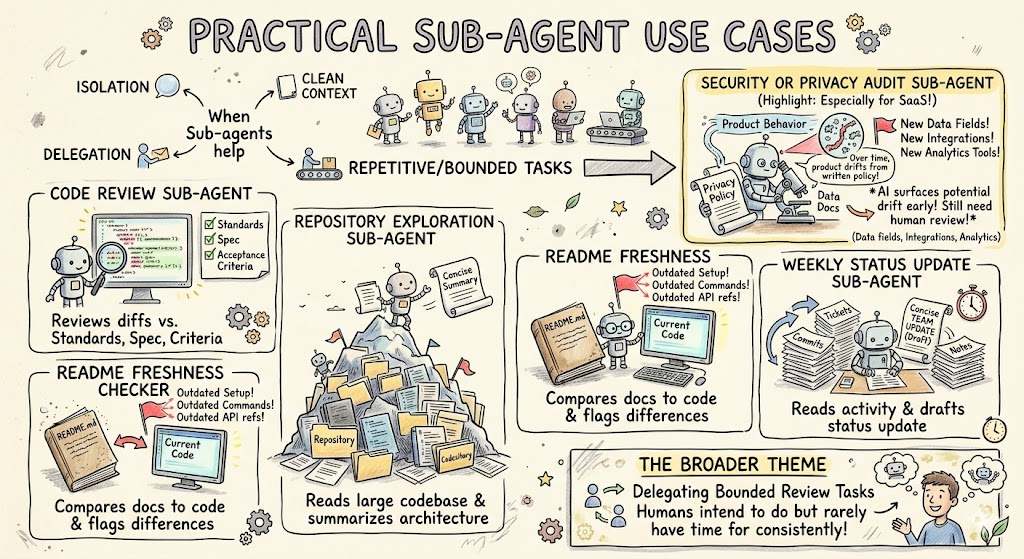
Sub-agents are useful when a task benefits from isolation, a clean context, or delegation. They are also useful when the task is repetitive and bounded.
Some strong examples include:
- Code review sub-agent: Reviews a diff against your company’s standards, the original spec, and known acceptance criteria.
- Repository exploration sub-agent: Reads a large or unfamiliar codebase and returns a concise architecture summary to the main agent.
- README freshness checker: Compares documentation against the current code and flags outdated setup instructions, commands, or API references.
- Security or privacy audit sub-agent: Looks for drift between product behavior and privacy policy, data handling docs, or compliance commitments.
- Weekly status update sub-agent: Reads recent work, commits, tickets, and notes, then drafts a concise status update for the team.
The privacy-policy example is especially interesting for SaaS companies. Your lawyers may write a privacy policy based on how the product works at a point in time. Then engineering keeps shipping. New data fields are collected. New integrations are added. New analytics tools are installed. Over time, the product can drift away from the written policy.
A sub-agent that reviews code, documentation, and policy language could flag potential drift before it becomes a compliance problem. You would still want legal and security review, of course. But AI can help surface issues earlier.
That is the broader theme here. Sub-agents let you delegate bounded review tasks that humans often intend to do but rarely have time to do consistently.
Claude.md: Standing Orders for How You Work
The final piece is Claude.md.
A Claude.md file is where you store standing instructions. It can exist at the project level or the user level. The project Claude.md tells Claude how to work inside a specific codebase. The user Claude.md tells Claude your personal preferences across projects.
For a SaaS product, the project Claude.md might include coding conventions, test commands, architecture notes, package manager preferences, deployment warnings, and links to important docs. It might say, “Always run tests before finalizing changes,” or “Use this component library for new UI,” or “Do not modify the billing module without adding regression tests.”
A user Claude.md is more personal. It might say you always want version control initialized on side projects. It might tell Claude to prefer TypeScript. It might remind Claude to check docs before using new APIs. It might tell Claude how you like tasks summarized.
Patrick described Claude.md as “standing orders.” That’s exactly how to think about it.
If you keep repeating the same instruction, put it in Claude.md. If everyone on the team needs the same instruction for a project, put it in the project Claude.md. If it’s just your preference, put it in your user Claude.md.
Claude.md is not a replacement for skills. It is more like persistent background guidance. Skills are invoked for specific capabilities. Claude.md is the baseline way you want Claude to behave.
Together, they create a much better operating environment.
Bringing It All Together
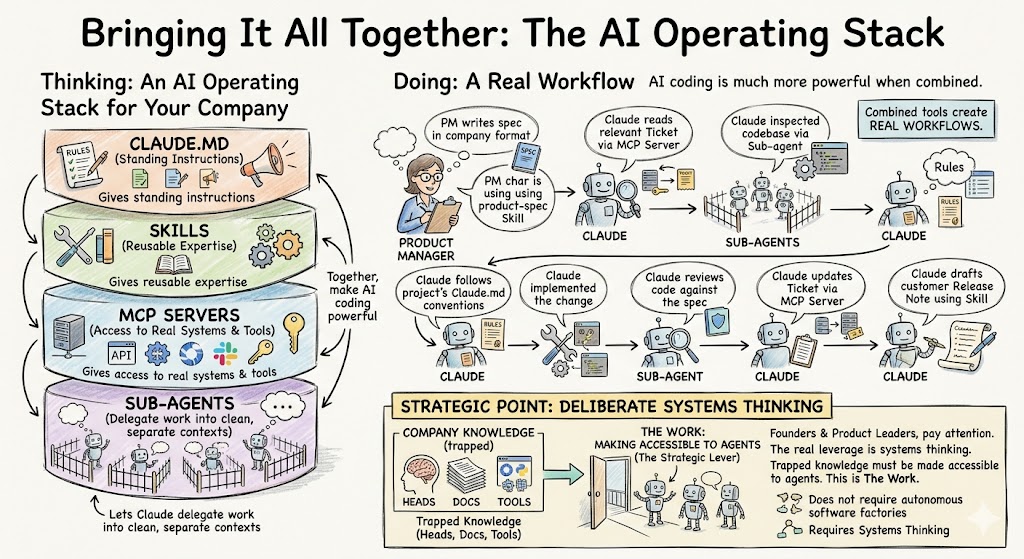
The useful way to think about these tools is as an AI operating stack for your company.
Claude.md gives Claude standing instructions. Skills give Claude reusable expertise. MCP servers give Claude access to real systems and tools. Sub-agents let Claude delegate work into clean, separate contexts.
When these pieces work together, AI coding becomes much more powerful.
A product manager can write a spec in the company’s standard format using a product-spec skill. Claude can read the relevant ticket through an MCP server. It can inspect the codebase using a sub-agent. It can follow the project’s Claude.md conventions. It can implement the change. Another sub-agent can review the code against the spec. An MCP server can update the ticket. A release-note skill can draft the customer-facing summary.
That is a real workflow.
It does not require fully autonomous software factories. It does require deliberate systems thinking.
And this is where founders and product leaders should pay attention. You do not need to know every technical detail of MCP transport or sub-agent configuration to understand the strategic point. Your company has knowledge, systems, and workflows. Right now, much of that is trapped in people’s heads, scattered across docs, or locked inside tools. AI coding gets dramatically more useful when that knowledge and those systems become accessible to agents.
That is the work.
Final Thoughts
AI coding is not just about writing code faster. It is about redesigning how product and engineering work gets done.
Skills let you package expertise. MCP servers connect Claude to your company’s systems. Sub-agents create clean-context delegation. Claude.md gives Claude persistent instructions. Together, they turn Claude Code from a powerful individual tool into part of an organizational development system.
The founder takeaway is simple: don’t stop at prompting. Start encoding.
Encode your product specs. Encode your design standards. Encode your code review rules. Encode your company workflows. Connect your systems of record. Give Claude safe tools. Use sub-agents for review and exploration. Put standing instructions where Claude can always find them.
That is how your team moves from “AI helped me write some code” to “AI is built into the way we ship software.”
And once that happens, the leverage compounds. Your best workflows become reusable. Your team stops copy-pasting context between tools. Your product managers can define clearer work. Your engineers can delegate more safely. Your QA process gets stronger. Your company learns faster.
The tools will keep changing. The models will keep improving. But the practice travels: give agents clear goals, reusable knowledge, connected tools, clean review loops, and strong standing instructions.
That’s how SaaS teams become truly AI-ready.