
Setting up your Claude Code Development Environment
A practical guide to setting up Claude Code, getting comfortable with the terminal, and building your first AI-assisted development workflow. Learn how to create safe project folders, run simple prototypes, handle permissions, debug errors with AI, and use Claude Code as an agent that can write, test, and improve software faster.

Claude Code represents one of the biggest shifts in software creation in the last decade. The old model was simple: a developer wrote code, debugged it, ran it, checked the browser, fixed errors, and repeated that loop hundreds of times. The new model is different. The AI agent can write code, inspect files, run commands, restart servers, test browser output, look at screenshots, and often find its own bugs before you even touch the keyboard.
For founders, product leaders, and developers, the lesson is not that AI magically replaces engineering judgment. It is that the interface to building software is changing. As Ryan Allis put it, “It’s an extraordinary time in human history where we can utilize these tools to build products that matter.” The practical opportunity is simple: get your Claude Code environment working, learn the basic workflow, and start building small things until the new way of working feels natural.
You can put your R&D team and product team in our upcoming four-day online AI Coding Bootcamp June 22-25, 2026. Apply at saasrise.com/aibootcamp.
The first mindset shift is that Claude Code is not just a chatbot that writes snippets. It is an agent running on your machine. That distinction matters. A chatbot can give you code in a browser. Claude Code can sit inside a project folder, create files, install packages, run a local server, interact with your app, and revise the implementation based on what happened. That is why the setup feels slightly more technical at first, especially if you have not opened a terminal in years. But once you get through that first hurdle, the payoff is huge.
Ryan framed the moment well: “We can now build more with 2 or 3 developers than we could with 60 developers previously.” That is not because the work has become trivial. It is because the feedback loop has collapsed. A capable team can go from idea to prototype in minutes, then from prototype to usable internal tool in hours or days. The limiting factor starts to become less about typing speed and more about taste, judgment, product clarity, and how well you can describe what you want built.
Start by getting comfortable with the terminal
For many non-technical people, the terminal is the scariest part. It looks like an old black box from the 1990s, and it feels like one wrong command could break your machine. That fear is understandable, but it is also worth getting past.
Claude Code runs from the command line because the command line gives it direct access to your project files and local development environment. That is what lets it create an app, install dependencies, run tests, start a server, and debug the result. Browser-based AI tools are useful for quick experiments, but the terminal workflow is where Claude Code becomes much more powerful.
Ryan admitted the learning curve in a very human way: “I had to go on ChatGPT and say, how do I open a terminal on my Mac?” That is the right attitude. You do not need to pretend you already know everything. Use AI to help you use AI. If you hit a setup error, paste the error into Claude, ChatGPT, or another assistant and ask what it means. In the recording, multiple people solved installation issues exactly this way. One participant hit a Windows path error, pasted a screenshot into ChatGPT, followed the instructions, and got unstuck faster than a human could walk them through every dialog box.
The key is not to become a command-line wizard overnight. The key is to learn enough to create a folder, move into it, launch Claude Code, and run whatever the agent builds.
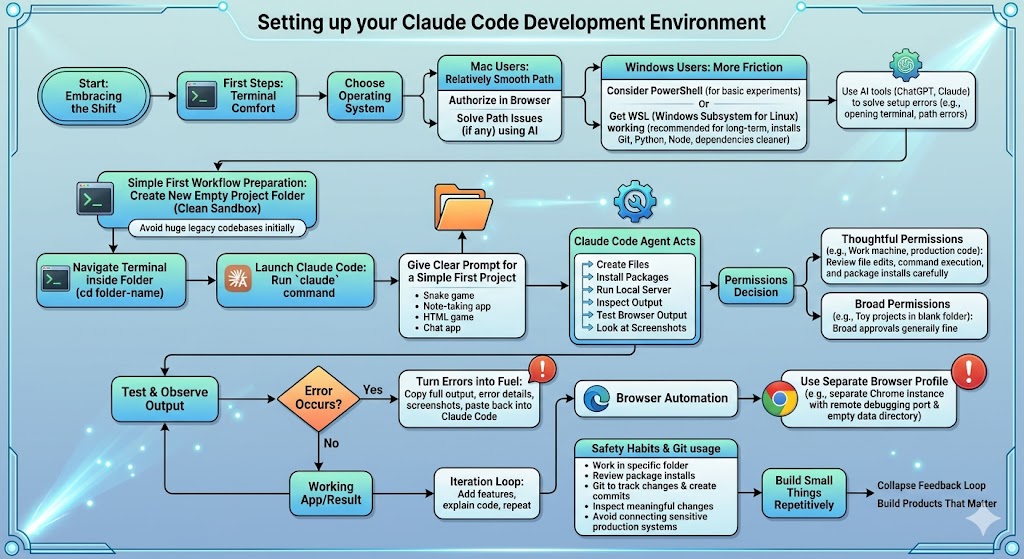
A simple first workflow looks like this:
- Create a new empty project folder so Claude Code has a clean workspace.
- Open your terminal inside that folder, or use cd folder-name to move into it.
- Run claude to start Claude Code.
- Give it one clear prompt for a simple app, game, or tool.
- Let it create files, install dependencies, run the project, and show you how to test it.
That is enough to get started. The empty folder matters more than people realize. You do not want to run Claude Code from your entire user directory or from the root of your computer. Claude uses the current folder as context. Give it a clean sandbox for experiments. Later, when you work with real codebases, you can point it at a specific repository, but your first projects should be lightweight and isolated.
Choose simple first projects
A lot of people make the mistake of starting with their most complicated real business application. They point Claude Code at a huge legacy codebase, ask it to add a sophisticated feature, and then get frustrated when it needs context, dependencies, credentials, database access, and build instructions.
That is not the best first step.
Start with something simple and disposable. Build a snake game. Build a note-taking app. Build a tiny chat app. Build a ski game for your kid. Build a single-file HTML game. The goal is not to create something commercially useful on day one. The goal is to learn the loop.
Patrick demonstrated this by building a simple chat app from an empty directory. He did not specify a programming language or framework. Claude Code asked questions, suggested Node.js, created the files, ran package commands, started a local server, and produced a working app that could chat between browser windows. Then he asked it to modify the app to support a daily stand-up workflow. It added a feature, introduced a bug, tested the browser, found its own issue, and fixed enough of the flow to show the broader point.
That broader point is this: writing code is only part of engineering. Running it, observing it, debugging it, and changing it based on reality is the actual loop. Claude Code starts to accelerate that whole loop.
Ryan captured the founder-level impact when he said, “It’s really an exciting time to be here in 2026, where it’s in some ways easier to build software products, but in some ways it’s challenging because things are changing so quickly.” That is exactly the feeling most teams will have. The tools are easier in one sense, but the pace of change is dizzying. The best way through that discomfort is repetition. Build small things until the process feels ordinary.
For non-coders or junior builders, HTML and JavaScript are often the best starting point. You can ask Claude Code to build a single-file browser game, then ask it to explain the file line by line. You can ask it to create a “custom manual” explaining how to change the colors, keyboard controls, speed, or scoring. This is a powerful learning method because the explanation is specific to the thing you just built. Instead of reading a generic tutorial, you are learning from your own working example.
For experienced developers, the temptation is to skip the toy examples. I would still recommend doing at least one or two. Not because you need help building a chat app, but because you need to feel how the agent behaves. You want to see when it asks permission, how it structures files, how it reasons through errors, when it overreaches, and how to bring it back on track.

Understand what makes Claude Code agentic
The magic of Claude Code is not that it can write a React component or a Python script. Many tools can do that. The magic is that it can take actions.
It can run terminal commands. It can install packages. It can create and edit files. It can start a web server. It can inspect output. It can use browser automation when you give it a browser running with remote debugging enabled. It can look at screenshots and reason visually about whether the application did what it was supposed to do.
This is a very different pattern from autocomplete. Older AI coding tools sat beside the developer. They suggested code. They saved keystrokes. Sometimes they were helpful, and sometimes they hallucinated just enough to waste your time. Claude Code puts the agent at the center of the workflow. You are still responsible for direction and judgment, but the agent is doing more of the mechanical work.
Ryan noticed this distinction during the demo: “The advantage of doing it in the terminal is that it has a lot more functionality. It can take over your browser for you.” That browser piece is especially important for real product work. Most bugs do not live neatly in a terminal. They show up as broken buttons, wrong layouts, failed form submissions, blank pages, bad states, or confusing UI behavior. When the agent can drive the browser and inspect screenshots, it gets much closer to the real environment users experience.
There is a practical caution here. Your regular Chrome profile should not be the browser you hand to an agent. The demo used a separate Chrome instance launched with a remote debugging port and an empty data directory. That means no personal cookies, no logged-in accounts, no browser extensions, no saved sessions. This is a much safer pattern. You are giving the agent a controlled browser, not the keys to your personal digital life.
The more context you give Claude Code, the better it performs. In a small app, the context is the folder and the prompt. In a real product, context might include Jira tickets, screenshots from customers, stack traces from Sentry, documentation, API notes, build commands, database schemas, and product requirements. Over time, the work becomes less about typing code and more about feeding the right context into the agent.
Use permissions thoughtfully
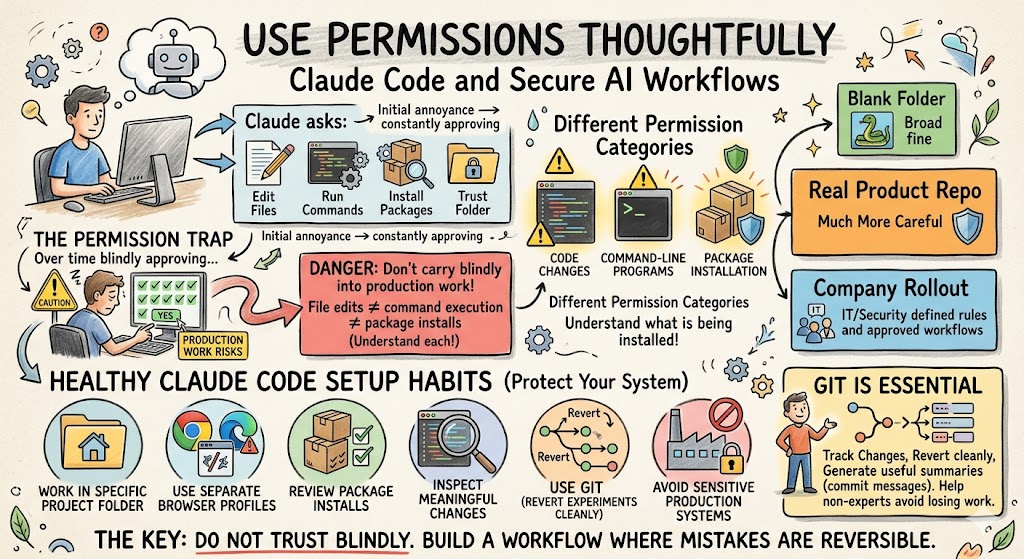
One of the most important lessons from the setup discussion was around permissions. Claude Code will ask before doing many things. It may ask to edit files. It may ask to run commands. It may ask to install packages. It may ask whether to trust a folder.
At first, this gets annoying. You will feel like you are constantly approving things. Then you will be tempted to say yes to everything. That can be fine in a disposable toy project, but it is not a habit you should carry blindly into production work.
File edits and command execution are different permission categories. Saying yes to code changes does not automatically mean you are allowing arbitrary command-line programs to run. Package installation is also its own kind of risk. Installing a Python or Node package is common, but you should still understand what is being installed, especially on a work machine.
The right approach depends on the environment. For a blank folder where you are building a snake game, broad permissions are usually fine. For a real product repository, you should be much more careful. For a company rollout, IT and security teams should define configuration rules, project-level permissions, and approved workflows.
A healthy Claude Code setup should include a few basic safety habits:
- Work in a specific project folder, not your entire computer.
- Use separate browser profiles for automation and testing.
- Review package installs before approving them.
- Let Claude Code edit files, but inspect meaningful changes before committing.
- Use Git so you can revert experiments cleanly.
- Avoid connecting sensitive production systems until you understand the permission model.
Git deserves special mention. You do not need to be a Git expert on day one, but having Git installed matters. Claude Code can use it to track changes, create commits, and help you understand what changed. One of the demo moments that made developers cringe was when Patrick asked the agent to write a commit message. But honestly, Git is an area where the model has a lot of pattern knowledge. It can generate useful summaries, organize changes, and help non-experts avoid losing work.
The key is not to trust blindly. The key is to build a workflow where mistakes are reversible.
Windows, Mac, and WSL realities
Mac users generally had the smoothest path in the discussion. Install the dependencies, run the command, authorize Claude in the browser, and continue. There were still path issues for some people, but the flow was relatively simple.
Windows users had more friction, especially around WSL, which stands for Windows Subsystem for Linux. WSL gives Windows users a Linux environment inside Windows. That helps because many development tools, package managers, and command-line workflows are easier in Linux-style environments. Installing Python, Git, Node.js, and other dependencies tends to be cleaner there.
That said, WSL adds another setup layer. For some users, using PowerShell directly may work fine. For others, WSL will be the better long-term path. The practical recommendation is this: if you are on Windows and plan to do more than casual experiments, get WSL working. It may be a pain for the first hour, but it will likely save time later.
One participant asked whether the Windows implementation of Claude Code was limited. The answer was no. The issue is less about Claude Code itself and more about the surrounding development ecosystem. The agent can only run what your machine can run. If your environment has Git, Python, Node, PHP, Laravel, .NET, Angular, or whatever your stack requires, Claude Code can work with those tools. If the dependencies are missing or broken, it will get stuck just like a human developer would.
This is an important mental model. Claude Code is powerful, but it is not floating above your system in some magical perfect cloud. It operates inside your environment. If your environment is messy, it has to work through that mess.
Working with existing codebases
New projects are easy. Existing codebases are where the money is.
This came up directly in the conversation when someone asked about large .NET and Angular systems with APIs and microservices. The answer was yes, Claude Code can work on existing systems. But it needs context. Your senior engineers know things that are not written down. They know which service is fragile, which build command actually works, which tests are meaningful, which environment variables are required, and which parts of the codebase should not be touched.
Claude Code does not automatically know that. You have to teach it.
This is where documentation becomes leverage. A short README that explains how to install dependencies, run the app, run tests, start the local server, and validate a change is not just useful for humans anymore. It is useful for agents. A well-documented codebase becomes dramatically easier for Claude Code to operate inside.
The same applies to old systems. Many companies have code that is 10, 15, or 20 years old. That code was not written for AI. But it was also often not written for the next human developer either. The process is similar. You create a safe environment, explain the architecture, provide build and test commands, ask Claude Code to inspect before editing, and start with small changes.
One of the best first prompts for an existing codebase is not “add this feature.” It is: “Read this repository and explain how it is structured, how to run it locally, and where you would make a small change for X.” That turns Claude Code into an onboarding assistant before it becomes an implementation agent.
Turn errors into fuel
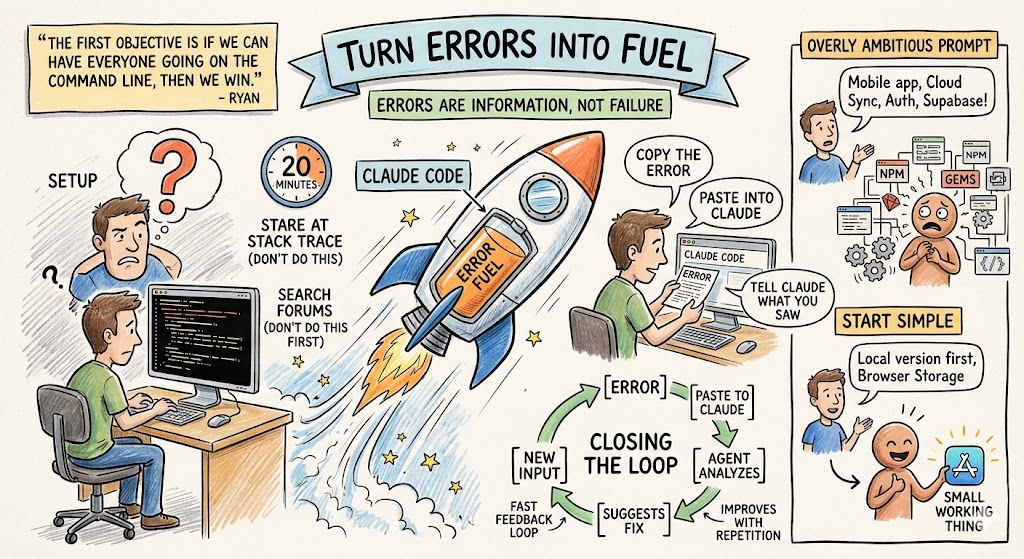
One of the strongest practical lessons was simple: when something breaks, feed the error back into the tool.
Do not stare at a stack trace for 20 minutes. Do not search random forums first. Copy the error and paste it into Claude Code. If a popup appears, screenshot it. If an install command fails, paste the full output. If the browser shows a blank screen, tell Claude what you expected and what you saw.
The faster you give the agent the error, the faster it can close the loop.
This feels almost too obvious, but it changes the psychology of development. Beginners often freeze when they see an error. Experienced developers know errors are information. Claude Code makes that even more true. The error is not a failure. It is the next input.
This is why the first objective is not mastery. Ryan summarized it well: “The first objective is if we can have everyone going on the command line, then we win.” Once you can launch Claude Code, create a folder, run a prompt, and paste errors back in, you are in the loop. Everything else improves with repetition.
The same principle applies to overly ambitious prompts. If you ask for a mobile-ready app with cloud sync, authentication, Supabase, deployment, and multiple users, Claude Code may start installing a lot of dependencies. That can be fine if you know what you are doing. But if you are learning, it is often better to simplify. Ask for a local version first. Use browser storage or SQLite. Remove deployment. Remove login. Get one small working thing, then expand.
The founder-level lesson
The deeper lesson here is not about Claude Code installation. It is about how product development is changing.
A founder can now sit with an idea and see a working version the same morning. A product manager can prototype a workflow without waiting for sprint planning. A developer can explore an unfamiliar language or framework with much less friction. A child can describe a game and get something playable. A marketer can automate parts of their workflow if they are willing to learn the basics of the command line.
That does not mean everything is production-ready. It does not mean security stops mattering. It does not mean code review disappears. It means the distance between imagination and software has shrunk.
Ryan’s line is the right north star: “We can utilize these tools to build products that matter.” That is what makes this more than a novelty. The value is not in building toy chat apps forever. The value is in building prototypes, internal tools, workflow automations, product experiments, test harnesses, dashboards, migrations, and eventually real customer-facing features faster than before.
But speed only helps if you pair it with judgment. Claude Code can make you dangerous quickly. To become useful, you need the habits: clean folders, Git, permissions, small prompts, safe browsers, good context, careful review, and a willingness to debug through the agent instead of around it.
The best next step is very simple. Create an empty folder. Open Claude Code. Ask it to build something small. Let it run. When it breaks, paste the error back in. When it works, ask it to explain the code. Then ask it to add one feature. Then commit the result.
That loop is the new muscle.
And the sooner your team builds it, the sooner AI stops feeling like a demo and starts becoming part of how you actually ship software.