
Refactoring Your Existing SaaS App with Claude Code
A practical guide for SaaS founders and product leaders on how to use Claude Code to safely modernize an existing SaaS application, reduce technical debt, improve AI-readiness, and unlock faster product development without creating regressions.

Most SaaS companies eventually reach the same painful point: the product works, customers depend on it, revenue is flowing, and yet the codebase itself starts slowing the company down. Maybe the app is built on an old framework. Maybe the test coverage is thin. Maybe deployments are scary. Maybe every small feature feels like walking through a minefield because nobody fully understands what will break.
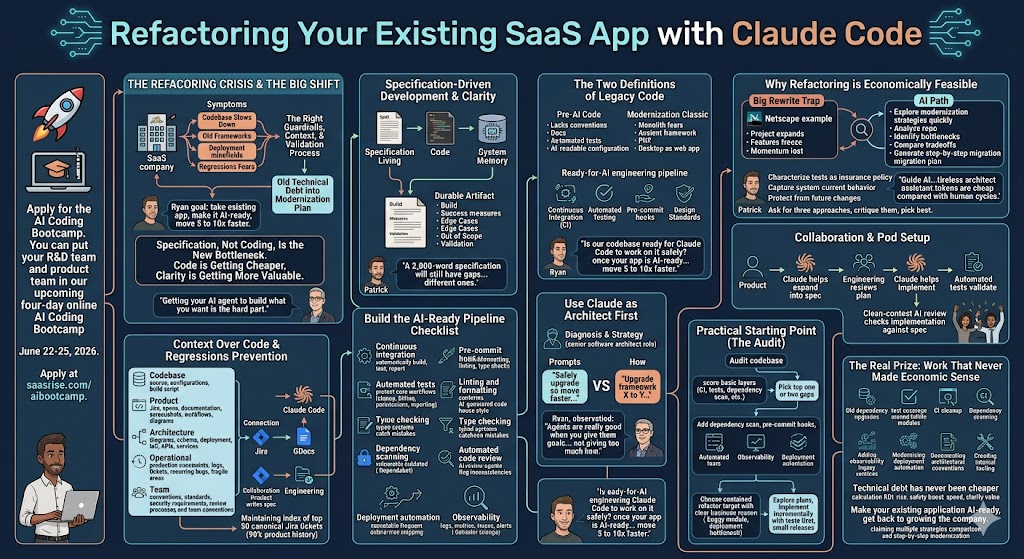
Claude Code changes the economics of that problem. Refactoring, upgrading, and modernizing an existing SaaS app used to feel like a multi-quarter engineering bet with real risk to the roadmap. Now, with the right guardrails, context, and validation process, a team can start turning old technical debt into an actionable modernization plan much faster. As Ryan put it, “For me, this is the core: how to take your existing SaaS application, make it AI-ready, and then move 5 to 10x faster.”
You can put your R&D team and product team in our upcoming four-day online AI Coding Bootcamp June 22-25, 2026. Apply at saasrise.com/aibootcamp.
The big shift is this: code is getting cheaper, but clarity is getting more valuable. If you ask Claude Code to “refactor the app” or “upgrade the framework,” it may produce something impressive. It may also make assumptions that are wrong, miss business logic buried in the application, or create regressions your team does not catch until customers do. The companies that win with AI coding will not be the ones that simply let the model write more code. They will be the ones that build an AI-ready engineering pipeline around it.
As Patrick said in the recording, “Code is cheap now. Getting your AI agent to actually build what you want is what has become the hard part.”
That one sentence captures the whole lesson.
The New Bottleneck Is Specification, Not Coding
For years, software development was constrained by how long it took humans to write, debug, and review code. That bottleneck has moved. Claude Code can generate implementations, test ideas, and explore alternatives incredibly quickly. But it still needs to know what “right” means.
That sounds obvious until you put it inside a real SaaS company.
Your existing application is not just code. It is years of product decisions, customer expectations, edge cases, weird exceptions, support tickets, old Jira stories, half-remembered architecture choices, and business rules nobody wrote down because “everyone knows how that works.”
Claude does not know those things unless you give them to it.
This is why spec-driven development becomes so important. A good specification is not just a prompt. It is a durable artifact that explains what should be built, how success will be measured, what edge cases matter, what is out of scope, and how the implementation should be validated.
Patrick made a useful point here: “A 2,000-word specification will still have gaps. It will just have different ones.”
That is exactly right. The goal is not to write perfect documentation. The goal is to reduce ambiguity enough that Claude makes fewer dangerous assumptions and your team has a written standard to test against.
In the old world, specs often died after implementation. A product manager wrote a Jira ticket, an engineer implemented it, and the documentation disappeared into the archive. In the AI-assisted world, the spec should live alongside the code. It should become part of the system’s memory.
That is especially valuable in refactoring work, because modernization projects are rarely one-and-done. You may be upgrading a framework, splitting a monolith, improving deployment automation, adding tests, or replacing a brittle subsystem. These projects happen over time, across many commits and many context windows. Claude will forget what happened yesterday unless you store the plan somewhere it can read again.
Your spec becomes the bridge between today’s prompt and next month’s implementation.

Legacy Code Means Two Different Things
One of the most useful distinctions from the recording was the idea that “legacy code” actually means two different things.
The first kind of legacy code is simply code written before AI-assisted development. It may be modern, clean, and well-structured, but it was not designed with AI agents in mind. It may lack clear conventions, local documentation, automated test coverage, or AI-readable deployment configuration.
The second kind is the classic version of legacy code: old code that needs modernization. This might be a 10-year-old Node.js app, a PHP application on an ancient framework, a desktop app that should really be a web app, or a monolith that nobody wants to touch because every change creates regressions.
Most established SaaS companies have both.
That is why the right question is not, “Can Claude Code work on our codebase?” It probably can. The better question is, “Is our codebase ready for Claude Code to work on it safely?”
Ryan framed it well near the end of the discussion: “Once your existing SaaS application is AI-ready, and you have continuous integration, pre-commit hooks, automated testing, and design standards, then you can move 5 to 10x faster.”
That is the promise. But the order matters. You do not get the speed first and add the safety later. The safety is what unlocks the speed.

Why Refactoring Has Become Economically Feasible Again
Every SaaS founder has seen some version of this movie.
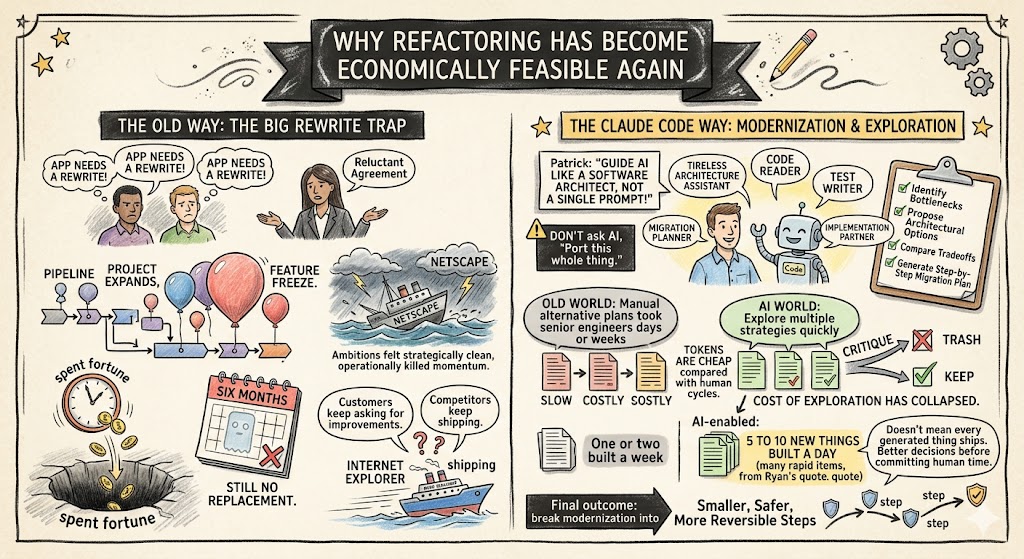
The engineering team says the app needs a rewrite. The business agrees, reluctantly. A plan forms. The project expands. Features freeze. Customers keep asking for improvements. Competitors keep shipping. Six months later, the company has spent a fortune and still does not have a shippable replacement.
The recording referenced the famous Netscape example, where an ambitious rewrite helped create the conditions for losing ground while Microsoft kept shipping Internet Explorer. That story still matters because the trap is timeless: the big rewrite feels strategically clean, but operationally it can kill momentum.
Claude Code gives founders another path. Instead of committing to a massive rewrite upfront, you can explore multiple modernization strategies quickly. You can ask Claude to analyze the existing codebase, identify bottlenecks, propose architectural options, compare tradeoffs, and generate a step-by-step migration plan.
The key is not to ask it to one-shot the whole thing.
“Don’t tell Claude, ‘Port this whole thing,’” Patrick said. “Guide AI through the same sort of process that a software architect would follow.”
That is the mindset shift. Claude Code is not just a faster typist. It is a tireless architecture assistant, code reader, test writer, migration planner, and implementation partner. Used well, it can help your team break modernization into smaller, safer, more reversible steps.
This is especially powerful because tokens are cheap compared with human cycles. In the old world, producing three serious alternative plans might take senior engineers days or weeks. With Claude, you can ask for three approaches, critique them, throw two away, and keep the best one.
As Ryan said, “You can get 5 to 10 new things built a day instead of one or two new things built a week.”
That does not mean every generated thing should ship. It means the cost of exploration has collapsed. And when exploration gets cheaper, your team can make better technical decisions before committing human time.
Start With Context Before You Start With Code
The biggest mistake teams make with Claude Code is asking for big changes without giving it enough context.
That is how regressions happen.
Claude fills gaps with assumptions. If it does not know your architecture, business rules, deployment model, customer constraints, security expectations, or historical product decisions, it will make reasonable-sounding guesses. Some will be right. Some will be wrong. The wrong ones are where the bugs come from.
Before a serious refactoring project, gather as much context as possible into places Claude can access.
- Codebase context: source code, related repositories, shared libraries, configuration files, dependency files, and build scripts.
- Product context: Jira tickets, product specs, user documentation, screenshots, customer workflows, and business process diagrams.
- Architecture context: system diagrams, database schema, deployment architecture, infrastructure-as-code, API documentation, and service boundaries.
- Operational context: production constraints, observability tools, error logs, support tickets, recurring bugs, and known fragile areas.
- Team context: coding conventions, design standards, security requirements, review processes, and “how we do things here.”
The ideal is not to copy-paste everything manually every time. The better long-term answer is to connect Claude Code to the systems your team already uses. If Jira is where your product history lives, wire Claude into Jira. If Google Docs contains specs, convert the important ones into Markdown or make them accessible. If your architecture docs live somewhere else, bring them into the repo or reference them from a local CLAUDE.md.
One especially practical idea from the discussion was to maintain an index of the 50 Jira tickets that define 90% of the product’s historical behavior. That may be enough to give Claude a working map of what matters.
This is also where product and engineering can collaborate in a new way. A product person may not be the one implementing code, but they can help create the spec, identify the canonical tickets, and define acceptance criteria. Engineering can then use Claude Code to implement against a much clearer standard.
That handoff alone can save days of ambiguity.
Build the AI-Ready Pipeline Before You Go Fast
Claude Code can produce code faster than your company can validate it. That is both exciting and dangerous.
If development velocity goes up 5x, but QA, code review, testing, and deployment stay the same, you do not have a faster company. You have a pileup. Work stacks up in review. Bugs slip through. Releases become more stressful. Engineers get frustrated because the bottleneck moved downstream.
Patrick described it well: “You get AI speed typing on one side and human speed validation on the other.”
That is why the AI-ready pipeline matters. The goal is to create automated guardrails so your team can trust faster output without manually inspecting every line at the same pace as before.
For an existing SaaS application, the most important AI-readiness layers are:
- Continuous integration: every meaningful change should automatically build, test, and report status before merging.
- Pre-commit hooks: formatting, linting, type checks, and basic rules should run before code even leaves the developer’s machine.
- Automated tests: unit tests, integration tests, and regression tests should protect the core workflows customers depend on.
- Linting and formatting: AI-generated code should conform to your house style automatically.
- Type checking: typed systems make it easier for both humans and AI to catch mistakes early.
- Dependency scanning: tools like Dependabot can catch vulnerable or outdated packages before they create risk.
- Automated code review: AI review agents can inspect changes with a clean context and flag inconsistencies.
- Deployment automation: shipping should be repeatable, low-drama, and frequent enough to avoid giant release piles.
- Observability: logs, metrics, traces, and alerts should make it clear whether production behavior changed after refactoring.
This is not glamorous work, but it is the foundation. It is the software equivalent of strengthening the bridge before increasing the traffic.
A powerful exercise from the recording was running an AI-readiness audit against your codebase. Claude can inspect whether these layers exist, identify gaps, and recommend tasks to improve them. If your app scores low, that is not an indictment. It is a roadmap.
One participant ran a small AI-generated codebase through the audit and got zero green checkmarks. The lesson was simple: AI does not automatically add engineering discipline unless you ask for it. It will write the app, but it will not necessarily add CI, tests, dependency scanning, or deployment safety unless those are part of the spec.
That is a huge point for founders.
If your team is using Claude Code but not seeing speed gains, the problem may not be the model. The problem may be that your engineering system cannot absorb the velocity.
Use Claude as the Architect Before You Use It as the Builder
When refactoring a large existing SaaS app, the first job is not implementation. The first job is diagnosis.
Ask Claude to act like a senior software architect. Have it inspect the codebase, identify tight coupling, find outdated dependencies, map risky areas, and explain what is holding the team back. Then ask it to propose multiple modernization paths.
For example, you might ask:
“What is the safest way to upgrade this application so we can release faster, reduce regressions, and make the codebase easier for AI-assisted development?”
That prompt is better than:
“Upgrade us from framework version X to version Y.”
Why? Because the first prompt gives Claude the business goal. The second gives it a task that may or may not be the right solution.
Stuart made a good observation in the recording: sometimes it is easier to tell AI what you want the code to do than to ask it to reinterpret messy old code. Patrick agreed and clarified the principle: “Agents are really good when you give them goals, not when you give them too much how.”
That is worth putting on the wall.
A founder or CTO may think the goal is “upgrade Angular four versions” or “split the monolith.” But the real goal might be “release twice a week instead of once a month,” “reduce customer-impacting regressions by 80%,” or “make it possible for two engineers to work independently without stepping on each other.”
When you give Claude the actual goal, it may propose a better path than the one you had in mind.

Avoid the Big Bang Unless You Have No Other Choice
There are several ways to modernize an old SaaS app. Some are safer than others. Claude Code can help evaluate which pattern fits your codebase, customer base, team, and risk tolerance.
The main modernization patterns are straightforward:
- Strangler pattern: gradually replace pieces of the old system with new components until the old system disappears.
- Parallel run: build a new implementation alongside the old one and compare outputs before switching over.
- Module-by-module replacement: refactor or rewrite one bounded area at a time, useful for monoliths with separable domains.
- Big Bang rewrite: rebuild everything and switch all at once, usually the highest-risk option and best treated as a last resort.
The Big Bang approach is tempting because it feels clean. But in a real SaaS business, clean architecture does not matter if you stop shipping valuable product improvements for too long. Customers do not care that your new codebase is elegant if their feature requests go unanswered for 18 months.
Claude makes incremental modernization more realistic because it lowers the cost of planning, testing, and executing smaller changes. It can help write compatibility layers, generate tests around existing behavior, map dependencies, and produce migration scripts.
That means many projects that once required a full rewrite may now be handled through a sequence of smaller, safer refactors.
Tests Are the Insurance Policy
There was a great line in the recording: it may sound funny that AI writes tests to stop AI from breaking code, but that is exactly how you create a safety net.
The key is context separation.
If Claude writes tests today and then you clear the context tomorrow before asking it to refactor a component, it does not “remember” the tests as something it wrote. The tests become independent guardrails. They are executable specifications. They encode current behavior and protect it from future changes.
This is especially valuable in legacy codebases because often nobody fully knows what the current behavior is supposed to be. The app itself is the spec. Customers have adapted to it. Support knows the quirks. Product may know the desired behavior, but the code contains the actual behavior.
Before changing old code, ask Claude to write characterization tests. These are tests that capture what the system currently does, even if the implementation is ugly. Once those tests exist, you can refactor with more confidence.
You can also ask Claude to generate tests around the most critical customer paths: signup, billing, permissions, reporting, imports, exports, integrations, notifications, and any workflow tied to revenue.
Do not try to cover everything at once. Start where regressions hurt most.
If one bug in billing can cost $50,000 in lost revenue or support time, write tests there first. If one broken integration affects 200 enterprise customers, write tests there first. If a reporting workflow drives executive dashboards for your customers, write tests there first.
This is where concrete prioritization matters. Not every test has equal business value.
Use Bug Patterns as Refactoring Input
One of the most interesting ideas in the discussion came from looking at recurring Jira bugs as a refactoring signal.
Most companies have patterns in their support tickets and bug reports. Maybe the same workflow breaks repeatedly. Maybe the same module creates downstream issues. Maybe a certain class of customer sees the same failure every month.
Claude can analyze that.
Instead of asking it to refactor randomly, feed it a set of bug reports and ask it to find architectural patterns. For example:
“These 40 Jira tickets all relate to recurring billing errors. Analyze the tickets and the related code. Identify the likely architectural root causes and propose a refactoring plan to reduce this category of bug by 80%.”
That is a much better business case than “clean up the billing code.”
It connects refactoring to real economic pain.
Patrick made a powerful point here about the hidden cost of repetitive bugs. If a software engineer gets eight bugs in a day, “I guarantee they’ll do nothing else.” Even if each bug looks small on paper, the context switching destroys flow. The team loses momentum. Product work slows. Customers feel the drag.
Most companies do not account for that cost properly. Claude can help surface it by identifying recurring patterns and turning them into a modernization roadmap.
This may be one of the highest-ROI ways to use AI coding in an established SaaS business: not building new features, but eliminating the recurring noise that keeps senior engineers from doing valuable work.
Security and Privacy Still Matter
Giving Claude Code access to your codebase is not something to treat casually. For teams on enterprise plans, privacy and data-retention controls may be available, and those should be reviewed by your technical and security leadership before broad rollout.
But the bigger practical risk may not be Claude itself. It may be the ecosystem around it.
Plugins, MCP servers, extensions, and random GitHub tools can become a new attack surface. If your developers install untrusted extensions into an environment that has access to production code, credentials, tickets, or internal docs, you have created unnecessary risk.
The right approach is basic but important: set company standards for which tools are approved, who can install them, how they are reviewed, and what data they can access.
You also need to think carefully about prompt injection when connecting Claude to systems like Jira, support tickets, customer feedback, or external emails. A trusted internal engineering ticket is different from a support ticket created by someone outside the company. If untrusted text can enter Claude’s context, your team needs filters, boundaries, and review.
This does not mean you should avoid connecting systems. The value is too high. Customer feedback, support tickets, and bug reports can become an incredible product intelligence layer. But you need to separate trusted and untrusted sources and avoid letting external content drive automated code changes without validation.
Product Managers Can Now Participate More Directly
One of the underrated changes here is that Claude Code can shift some product and engineering boundaries.
A non-technical product leader may not be ready to edit production code directly. But they can define specs, gather canonical tickets, run audits, ask architectural questions, and create structured plans that engineering can review and implement.
Ryan described the practical version of this: “Write specs in Google Docs, Jira, or wherever your team already works, and use Claude Code to help turn those specs into implementation.”
That is a big organizational shift.
The best setup may be a pod: product defines the goal, Claude helps expand it into a spec, engineering reviews the plan, Claude helps implement, automated tests validate, and a clean-context AI review checks the implementation against the original spec.
This does not remove engineers. It gives engineers better starting material and reduces the time they spend translating vague asks into executable work.
For smaller fixes, product may even be able to run Claude Code in a controlled branch or Codespace, then hand the change to engineering for review. That is not appropriate for every company or every codebase, but it is worth exploring for low-risk changes.
The important principle is this: AI-assisted development rewards clarity. Product leaders who can articulate goals, constraints, and acceptance criteria become much more valuable in the engineering workflow.
The Real Prize Is Not Just Saving Time
It is tempting to frame Claude Code as a time-saving tool. That is true, but it is not the biggest opportunity.
The bigger opportunity is doing work that previously never made economic sense.
Old dependency upgrades. Test coverage around brittle modules. CI cleanup. Dependency scanning. Refactoring noisy subsystems. Adding observability to legacy services. Modernizing deployment automation. Documenting architectural conventions. Reviewing bug patterns. Creating internal tooling. Cleaning up the long tail of technical debt.
These projects often lose in roadmap planning because they do not look as exciting as new features. But they are exactly the projects that determine whether your company can move faster next quarter.
Patrick said, “Technical debt has never been cheaper.” That is the right way to think about it.
If a modernization project used to cost 500 engineering hours and now costs 150 hours plus AI token spend, the ROI calculation changes. If a framework upgrade used to require a three-month freeze and now can be planned, tested, and released incrementally, the risk calculation changes. If writing 200 regression tests used to feel impossible and now Claude can generate a strong first draft, the safety calculation changes.
This does not mean every refactor is worth doing. It means founders should revisit old assumptions.
A project that was irrational in 2022 may be rational in 2026.
A Practical Starting Point for Your SaaS Company
Start with an AI-readiness audit. Do not start with the sexiest refactor. Do not start by asking Claude to rewrite your hardest module. Start by asking: can our engineering system safely absorb AI-generated velocity?
Run the audit against your main codebase and score the basics: CI, tests, linting, formatting, type checking, dependency scanning, automated review, deployment automation, and observability.
Then pick the top one or two gaps.
If you have no dependency scanning, add it. If you have no pre-commit hooks, add them. If your build cannot run locally, fix that. If there are no tests around your most important workflows, ask Claude to help write them. If your deployment process is manual and fragile, document it and start automating.
The goal is not to become perfect. Nobody in the recording reported a perfect 9-out-of-9 readiness score. The goal is to improve the foundation enough that Claude Code becomes a force multiplier instead of a regression generator.
Then choose one contained refactoring target with a clear business reason. Maybe it is the module causing the most bugs. Maybe it is the framework upgrade blocking future hiring. Maybe it is the deployment bottleneck that prevents frequent releases. Maybe it is an old service nobody wants to touch.
Give Claude the goal. Give it context. Ask for multiple plans. Review the plans with a senior engineer. Write the plan down. Add tests first. Implement incrementally. Use clean-context review. Ship in small releases.
That is how you make this real.
Final Thoughts
Refactoring your existing SaaS app with Claude Code is not about handing your codebase to an AI and hoping for magic. It is about changing the economics of modernization while respecting the realities of production software.
The best teams will use Claude to read more code, write more tests, explore more options, document more decisions, and reduce the cost of technical debt. They will not skip architecture. They will not skip QA. They will not skip security. They will move faster because they built the guardrails that make faster safe.
The founder takeaway is simple: your old codebase is not as stuck as it used to be.
You may have modernization projects your team avoided for years because they were too expensive, too risky, or too disruptive. Those assumptions deserve a fresh look. With Claude Code, a strong spec, an AI-ready pipeline, and disciplined validation, your team can start turning the codebase from a drag on growth into an accelerant.
And once that happens, the business changes. Product ships faster. Engineers spend less time fighting old problems. QA becomes more automated. Product managers contribute clearer specs. Customers see improvements more often. The whole company learns to operate at a new speed.
As Ryan said, the point is to “make your existing SaaS application AI-ready” so your team can build more, ship faster, and get back to the work that actually grows the company.