
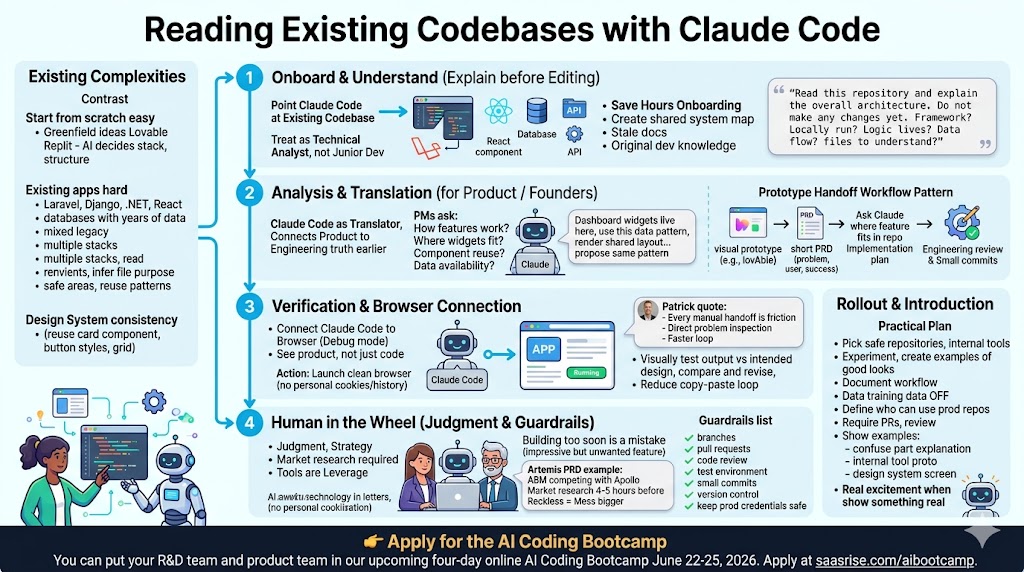
Reading Existing Codebases with Claude Code
A founder-focused guide to using Claude Code to understand, map, and safely improve existing codebases. It explains how AI can help product and engineering teams read complex repositories, plan changes before editing, connect prototypes to real systems, and move faster without losing technical discipline.

One of the biggest unlocks in AI coding is not building a toy app from scratch. That’s fun, and it’s a great way to learn. But the real leverage comes when you can point Claude Code at an existing codebase and ask it to understand what’s already there.
Most SaaS companies are not starting from zero. They already have a product. They already have a website, a database, an API, a design system, a backlog, a few years of engineering decisions, and probably a few areas of the codebase that nobody loves touching. The question is not just, “Can AI build a new app?” The better question is, “Can AI help us understand, improve, and safely extend the product we already have?” That is where Claude Code starts to become incredibly valuable.
You can put your R&D team and product team in our upcoming four-day online AI Coding Bootcamp June 22-25, 2026. Apply at saasrise.com/aibootcamp.
I’ve been building SaaS companies for 23 years, but I’ve always been the non-technical founder. I’ve been the product owner, the product strategist, the CEO, the person who understands the customer and the business problem, but I’ve always partnered with a technical builder to turn the vision into working software.
That’s why this moment is so exciting to me. AI coding does not just let you create a landing page or prototype a new app. It lets product people, founders, and engineers create a shared understanding of an existing system much faster than before. Instead of waiting days for someone to explain how a feature works, you can ask Claude Code to inspect the repository, read the files, follow the routes, identify the data model, and explain the architecture in plain English.
As I said in the session, “The old world of hand coding pre-2026 is ending.” I don’t mean engineering is ending. I mean the old workflow, where every product idea had to slowly move through layers of translation before anyone could see it working, is being replaced by something faster, more collaborative, and much more iterative.
Why existing codebases are the real test
Starting from scratch is easy compared to working inside an existing product.
When you build a new prototype in Lovable, Claude Artifacts, Google AI Studio, or Replit, the AI can make all the decisions. It can choose the stack, create the file structure, pick the database pattern, and decide how the app should work. That’s useful for greenfield ideas.
But real companies rarely have that luxury.
Your app may already be built in Laravel, Rails, Django, .NET, React, Angular, Vue, Flutter, Xamarin, or some combination of all of the above. You may have a marketing site in WordPress or Webflow, a product app in React, a backend API in Node or Python, a mobile app in React Native, and a database with years of production data.
That means Claude Code has to do something harder than generate. It has to read.
It has to understand the conventions already in place. It has to infer why certain files exist. It has to understand which parts of the system are safe to touch and which ones need more care. It has to know when to reuse a pattern instead of inventing a new one. And most importantly, it has to help the human at the keyboard understand what is going on before it starts making changes.
This is the real frontier for AI coding inside companies.
A brand-new app proves that the model can generate code. An existing codebase proves whether the model can become useful inside your actual business.
Start by asking Claude Code to explain before it edits
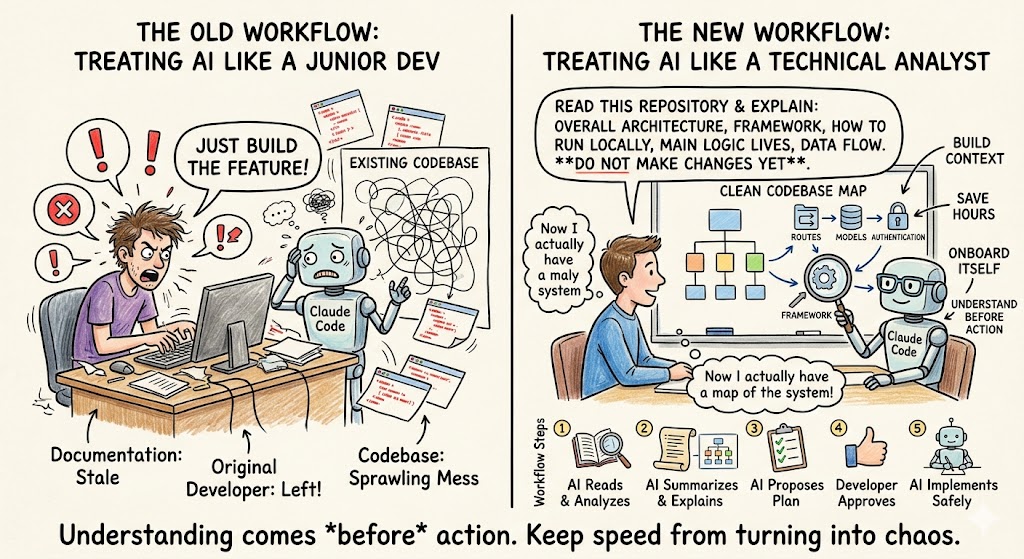
The first thing I would do with Claude Code inside an existing repository is not ask it to build a feature. I would ask it to read.
That sounds simple, but it changes the whole workflow. Instead of treating Claude Code like a junior developer who needs a task, treat it like a technical analyst who can onboard itself into the system. Ask it what the codebase does. Ask it how the app starts. Ask it what framework is being used. Ask it where the routes live, where the database models are defined, where authentication is handled, and where the feature you care about probably lives.
This matters because many teams have codebases that even their own people don’t fully understand anymore. The original developer left. The documentation is stale. The README only works if you already know the missing steps. The product has evolved through hundreds of small changes, and nobody has a clean map of the system.
Claude Code can help create that map.
A good first prompt might be:
“Read this repository and explain the overall architecture. Do not make any changes yet. Tell me what framework it uses, how to run it locally, where the main application logic lives, how data flows through the system, and what files I should understand first.”
That single prompt can save hours. It gives the founder, product manager, or new engineer a starting point. It also gives Claude Code a chance to build context before it acts.
The key phrase is: do not make any changes yet.
AI agents are powerful because they can take action. But when you are dealing with an existing codebase, action should come after understanding. I like having Claude Code summarize what it sees, then propose a plan, then implement only after I approve the direction.
That is how you keep speed from turning into chaos.
The prototype-to-codebase handoff
One of the most useful patterns we discussed was the handoff from prototype to production.
I’ve been using tools like Google AI Studio, Claude Artifacts, and Claude Design to get ideas out of my head and into a visual form. As I said, “We just started typing in English what we wanted, and once I had something that visually looked like what I wanted, we were able to actually build it live.”
That’s exactly how we worked on Pulse.bot and Artemis.
With Pulse, I had a personal problem. I needed to stay up to date on AI, SaaS, and technology news, but the information was scattered across too many places. So we prototyped the idea in Google AI Studio in June and July of 2025. Then Steve Canfield built it into a real application using Claude Code inside Cursor, deployed on Vercel, with Supabase as the database. Today, it’s a real product with tens of thousands of visitors per month and roughly 100,000 pages.
With Artemis, our account-based marketing list-building tool, I prototyped the first version in Claude Artifacts. Steve then turned it into a functioning product with Claude Code, Cursor, Vercel, and Supabase.
The handoff worked because the prototype gave Steve something real to inspect. It was not just a paragraph in a Google Doc. It was a visual representation of what I wanted. But Steve still had to do the real technical work: understand the functionality, plan the architecture, and create a proper implementation path.
Steve put it well: a big part of doing things correctly is planning and creating an in-depth PRD.
That’s the balance. The prototype accelerates the conversation. Claude Code accelerates the implementation. But product thinking and engineering judgment still matter.
A practical handoff from prototype to existing codebase usually looks like this:
- Build a quick prototype in Claude Artifacts, Claude Design, Lovable, or another visual tool.
- Write a short PRD explaining the user, the problem, the workflow, and the success criteria.
- Ask Claude Code to read the existing codebase and identify where the new feature should fit.
- Have Claude Code create an implementation plan before touching files.
- Let engineering review the plan, then implement in small commits.
That workflow is dramatically faster than the old version, but it still respects the codebase.
Claude Code as a product manager’s translator
One of the things I’m most excited about is how Claude Code changes the relationship between product and engineering.
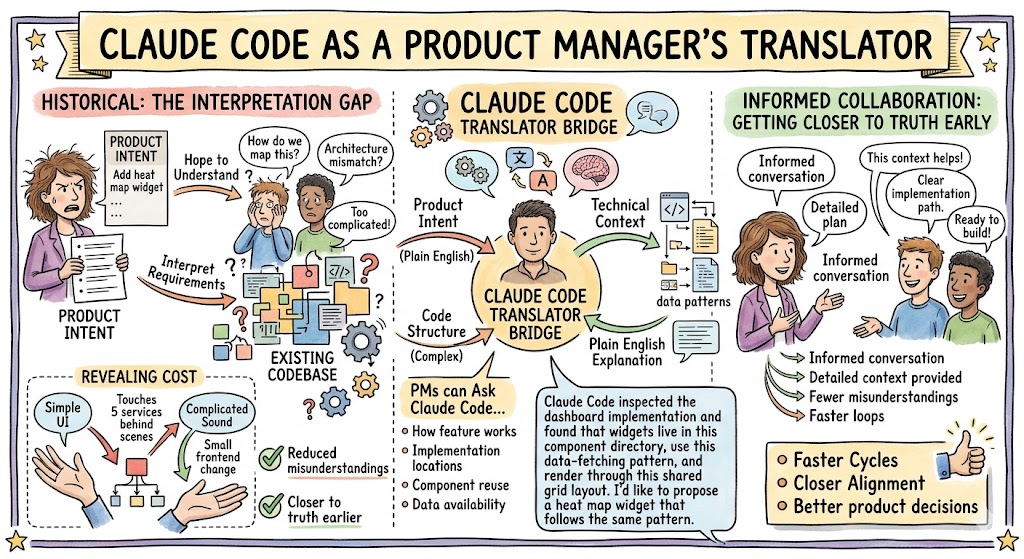
Historically, product managers and founders had to describe what they wanted, then hope engineering understood it. Engineers had to interpret those requirements, map them into the existing codebase, and push back when the product idea didn’t fit the architecture.
With Claude Code, both sides can get closer to the truth earlier.
A product manager can ask Claude Code to explain how an existing feature works. They can ask where a new dashboard widget would likely be implemented. They can ask which components are reused across the app. They can ask what data is already available versus what would require a new API endpoint.
That does not mean the product manager should start merging code into production. But it does mean they can have a much more informed conversation with engineering.
For example, instead of saying, “Can we add a heat map widget to the dashboard?” they can say, “Claude Code inspected the dashboard implementation and found that widgets live in this component directory, use this data-fetching pattern, and render through this shared grid layout. I’d like to propose a heat map widget that follows the same pattern.”
That is a much better starting point.
It also helps non-technical leaders understand the cost of their requests. Sometimes a feature looks simple in the UI but touches five services behind the scenes. Sometimes a feature sounds complicated but is actually a small frontend change. Claude Code can help reveal that difference.
This is where the tool becomes a translator. It translates product intent into technical context. It translates code structure into plain English. And it helps both sides reduce the number of misunderstandings that slow teams down.
Claude Code and the browser: seeing the product, not just the code
One of the most powerful ideas from the transcript was connecting Claude Code to a browser.
This matters because software is not just files. Software is what the user experiences on the screen. A code change may compile successfully and still look wrong. A dashboard widget may render but be misaligned. A form may submit but feel confusing. A page may technically work but violate the design system.
Claude Code becomes much more useful when it can inspect the running application.
Patrick demonstrated this by launching Chrome in debug mode, creating a clean browser instance with no personal cookies or accounts, and letting Claude Code connect to it. That gives the agent a way to see what is open, interact with pages, inspect behavior, and potentially compare the app’s actual output against the intended design.
That is where existing codebase work gets more interesting. You can ask Claude Code to make a change, run the app locally, open the browser, take a screenshot, compare it to the target design, and revise.
That reduces the copy-paste loop.
One of the best lines from the session was Patrick saying, “If I’m copying and pasting something back and forth, or bouncing between tools, I’m the problem.” That’s the right way to think about agentic workflows. Every manual handoff is friction. The more directly Claude Code can inspect the problem, the faster the loop becomes.
But there’s a safety point here too. You don’t want to hand an AI agent your normal browser session with your email, LinkedIn, banking, admin tools, and company systems all logged in. The safer approach is to run a separate clean browser instance. No cookies. No history. No logged-in accounts unless you explicitly choose them.
That gives you the upside of browser-based testing without giving the agent access to your whole digital life.
The right person still needs to be at the wheel
AI coding can make people overconfident.
A founder sees Claude generate an app in 10 minutes and thinks, “Great, I can now ship product changes directly.” A product manager sees a working prototype and thinks, “Why do I need engineering?” An engineer sees Claude refactor a file and thinks, “Let’s let it loose on the whole repo.”
That is where teams get into trouble.
As I said in the session, “The product owner that really understands the vision should write the basic foundation of what the product should do, then put that into ChatGPT or Claude for feedback before building.” The human still brings the judgment. AI can accelerate research, planning, design, coding, and review, but it does not replace product strategy.
The same is true technically. For small changes, a product manager may be able to propose a pull request with Claude Code. For more complex work, a senior engineer or software architect should be the one guiding the agent. The more important the system, the more experienced the person at the wheel should be.
This is especially true inside existing codebases. Claude Code can move fast, but it does not automatically understand your production risks. It may not know which customer workflows are fragile. It may not know which cron job depends on a certain field. It may not know which part of the system has hidden business logic that never got documented.
That does not make the tool unsafe by default. It means you need guardrails.
Use branches. Use pull requests. Use code review. Use test environments. Use staging. Use small commits. Use version control. Keep production credentials out of the agent’s reach unless you have a very clear reason and a very strong sandbox.
Patrick said it perfectly: “We didn’t need AI to make mistakes, but it lets you make them a lot faster.” That’s the reality. AI accelerates whatever process you already have. If your process is thoughtful, AI makes you faster. If your process is reckless, AI makes the mess bigger.
Using Claude Code to understand design systems
A lot of existing codebase work is not backend architecture. It’s UI consistency.
A product team wants to add a new page, widget, modal, report, or settings screen. The hard part is not necessarily generating the code. The hard part is making it look and feel like the rest of the product.
That came up in the discussion around Claude Design and Figma. Building something from scratch with AI is easy. Building something that respects an existing design library is harder. If your company has a mature design system, you don’t want AI creating random buttons, colors, spacing, and layouts.
This is where Claude Code and Claude Design can work together.
Claude Design can help create the screen or workflow based on your brand guidelines, Figma file, or design system. Claude Code can then inspect the existing codebase and figure out which components, styles, and patterns are already used. Instead of generating a one-off UI, it can reuse your existing card component, button styles, layout grid, data table, and charting library.
That is how AI starts to fit into a real product organization.
The product manager can describe the desired user experience. Claude Design can help visualize it. Claude Code can read the existing codebase and implement it using existing patterns. Engineering can review the output and make sure it belongs.
This is a much better model than dropping AI-generated UI into a mature product and hoping it matches.
What Claude Code can do inside an existing repo
Once Claude Code has read the codebase, there are several high-value tasks it can help with. The temptation is to start with big features, but I’d start smaller. Let it build trust.
Ask it to explain. Ask it to document. Ask it to trace a bug. Ask it to identify dead code. Ask it to summarize a module. Ask it to find where a feature is implemented. Ask it to write a test for an existing function. Ask it to make a small UI copy change. Ask it to update a component while preserving the existing pattern.
These small tasks help the team learn how Claude Code behaves inside your repository. They also help Claude build context without making risky changes.
Over time, you can expand the scope.
Here are good starter tasks for reading an existing codebase with Claude Code:
- “Explain how authentication works in this app and which files are involved.”
- “Find where the dashboard widgets are rendered and summarize the component structure.”
- “Trace how this API endpoint works from route to database query.”
- “Identify the safest place to add a new field to this form.”
- “Create a short developer onboarding guide for this repository.”
- “Look for duplicated logic in this feature area and suggest a refactor plan.”
- “Run the tests, summarize failures, and propose the smallest fix.”
That is not just coding. That is codebase intelligence.
And for many companies, codebase intelligence is exactly what’s missing. The product has years of accumulated logic, but the understanding lives in people’s heads. Claude Code can help pull that understanding into writing.
Don’t skip market and product thinking
One of the biggest mistakes with AI coding is building too soon.
Because the tool makes it easy to create a prototype or modify code, people skip the hard part: deciding whether the thing should exist. This is dangerous for founders because it feels productive. You can spend three days building an impressive AI-generated feature that nobody wants.
That’s why I’m still a big believer in doing the product work first.
When I built the PRD for Artemis, I started with the concept: an account-based marketing tool designed to compete with Apollo. Then I used AI to research the market, understand competitors, think through workflows, and refine the product requirements. “I write the outline myself, then iterate with either ChatGPT or Claude to give me feedback and plan it out before I start building.”
That took a couple of hours, and it was time well spent.
My advice is simple: “Don’t start coding if you’re actually building something real that you plan to sell until you’ve done four to five hours of market research.”
That applies even more when working in an existing codebase. Every change has a cost. Every feature adds complexity. Every new workflow needs maintenance. AI reduces the cost of implementation, but it does not reduce the cost of cluttering your product with the wrong ideas.
Claude Code can help you build faster, but the founder or product leader still needs to decide what is worth building.

How to introduce this inside your company
Rolling out Claude Code into an existing engineering organization is not just a technical decision. It’s a change management decision.
Some companies will have engineers who are excited and already using these tools every day. Others will have engineers who are skeptical, worried, or even threatened. Some companies will have no guardrails at all, while others will create so much policy that nobody can use the tools effectively.
The answer is not chaos, and it’s not paralysis.
You need a practical adoption plan. Start with learning. Pick a few safe repositories or internal tools. Let engineers and product managers experiment. Create examples of what good looks like. Document the workflow. Decide what data can go into AI tools. Turn off training on company data where appropriate. Define who can use Claude Code on production repositories. Require pull requests and code review. Teach people how to use branches.
Most importantly, make the goal clear. You are not adopting Claude Code so people can play with a new toy. You are adopting it to reduce cycle time, improve understanding, make better product decisions, and ship more of the right work.
In my experience, people get excited when they see something real. Have someone use Claude Code to read a confusing part of the codebase and generate documentation. Have someone prototype a long-requested internal tool. Have someone use Claude Design to create a new screen that follows the company’s design system. Then show the team.
You’ll get one of two reactions: disbelief or excitement. Often both.
The future of working with existing code
The future is not AI replacing engineering teams. The future is AI making every serious builder more capable.
A founder can understand more of the product. A product manager can write better specs. A designer can hand off more complete workflows. An engineer can onboard into unfamiliar code faster. A senior architect can guide a powerful agent through complex changes. A small team can move with the speed of a much larger team.
That’s the part that excites me most.
When I look at what Steve and I have been able to do with Pulse and Artemis, it’s clear that the team structure is changing. We don’t need a 20-person team to make meaningful progress. We need a clear product owner, a strong technical builder, the right AI tools, and a fast feedback loop.
Claude Code is especially valuable because it can meet your company where it already is. It can read your existing codebase. It can understand your patterns. It can run your app locally. It can connect to a browser. It can help generate documentation, tests, refactors, and features. But it works best when you give it context, constraints, and a clear goal.
The practical next step is simple. Pick an existing repository. Don’t ask Claude Code to change anything at first. Ask it to explain the system. Ask it to draw the map. Ask it where a small change would go. Then let it propose a plan.
Once you trust the plan, let it make one small change. Run it. Review it. Commit it. Learn from it.
That is how teams will build confidence.
And over time, the companies that learn how to read, understand, and improve existing codebases with AI will have a serious advantage. They will move faster without starting from scratch. They will unlock old systems that used to be too painful to touch. They will help product and engineering speak the same language.
That is the real promise of Claude Code. Not just creating new code, but helping us finally understand and improve the code we already have.