
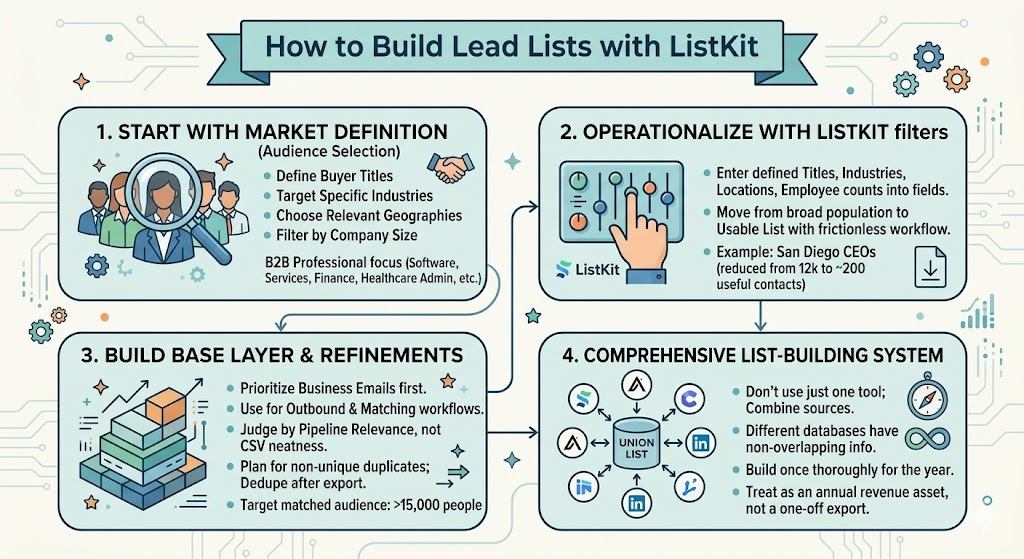
How to Build Lead Lists with ListKit
A straightforward look at how to use ListKit to build fast, cost-effective lead lists for outbound and matched audience campaigns. The post explains how to start with market definition, build broader than your instincts, and use ListKit as part of a larger list-building system.

Some founders start by obsessing over the tool instead of the market. Should we use Apollo, ListKit, Instantly, Clay, LinkedIn Sales Navigator, or some combination of all of them? That is not actually the first question. The first question is who you want to target and whether that market is big enough, valuable enough, and reachable enough to justify building the list in the first place. As I mentioned in the session, “The first step of B2B marketing is audience selection.”

ListKit is a very solid tool for turning that market definition into an actual working export quickly. The reason I like it is not because it magically solves strategy. It does not. I like it because once you know the job titles, industries, geographies, and company characteristics you want, you can move fast and get a usable list without a lot of friction. As I said during the training, “You just do what you did earlier on your target market sheet, and you just put it into the fields and the searches for these three different products. And it’s really as simple as that.”
The larger point is that ListKit is not just an outbound tool. Your lead list is the raw material for outbound email, matched audience ads, retargeting, and broader ABM execution. If you build the right list, you can use it across channels. If you build the wrong list, you just end up spreading bad targeting faster.
Start with the market, then use ListKit to operationalize it
The easiest mistake to make in any lead database is to begin with filters instead of first principles. I prefer to start by getting clear on the market definition: buyer titles, adjacent titles, industries, countries, company size, and whether the people I’m targeting are the kind of professionals who actually show up in these databases. In the session, I made that point pretty directly: “As long as your contacts are people that probably have a LinkedIn profile, or at least most of them do, then you can use Apollo, ListKit, and Instantly very easily and nicely.”
That matters because tools like ListKit work especially well for white-collar and B2B professional audiences. If you sell into software, services, agencies, finance, healthcare administration, education administration, or other professional markets, this is usually a very efficient way to build the first version of your list. If you are trying to target markets that are less represented online, or people who do not sit at a computer all day, then you may need different data sources or a more custom workflow.
What I want founders to understand is that ListKit is only as good as the clarity you bring to it. If you just vaguely say, “We sell to mid-market companies,” you are going to get a vague list. If you know the exact title bands, the right industries, the countries that matter, and the employee ranges that match your sales motion, then ListKit becomes useful very quickly.
- Define the buyer titles before you open the tool.
- Focus on industries that match real customer fit, not aspirational fit.
- Filter to the countries and company sizes that make sense for your ACV.
- Make sure the people you are targeting are likely to exist in B2B data sources.
This is really the mindset shift. The tool is not the strategy. The strategy is good audience selection, and the tool is there to help you execute it faster. When founders get that right, list building stops feeling like admin work and starts feeling like market creation.

ListKit is useful because it gets you to a working list fast
One thing I like about ListKit is how simple the workflow is. In the demo, I literally walked through it in a few steps: choose the job titles, set the geography, narrow the industry, and download the leads. In the example, I used San Diego CEOs just to show the mechanics, and the system moved from roughly 12,300 CEOs in San Diego down to 189 relevant CEOs, with 203 people available for export depending on the final settings.
That example matters because it shows what these tools are actually for. They are not abstract data platforms. They are practical market-slicing tools. You take a broad population, apply your ICP logic, and turn it into a list you can actually use in campaigns. As I said on the call, “I just click download leads. And you wanna get the business email. You don’t really need the mobile phone number unless you’re gonna use that for matching purposes or to call them.”
There is also a cost advantage here that matters a lot for founders. In the training, I explained that ListKit and Instantly come out to about two cents per record, which makes them attractive baseline sources for building large market lists without spending Clay-level money. That matters when you are trying to build 50,000, 100,000, or 250,000-person datasets and still keep the economics reasonable.
- Use ListKit to build the first strong version quickly.
- Prioritize business emails first since they are enough for outbound and a lot of matching workflows.
- Add mobile numbers only if they are actually useful for your channels.
- Think in terms of building a usable base layer, not a perfect final asset.
That speed matters because list building is not the finish line. It is the foundation. As I explained in the training, “This is the foundational step to mid market and enterprise marketing,” and if you skip it, everything else becomes harder than it should be.
Build wider than you think, then refine with evidence
A lot of founders narrow too early. They get obsessed with exact titles, perfect title strings, or an ultra-clean CSV before they have even tested whether the market is broad enough to work. In practice, that usually leads to underbuilding the list and accidentally filtering out relevant buyers.
What I have found is that commercial usefulness matters more than cosmetic neatness. In the session, I made the point this way: “Go a little bit wider with your targeting because the cost of showing ads is low.” That is a really important idea. If a slightly broader list helps you keep the actual buyers in the audience, that is usually a very good trade.

This is especially true if you plan to use the list for matched audience ads and not just outbound email. In the demo, I explained that “You need at least five thousand people to build a good matched audience with,” and I would “only really recommend building matched audiences if you have at least fifteen thousand people in your target market.” Those numbers matter because they force you to think beyond small handcrafted lists and toward actual market coverage.
There is another practical wrinkle here with ListKit specifically. It does not natively support suppression-list handling the same way Clay or Apollo can, so if you are combining multiple data sources, you should expect overlap and plan to deduplicate after export. In the session, I explained that with ListKit and Instantly, “You just have to buy it and then know that about fifty percent is gonna be nonunique, and then you dedup it later using ChatGPT.”
- Do not overfit the first version of the list to hyper-specific titles.
- Build broad enough to include the real buying committee.
- Plan for overlap if you are using multiple tools and dedupe after export.
- Judge the list by pipeline relevance, not by how pretty the CSV looks.
This is where founder judgment matters. A list with some noise but strong commercial relevance is usually far more valuable than a list that looks clean but misses half the market. You do not need a perfect file. You need a list that gives you enough reach to create awareness, generate engagement, and learn what the market is telling you.
ListKit should be one part of a comprehensive list-building system
The biggest mistake I see is founders asking which one tool they should use as if there is going to be one perfect database. Usually there is not. Different data sources have different coverage, different strengths, and different pockets of non-overlapping information. That is why I said very directly in the session, “Just use all of them. Just use all three that I just demoed. Build a comprehensive list of the union of all three.”
That is also how we approach it in practice. We tend to use multiple sources including Apollo, Instantly, Clay, ListKit, and LinkedIn Sales Navigator because each one contributes different data and helps fill in gaps left by the others. The goal is not loyalty to one platform. The goal is to build the most comprehensive useful list of your market that you can justify economically.
The economics of that decision depend on your stage. If you are early and cash is tight, a lower-cost list from one source is a fine place to begin. If you have more resources and the market opportunity is meaningful, it usually makes sense to invest once, do it thoroughly, and build a more complete union list you can use for the next year. As I told the group, “You really don’t wanna be doing this every couple months. You really wanna be doing this, like, once a year.”
- Start with ListKit if you want a lower-cost, fast-moving source of leads.
- Combine it with other tools when coverage and completeness matter.
- Build once thoroughly instead of rebuilding partial lists every quarter.
- Treat the final output as an annual revenue asset, not a one-off export.
That is really the founder takeaway. ListKit is not the strategy. It is one very practical way to turn a good market definition into a usable list quickly and affordably. Used well, it helps you build the audience layer that powers outbound, matched audience ads, and long-term ABM. And as I said near the end of the session, “The way to breakthroughs is mistakes. The way to innovation is screw ups.” So build the list, play with the filters, learn the interface, and let the market teach you what the next version should look like.