
Building an AI App with AI Coding
A practical guide to building your first AI-powered app using AI coding tools like Claude Code, Cursor, and Claude Artifacts. Learn how to prompt effectively, use plan mode, create simple prototypes, save your work with Git, and understand when to move from a quick AI-generated prototype to production-ready software.

There’s a moment that happens when someone builds their first working app with AI. It might be a tiny Kanban board, a simple chat tool, a weather script, or a goofy browser game, but the feeling is the same: wait, I can actually make software this way? That moment matters because it changes how founders, product leaders, and operators think about building. AI coding is no longer just autocomplete for engineers. It is becoming a new way to turn ideas into prototypes, prototypes into internal tools, and internal tools into real products.
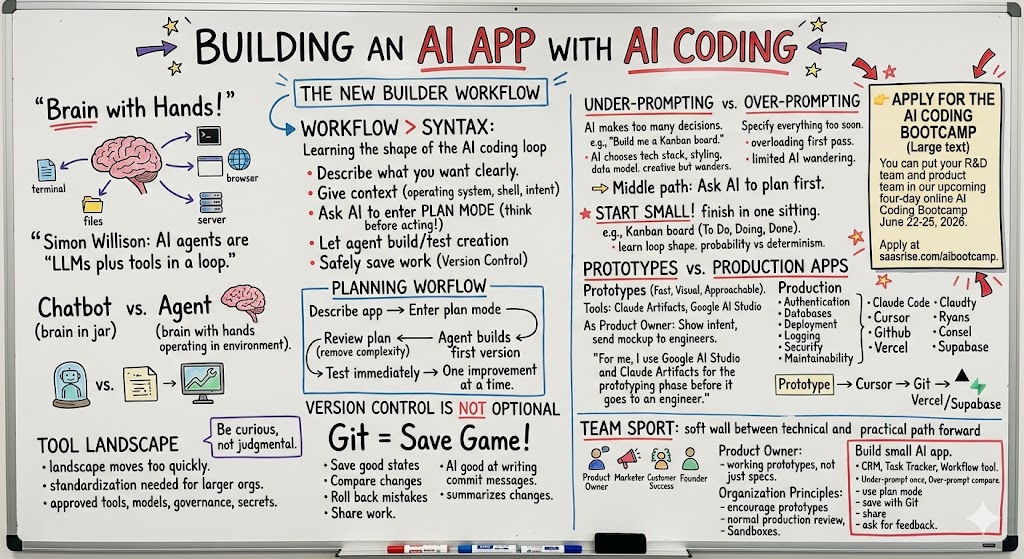
The big lesson from this transcript is that building an AI app with AI coding is less about memorizing syntax and more about learning the workflow: how to describe what you want, how to give the AI enough context, how to let it plan before it builds, how to test what it creates, and how to safely save your work. Claude Code, Cursor, Claude Artifacts, Google AI Studio, GitHub, Vercel, Supabase, and other tools all fit into this broader shift. As Ryan put it during the discussion, “For me, I use Google AI Studio and Claude Artifacts for the prototyping phase before it goes to an engineer.” That is the founder-level unlock: you can now build enough of the idea to see it, test it, and communicate it before pulling a full engineering team into the loop.
You can put your R&D team and product team in our upcoming four-day online AI Coding Bootcamp June 22-25, 2026. Apply at saasrise.com/aibootcamp.
The shift from “AI writes code” to “AI builds with you”
A lot of people still think about AI coding in the old frame: you ask ChatGPT to write a code snippet, copy it into your editor, run it, see what breaks, paste the error back, and repeat. That is useful, but it is not the full story anymore.
The new world is agentic. An AI agent is not just a language model that generates text. It is a language model plus tools, running in a loop. It can inspect files, write files, run commands, call APIs, test outputs, and continue working toward a goal. Patrick summarized this with a simple phrase from Simon Willison: AI agents are “LLMs plus tools in a loop.” That distinction matters because software development is not just writing code. It is setting up environments, making decisions, debugging, testing, refactoring, saving progress, and communicating changes.
A normal chatbot is like a very smart brain in a jar. It can reason, explain, and generate. But unless you connect it to tools, it cannot really do much. Claude Code, Cursor, and similar tools give that brain hands. They let the AI operate in the same environment where software actually lives: files, folders, terminals, browsers, servers, repositories, and deployment workflows.
That is why the first AI-generated script exercise was so useful. Participants asked different models to write a simple shell script to show local weather. Some got Bash when they needed PowerShell. Some got HTML dumped into a terminal. Some got working code, but only because the model guessed the environment correctly. The lesson was not that LLMs are bad at code. The lesson was that context is everything.
When you ask a chatbot to write a script, it has to guess your operating system, your shell, your installed tools, and your intent. When you use an agent inside your actual project folder, it can inspect what is there and adjust. It still makes mistakes, but it has a much better chance of closing the loop itself.
This is the new builder skill: not “Can I write every line myself?” but “Can I guide an agent toward a working result?”

Start with something small enough to finish
The best first AI app is not your full product. It is not your legacy enterprise platform. It is not a multi-tenant app with authentication, billing, notifications, background jobs, and four API integrations.
The best first AI app is small enough that you can finish it in one sitting.
In the transcript, the shared exercise was to build a Kanban board. That was a smart choice because almost everyone understands the concept: cards move between columns like To Do, Doing, and Done. It has enough structure to be interesting, but not so much complexity that the AI gets buried in edge cases.
The purpose of an exercise like that is not to ship the world’s best Kanban board. It is to learn the shape of the AI coding loop. You prompt. The AI builds. You inspect. You ask for changes. It adjusts. You test again. You compare your result with others and realize that the same general idea can produce wildly different implementations depending on the prompt.
Patrick made a great point during the debrief: large language models are probabilistic, not deterministic. Code is deterministic once it runs, but the generation process is not. Give the same vague prompt to the same model twice and you may get two different apps. Give a vague prompt to five people in the same room and everyone may end up with a different interface, framework, or level of polish.
That can feel unsettling if you come from traditional software engineering, where precision is everything. But it is also the source of the creativity. The model fills in blanks. Sometimes that is helpful. Sometimes it is not. Your job is to decide which blanks you want the AI to fill and which ones you need to define.
Ryan captured the non-technical founder experience well when he said, “I’m an entrepreneurial rebel.” He was building in Claude Artifacts while others were using Claude Code in the terminal. That is an important point. Different tools support different levels of ambition and technical comfort. A founder may want a quick visual prototype. A developer may want a local agent with full project access. A product manager may want a clickable artifact to share with engineering. The right tool depends on the job.
Under-prompting, over-prompting, and planning
One of the most useful lessons in the transcript was the contrast between under-prompting and over-prompting.
Under-prompting is when you say something like, “Build me a Kanban board.” The model has to make almost every decision. Should it use Python? React? Plain HTML? Should cards be draggable? Should there be persistence? Should it look minimal or colorful? Should it support users? Should it save to local storage? Should it have a database?
Over-prompting is when you specify everything: the tech stack, columns, styling, data model, drag-and-drop behavior, local storage, mobile responsiveness, and maybe even file names. This gives the AI much less room to wander, but it can also overload the first pass if you specify too much too soon.
Neither approach is always right. Under-prompting is useful when you want to see what the AI will choose. Over-prompting is useful when you already know the product requirements. But the most reliable pattern is often something in the middle: ask the AI to plan first.
Plan mode is one of the most important habits to build. Instead of telling Claude Code to immediately write code, you tell it to think through the approach first. You can ask it to explain the architecture, identify files it will create, propose a simple implementation path, and list trade-offs. Only after you approve the plan does it start making changes.
A good working pattern looks like this:
- Describe the app in plain English, including who it is for and what it should do.
- Ask the AI to enter plan mode and propose the simplest useful implementation.
- Review the plan, remove unnecessary complexity, and clarify anything vague.
- Let the agent build the first version, then test it immediately.
- Ask for one improvement at a time instead of piling on ten changes.
That workflow sounds slower than just saying “build it,” but it usually saves time. The more important the project, the more you want the agent to think before acting. If it is a throwaway toy app, let it rip. If it is touching a real codebase, planning is your safety rail.

The difference between prototypes and production apps
A recurring theme in the conversation was the difference between building a prototype and building production software.
Claude Artifacts and Google AI Studio are great for prototypes. They are fast, visual, and approachable. You can ask for a UI, see it in the browser, make changes conversationally, and publish or share a link. Ryan explained it clearly: “What I find this useful for is prototyping. As a product owner, I can build something that looks pretty good, then save the artifact, publish it, and send it to a real developer who can build it for real.”
That is a big deal. In the old world, a product owner might write a spec, create a wireframe, or describe a workflow in a meeting. In the new world, they can show a working mockup. Even if it is not production-ready, it communicates intent much more clearly than a paragraph in a ticket.
But a prototype is not the same as a production app. Production apps need authentication, databases, deployment, logging, error handling, security, permissions, data validation, testing, maintainability, and integration with the rest of the company’s systems. AI can help with all of that, but you need the right environment and the right standards.
This is where Claude Code or Cursor becomes more relevant. If you want to connect to Supabase, deploy on Vercel, run tests, build mobile apps through Xcode, or work inside an existing Laravel, .NET, Angular, Flutter, or React codebase, the agent needs access to the actual project. It needs to run where the code runs.
Ryan’s comment on Cursor was helpful here: “This is more of a full-stack IDE development platform, something between command-line Claude Code and Google AI Studio or Claude Artifacts.” That middle ground matters. Many teams will use multiple tools, not because they are confused, but because the work has multiple stages.
A practical founder workflow might be:
- Use Claude Artifacts or Google AI Studio to explore the UI and workflow.
- Use Claude Code or Cursor to turn the prototype into a real application.
- Use GitHub to save versions and collaborate with the engineering team.
- Use Vercel, Supabase, Cloudflare, or similar tools to deploy and operate the app.
That is how the idea moves from sketch to software.
Version control is not optional anymore
One of the most important non-obvious lessons was about Git.
If you are an engineer, Git is already part of your daily life. If you are a founder, marketer, operator, or product leader, Git can feel like a foreign country. But AI coding makes version control more important, not less.
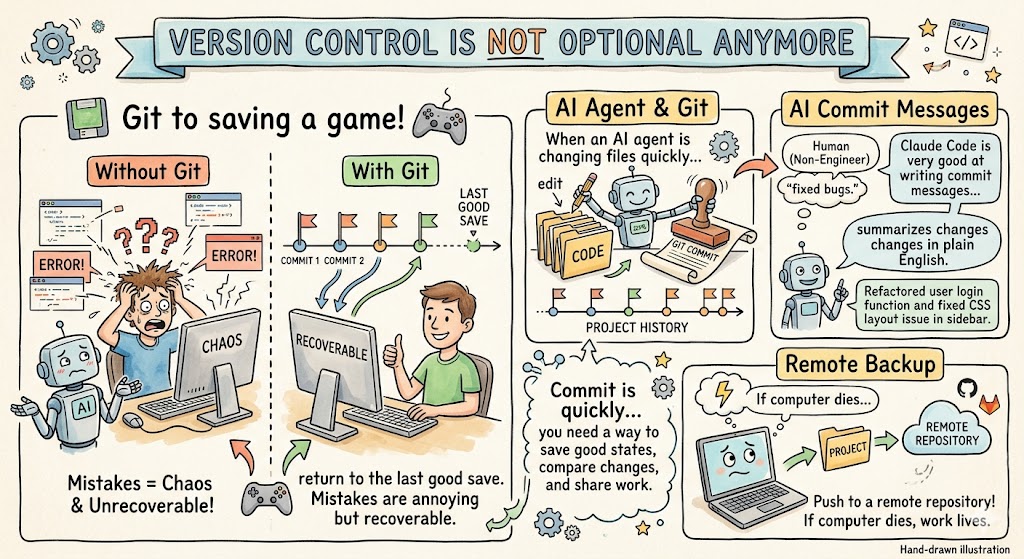
When an AI agent is changing files quickly, you need a way to save good states, compare changes, roll back mistakes, and share work with others. Git does that. GitHub, GitLab, and similar services let you back up that history remotely and collaborate with a team.
Patrick compared Git to saving a game. If something goes wrong, you can return to the last good save. That metaphor is perfect for AI coding because agents can move quickly. Sometimes they will improve the app. Sometimes they will break it. Sometimes they will refactor more than you intended. If you have version control, mistakes are annoying but recoverable. If you do not, mistakes can become chaos.
A simple habit is to initialize Git near the beginning of a project. Ask Claude Code to create a Git repository and make a first commit once the initial version works. Then, after each meaningful improvement, ask it to commit the change with a clear message.
This is also one of the funny places where AI may be better than humans. Patrick noted that Claude Code is very good at writing commit messages. It can summarize what changed in plain English because it has the context of the work it just did. For non-engineers, that is a huge unlock. You do not need to memorize every Git command on day one. You can ask the agent to help you create a clean history.
If your app matters to your business, it should not only live on your laptop. Push it to a remote repository. If your computer dies, your work should survive.
Choosing the right AI coding tool
There was a healthy discussion in the transcript about Claude Code, Cursor, VS Code, Claude Artifacts, Google AI Studio, Codex, Gemini, and other tools. The takeaway was not that one tool wins forever. The landscape is moving too quickly for that.
Claude Code is powerful because it runs locally, uses a strong agentic loop, and works directly with files and command-line tools. Cursor is powerful because it provides a familiar IDE experience and supports multiple models. Claude Artifacts is powerful because it makes visual prototyping easy in the browser. Google AI Studio can be excellent for quick UI experiments. Codex and other model-driven coding tools may perform better for certain stacks or workflows.
The danger is not using multiple tools. The danger is using multiple tools without a strategy.
For small teams, experimentation is good. For larger engineering organizations, you need some standardization. Which tools are approved? Which models should developers use? Which projects can AI touch? What are the code review rules? How do you handle secrets and credentials? When do you allow agentic execution? What is the workflow for non-engineers proposing changes?
Patrick’s advice was to be curious, not judgmental. That is the right posture. Some engineers will resist AI coding because early tools disappointed them. Others will jump too fast and ignore safety. Leadership’s job is to create a learning environment where teams can experiment while still protecting quality.
Ryan made the practical point that many non-technical users do not care about the distinction between Claude Code and the underlying Claude model. He said, “For 95% of people, Claude Code means Opus.” Technically, that is not quite right, because the model and the agentic harness are different things. But from a user adoption standpoint, he is right that many people experience the whole system as one thing. Leaders need to understand both levels: the model doing the reasoning and the product wrapping that model in tools.
Build apps by learning the loop, not chasing the perfect stack
A lot of AI coding beginners get stuck asking which stack to use. Python or JavaScript? React or Vue? Supabase or Firebase? Vercel or Netlify? Native iOS or Flutter?
Those are real decisions, but they are often premature. The first goal is to learn the loop.
Can you describe the product clearly? Can you get the AI to build a first version? Can you run it? Can you test it? Can you ask for a change? Can you save a working version? Can you share it? Can you explain what it does?
Once you can do that, the stack decisions get easier.
In the transcript, someone asked whether AI coding applies beyond web apps, especially mobile apps. Patrick’s answer was yes. Web apps come up often because they are the easiest way to learn and demo. But Claude Code can also work with mobile apps, desktop apps, command-line tools, .NET apps, Xcode builds, Flutter apps, and backend services, as long as the necessary tools are installed and accessible.
This is why local agents are so powerful. They can use what your machine can use. If Xcode is installed and configured, the agent can run Xcode build tools. If .NET is installed, it can build .NET apps. If your company uses Laravel, the agent can inspect the Laravel project, understand routes, views, controllers, and migrations, and propose changes.
That does not mean you should unleash it recklessly on production systems. It means the boundary is moving. Product people can propose code changes. Developers can move faster across unfamiliar parts of the stack. Teams can prototype more ideas before committing engineering cycles.
As Ryan put it after showing his Cursor-generated Kanban board, “It looks pretty beautiful, given that it just took four minutes.” That is the thing founders should pay attention to. Four minutes is not production. But four minutes can be enough to see an idea. And seeing the idea changes the conversation.

AI app building is becoming a team sport
The most interesting organizational implication is that AI coding changes who can participate in building software.
Historically, there was a hard wall between “technical” and “non-technical.” Engineers touched code. Everyone else wrote requirements, filed tickets, made mockups, or waited. AI coding softens that wall.
A non-technical product leader might use Claude Artifacts to build a prototype. A marketer might use Claude Code to create a lightweight internal reporting tool. A customer success leader might prototype an onboarding dashboard. A founder might create a working version of a product idea before asking engineering to harden it.
This does not eliminate the need for engineers. In many cases, it makes engineering more important because someone still needs to make decisions about architecture, security, reliability, and maintainability. But it does change the front end of the process. The handoff to engineering can be much richer.
Instead of saying, “I want a dashboard with these fields,” a product owner can say, “Here is a working prototype. The workflow feels right, but it needs to connect to the real API, use our design system, and follow our authentication patterns.” That is a much better starting point.
It also creates some organizational tension. Engineers may feel threatened when non-engineers start proposing code changes. Product teams may move faster than engineering governance is ready for. Leaders need to treat this as a change management issue, not just a tooling issue.
A few operating principles help:
- Encourage prototypes, but label them clearly as prototypes.
- Require production code to go through normal review.
- Teach non-engineers the basics of Git, branches, and pull requests.
- Create safe sandbox environments for experimentation.
- Let engineers define guardrails, but do not let fear block learning.
The companies that win with AI coding will not be the ones where one or two people secretly use tools. They will be the ones that turn it into a shared organizational capability.
The practical path forward
Building an AI app with AI coding starts with humility. You are going to be overwhelmed. You are going to hit environment issues. You are going to ask for something simple and get a weird result. You are going to watch the AI go down a rabbit hole and learn to hit Escape. You are going to discover that the free model is not good enough, that the paid model is worth testing, and that the same prompt can produce different results.
That is all normal.
The goal is not to master every tool. The goal is to develop judgment.
When should you use Claude Artifacts? When should you use Claude Code? When should you use Cursor? When should you ask the AI to plan? When should you stop it? When should you commit? When should you bring in an engineer? When is the prototype “good enough” to share?
Those are the new product-building questions.
The best next step is simple: build a small AI app. Not a giant one. Not your core platform. Build a Kanban board, a lightweight CRM, a personal task tracker, a simple internal dashboard, or a tiny workflow tool your team could actually use. Under-prompt it once and see what happens. Then over-prompt it and compare. Then rebuild it using plan mode. Save it with Git. Share it with someone. Ask what would make it useful.
That repetition is how the skill compounds.
AI coding is not just about faster software development. It is about faster learning. It lets you test ideas in hours that used to take weeks. It lets non-technical people communicate with working examples. It lets engineers move across stacks more confidently. It gives founders a new way to explore product surface area before committing serious resources.
And as the tools keep changing, the most important skill will not be memorizing today’s interface. It will be learning how to think with an agent: give it context, ask it to plan, let it build, test the result, steer it when it wanders, save what works, and keep moving.
That is how AI apps will increasingly get built. Not by replacing human judgment, but by putting a capable agent beside every builder who is willing to learn the loop.